You’ve written JavaScript for years. This 60-day program reforges that experience for 2026 — modern JS and TypeScript, the frameworks that matter now, and the AI-engineering skills that separate senior developers from the pack.
Written for mid-level and senior developers (not beginners), this is a structured, day-by-day program that upgrades your JavaScript craft across the whole stack — and adds the one thing most JS developers are still missing: real AI-engineering ability, in the language you already know.
Don’t want to wait for the next post? Want to go faster? Buy the full book now!
For most of computing history, trust was implicit. You installed the package from npm because it was on npm. You believed the photo in your feed because photos were hard to fake convincingly. You trusted the data in your warehouse because someone you knew had loaded it. None of that trust was verified — it was assumed, because forging the alternative was expensive or obvious.
That assumption has collapsed on three fronts simultaneously, and the collapse is why digital provenance — the verifiable record of a digital asset’s origin, authorship, modifications, and chain of custody — has gone from a niche concern to, in Gartner’s framing, one of the Top 10 Strategic Technology Trends for 2026. The same analysts estimate that organisations that fail to invest in provenance by 2029 face sanction risks potentially in the billions. This is no longer just good hygiene; it’s becoming a trust differentiator and a hard compliance requirement.
Three collapses, one cause
Software. Attackers learned that the cheapest way into thousands of organisations is through the build pipeline, not the firewall. SolarWinds, Log4Shell, CodeCov, and the 2025 GhostAction campaign all showed the same thing: a compromised build or a typosquatted dependency reaches every downstream consumer at once. Knowing what is in your software stopped being enough; you now have to prove where it came from and how it was built.
AI-generated content. Synthetic media went from a curiosity to a flood. Deepfake incidents grew roughly 900% from 2023 to 2025 (one count puts it at over 8 million incidents in 2025), and analysts project synthetic content could account for up to 90% of online media. When anyone can generate an indistinguishable image, video, voice, or document, “seeing is believing” is dead. You need a way to know what’s real that doesn’t depend on the content looking real.
Data. As data feeds analytics, decisions, and — increasingly — AI model training, “where did this data come from, and can I trust it?” became a question with legal and financial weight: copyright, consent, contamination, and auditability all hang on it.
The common cause beneath all three: the cost of forging a convincing fake dropped to near zero, so trust now has to be proven rather than assumed. Provenance is how you prove it.
Provenance vs. lineage: a distinction worth getting right
Two terms get used loosely, and developers should keep them separate. Provenance answers “is this authentic, and where did it come from?” — proof of origin, authorship, and integrity. Lineage answers “how did this move and transform?” — the flow of data or an artifact across systems. Provenance is about trustworthiness at a point; lineage is about the path. You generally need both: provenance to decide whether to trust the source, lineage to understand the downstream blast radius if you can’t. This post is about provenance, but the two interlock constantly, especially for data.
What regulation just did to the timeline
Adoption was already growing; regulation fixed the deadline. The compliance clock is concrete and, as of 2026, largely already running:
EU AI Act, Article 50 — enforceable from August 2, 2026 — requires deployers of AI systems to disclose when content has been artificially generated or manipulated, using both visible markings and machine-readable metadata.
US Executive Order 14028 requires federal software suppliers to provide verifiable provenance, and the EU Cyber Resilience Act imposes similar build-integrity obligations on software sold in the EU.
California SB 942 (the AI Transparency Act) took effect in January 2026, with the New York Stop Deepfakes Act and others following.
The US CISA endorsed content credentials as a key countermeasure in a January 2025 advisory on multimedia integrity, recommending adoption by government and critical-infrastructure operators.
If you ship software to governments, or produce AI-generated content for public distribution, or handle regulated data, provenance is no longer optional — it’s an audit item.
The five primitives behind all of it
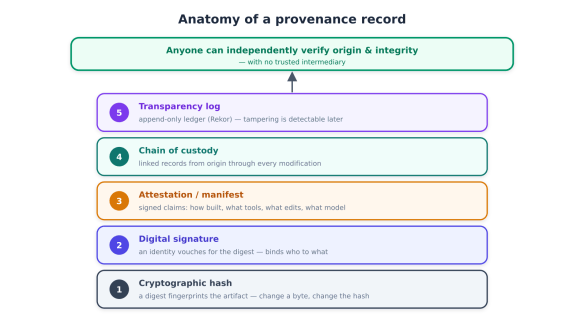
Here’s the unifying insight for developers, and the reason this is one post and not three unrelated ones: whether you’re vouching for a container image, a dataset, or a photograph, the cryptographic machinery is the same. A provenance system is built from five primitives stacked together.
Cryptographic hashing. A digest (e.g. SHA-256) of the artifact is its tamper-evident fingerprint: change one byte and the hash changes. This is how integrity is checked — the digest is the artifact’s identity.
Digital signatures. A key (tied to an identity) signs the digest, binding who vouches for this to exactly this artifact. A valid signature means an identity stood behind this specific bytes.
Attestations / manifests. Signed metadata that makes claims about the artifact — how it was built, which tools touched it, what edits were applied, what model generated it. This is where “provenance” becomes rich rather than just “unchanged.”
Chain of custody. Linked records connecting the artifact from its origin through every modification to its current state, so the whole history — not just the latest step — is verifiable.
Transparency logs. A tamper-evident, append-only public ledger (the model Sigstore’s Rekor uses) records signing events, so tampering or backdated claims can be detected even if a key is later compromised.
Stack these and you get the property that matters: anyone can independently verify origin and integrity, without trusting an intermediary. That independent verifiability is what separates real provenance from a metadata field anyone could fake.
The honest framing, set up front
One caution belongs at the start, not buried at the end, because it’s the most misunderstood point about provenance: provenance certifies history, not truth. A provenance record can prove that a specific tool signed a specific artifact and that it hasn’t been altered since. It cannot prove that the claim made is true — that the camera was pointed at what the caption says, that the dataset was collected ethically, that the code does what it claims. Provenance establishes that a claim was made and the artifact wasn’t tampered with afterward. It provides transparency, not judgement. Build with that boundary in mind and provenance is powerful; forget it and you’ll over-trust a green checkmark.
Why SBOMs aren’t enough
Start by clearing up a common confusion, because many teams think they’ve solved provenance when they’ve only solved inventory. A Software Bill of Materials (SBOM) tells you what’s inside an artifact: “this build contains these components at these versions.” The 2021 US Executive Order’s SBOM mandate did the industry a real service by forcing teams to actually know their dependencies.
But an SBOM has a hard scope limit: it doesn’t tell you whether the artifact was built from the code you think it was, or whether the build process itself was compromised. That’s exactly the gap SolarWinds and GhostAction exploited — the components were “legitimate,” but the build was subverted. As the post-GhostAction consensus puts it: SBOMs tell you what’s inside; provenance proves where it came from and how it was built. Large buyers increasingly demand both. SBOM is the ingredient list; provenance is the tamper-evident seal and the factory record.
Build provenance with SLSA
The framework that defines build provenance is SLSA — Supply-chain Levels for Software Artifacts (pronounced “salsa”), a vendor-neutral OpenSSF project. SLSA answers a precise question that SBOM, VEX, and the NIST SSDF don’t: is the artifact a consumer received the same artifact a build system produced from a specific source under documented controls?
It’s structured as a maturity ladder, which makes adoption incremental rather than all-or-nothing:
Level 1 — provenance exists: the build emits a description of how the artifact was made. Not tamper-resistant yet, but you have a record.
Level 2 — provenance is signed and produced by a hosted build service, so tampering is detectable.
Level 3 — provenance comes from a hardened, isolated build with verified source control, resistant to forgery even by a determined insider.
The provenance itself is a SLSA provenance predicate wrapped in an in-toto attestation (in a DSSE envelope) — capturing builder identity, build instructions, parameters, and dependency digests. In practice it’s a JSON document the build platform writes per release and a verifier reads to make a trust decision:
The subject.digest binds the attestation to one exact artifact (primitive #1), and the predicate is the attestation of how it was built (primitive #3).
Keyless signing with Sigstore
The signing layer (primitives #2 and #5) is where Sigstore has become the de-facto standard, because it removed the worst part of signing: key management. Its three components:
Cosign — signs and verifies container images and artifacts.
Fulcio — issues short-lived certificates tied to an OIDC identity (your GitHub, Google, or workload identity) instead of a long-lived key.
Rekor — a transparency log that records every signing event.
The magic is keyless signing: you authenticate via OIDC, Fulcio issues an ephemeral certificate bound to that identity, you sign, and the event lands in Rekor — no long-lived private key to store, rotate, or leak. This is why Sigstore adoption spread fast across npm, PyPI, and Kubernetes. (One caution from practitioners: don’t quietly fall back to long-lived static keys without a rotation plan — that reintroduces exactly the risk Sigstore removed.)
The verification gate: “no provenance, no deploy”
Generating provenance is worthless if nothing checks it. The payoff comes at the verification gate, where cloud registries and admission controllers enforce a simple policy: no valid provenance, no deploy. The full pipeline looks like this:
The verification logic is small but decisive, applied to build integrity:
def admit(artifact, provenance, policy) -> bool:
    # 1. integrity: provenance is bound to THIS exact artifact
    if provenance.subject.digest.sha256 != sha256(artifact):
        return reject("digest mismatch — not the artifact we verified")
    # 2. authenticity: signature verifies against a Sigstore identity in Rekor
    if not verify_signature(provenance, rekor=True):
        return reject("signature/transparency-log check failed")
    # 3. policy: built from the source and pipeline we expect
    if (provenance.repository, provenance.workflow, provenance.ref) not in policy.allowed:
        return reject("unexpected build source — possible tampering")
    return True   # only now does it deploy
Tooling makes each step turnkey: GitHub artifact attestations generate signed SLSA provenance from Actions; Red Hat’s Konflux issues in-toto attestations tied to policy; and GUAC (Graph for Understanding Artifact Composition) stitches provenance, SBOMs, and attestations into a queryable graph across your whole estate, so you can answer “where is this compromised dependency, and what did it build?” in one place.
A pragmatic adoption roadmap
The specifications are mature and the tooling exists, so the path is well-trodden: start at Level 1 by turning on provenance generation in CI (GitHub artifact attestations are the lowest-friction on-ramp); move to Level 2 by signing with Sigstore and recording in Rekor; target Level 3 for your most critical artifacts with hardened, isolated builds; and add the verification gate so unverified artifacts can’t promote to production. Regulation (EO 14028, the CRA) makes Levels 1–2 effectively table stakes for anyone selling software to regulated buyers.
The same primitives for data and AI models
Everything above is artifact-agnostic, which is why it extends naturally to data provenance. Recall the distinction: provenance (origin, authenticity, trustworthiness) versus lineage (flow and transformation). Apply the same primitives — hash the dataset, sign a manifest attesting its source and collection method, chain the transformations, log it — and you can answer “is this data what it claims to be?” with cryptographic confidence rather than a spreadsheet and good faith.
This matters most for AI, where two provenance questions are now business-critical. First, training-data provenance: what went into the model, and can you prove the rights, consent, and absence of contamination behind it — increasingly a legal and audit requirement. Second, model provenance: a model is itself a supply-chain artifact, so sign your model weights, treat the model card as an attestation, and verify model provenance before loading — the same way you’d verify a container image.
Why detection lost, and provenance won
The instinctive response to deepfakes is detection: build a classifier that spots fakes. That’s a losing battle. Generative models improve continuously, so any detector is perpetually one model version behind, and analysts project synthetic content could reach up to 90% of online media. You cannot win by inspecting the pixels.
C2PA inverts the problem. Instead of detecting fakes after the fact, it proves authenticity at the point of creation. Content that carries valid credentials doesn’t need to be detected as real — it cryptographically proves its origin and edit history. The losing game (spot the fake) becomes a winnable one (verify the genuine). That’s why the US CISA endorsed content credentials as a key countermeasure in its January 2025 advisory on multimedia integrity in the generative-AI era.
C2PA Content Credentials: a nutrition label for media
The Coalition for Content Provenance and Authenticity (C2PA) — with over 6,000 members and affiliates as of January 2026 — produces the open standard now treated as the global reference. Its Content Credentials are often described as a “nutrition label” for digital content, and structurally they’re just primitives applied to a media file:
Assertions — the claims: “captured by this camera,” “edited with Photoshop,” “generated by AI model X.”
Manifest — a tamper-evident record of the creation history and every edit/transform applied.
Signature — a cryptographic signature by the creator or tool, verifiable by anyone (primitive #2).
Chain of custody — the full provenance chain from creation through all modifications to the current state (primitive #4), bound to the asset’s hash (primitive #1).
A verifier checks whether the manifest is well-formed, signed by a trusted source, and still bound to the asset. It’s the exact same model — signed, hashed, chained claims — applied to a JPEG instead of a JAR.
Adoption is real in 2026 (and uneven)
Content Credentials moved into production across the whole content pipeline:
Capture: camera makers Leica, Nikon, and Canon sign at the hardware level; Canon moved C2PA-compliant capture into newsroom workflows. Devices like Samsung Galaxy S25 and Google Pixel 10 support it natively.
Creation/editing:Adobe Content Credentials and Microsoft (auto-labelling AI content in Bing and Designer); Intel is working on chip-level signing.
AI generation:OpenAI adds C2PA metadata to generated media and announced a layered approach with SynthID plus public verification; Google has SynthID verification live in Gemini and is expanding C2PA verification across Search and Chrome, with Content Credentials in Google Photos.
Distribution:LinkedIn and TikTok display verification icons.
The weak point — and it’s the big one — is preservation. Most social and messaging platforms still strip embedded metadata, and uploads, screenshots, exports, and recompression frequently break it. As of 2026, signed content often arrives at the viewer with its credential gone. C2PA is a strong signal, not a guarantee, when used alone.
Watermarking and durable content credentials
The fix for stripping is defence in depth for media. Because metadata can be removed, you pair it with marks that survive transformation:
Invisible watermarking (e.g. SynthID) embeds a signal into the pixels or audio that survives platform transfers, recompression, and many edits.
Fingerprinting lets you match content against a registry even with no embedded data at all.
The emerging best practice — and what the EU Code of Practice specifies as multi-layer marking, mapping to a “Durable Content Credentials” architecture — is to combine C2PA metadata + an invisible watermark + (optionally) fingerprinting. Metadata gives you the rich, verifiable manifest when it survives; the watermark gives you a durable fallback when the metadata is stripped. No single layer is foolproof; the stack is what holds up in the wild.
The compliance mandate
This is where the regulatory clock becomes a concrete engineering requirement for anyone shipping AI features:
EU AI Act Article 50, enforceable August 2, 2026, requires deployers to disclose AI-generated or manipulated content using both visible markings and machine-readable metadata — which is precisely the C2PA-plus-watermark stack.
California SB 942 (AI Transparency Act) took effect January 2026; the New York Stop Deepfakes Act and others are arriving.
If your product generates or significantly manipulates content for public distribution, labelling it with durable provenance is now a legal obligation, not a nice-to-have. The compliance clock is already running.
The honest limits (read this before you trust a checkmark)
A responsible provenance implementation is defined as much by what it doesn’t claim as what it does. Four limits matter:
Provenance certifies history, not truth. This is the most acute for media. A credential proves a device signed a file and it wasn’t altered since — it cannot verify that the camera was pointed at what the caption claims, that the scene wasn’t staged, or that the content is used in good faith. A credential establishes that a claim was made, not that the claim reflects reality.
Metadata stripping is endemic. Until platforms preserve credentials end to end, expect them to vanish in transit — which is why the watermark layer isn’t optional.
Adoption is incomplete. C2PA is necessary but structurally insufficient in isolation; treat it as one signal among several, not proof.
Provenance can carry privacy risk. Identity assertions in a manifest can create surveillance exposure — who created what, when, where. Balance disclosure against the creator’s privacy, and prefer minimal or pseudonymous assertions where identity isn’t required.
Build with these in mind and you get genuine value; ignore them and you’ll either over-trust a green badge or leak creator identity.
The builder’s playbook, and the whole picture
For an AI or content product in 2026, the practical implementation is: sign at creation (embed Content Credentials), add a durable invisible watermark, verify on ingestion and display, surface the “nutrition label” in your UI so users can inspect provenance, and treat the result as a signal, not a verdict — combined with other context, never as sole proof of truth. For generative features specifically, labelling output this way is how you meet Article 50.
Software, data, and AI-generated content all rest on the same five primitives: hash the artifact, sign it with an identity, attest to its origin and history, chain the modifications, and log it so anyone can independently verify. Implicit trust is gone across all three domains for the same reason — fakes became free — and verifiable provenance is the replacement. As of 2026 it’s simultaneously a trust differentiator and a hard compliance requirement, and the engineering is mature enough that the question is no longer whether to adopt it but how fast.
The throughline for developers is a single habit: sign what you produce, and verify what you consume — whether it’s a container image, a dataset, a model, or a video. That habit, applied consistently, is what rebuilds trust in a world where nothing can be trusted on sight.
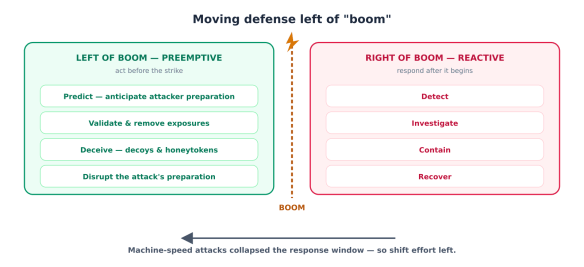
Security has one brutal piece of arithmetic at its core: defenders must be right every time; attackers only need to be right once. For decades the response to that asymmetry was reactive — build taller walls, install faster alarms, and when something gets through, detect and respond. Detection-and-response (D&R) is the model that gave us SIEMs, SOCs, EDR, and the entire incident-response playbook. It works by waiting for an attack to begin, then reacting.
In 2026, that model is buckling, and the reason is speed.
Machine-speed attacks broke the reactive window
The reactive model depends on a window: the time between an attack starting and a defender responding. That window has now collapsed toward zero, because attackers have AI too.
The numbers tell the story. Roughly 40,000 new CVEs were logged in 2024 alone — a 38% jump over the prior year — and adversaries now use generative AI to chain those flaws into attacks at machine speed, weaponising exposed services and misconfigurations within minutes of discovery. As one industry forecast put it bluntly: “AI-fueled attacks start and end before a ticket is even created.” When the attack completes faster than your SOC can open a case, faster alarms don’t help. You can’t respond your way out of an attack that’s already over.
The crucial nuance — and it’s good news for defenders — is that AI mostly isn’t creating brand-new attack vectors; it’s supercharging the speed and volume of existing ones. That means the fundamentals still work. What has to change is when you apply them. If you can’t win the race to respond, you have to win before the race starts.
What “pre-emptive” actually means
This is the shift the industry is now naming pre-emptive cybersecurity — and it’s not just a marketing rebrand. Gartner has formalised it as a primary strategic technology trend for 2026 and projects that about 35% of cybersecurity solutions may be pre-emptive by 2028.
Pre-emptive cybersecurity is a proactive approach that identifies, predicts, and neutralises potential threats before they can execute an attack. The analogy that captures it: reactive security is a smoke detector and a fire extinguisher; pre-emptive security is fireproofing the house, so the fire either never starts or gets snuffed out while it’s still an ember. You act on the early warning signs and the exploitable conditions before the adversary moves, rather than responding after.
Security people call the moment of compromise “boom.” Reactive security lives right of boom — everything after the attack begins. Pre-emptive security moves the work left of boom — into the period when, as the framing goes, cyberattacks aren’t random: attackers research their targets, test methods, and build tools before they strike. That preparation phase is an opportunity, and pre-emptive defence is about exploiting it.
Proactive vs. pre-emptive: the validation distinction
Here’s a distinction worth getting right, because it separates the real thing from the hype. “Proactive” and “pre-emptive” are not synonyms. Plenty of tools are proactive — they scan for vulnerabilities, flag misconfigurations, and produce long lists of theoretical risk. The trouble is that a list of 40,000 possible problems isn’t a defence; it’s a different kind of alert fatigue.
Gartner draws the line at validation. Security becomes genuinely pre-emptive only when it validates real attack feasibility — confirms that a given exposure could actually be exploited in your environment — and then mobilises mitigation before impact. Without that validation and early action, you’re proactive at best: busy, but not safe. Validation is the inflection point, and it’s exactly the step AI makes fast enough to matter.
The framework: Deny, Deceive, Disrupt
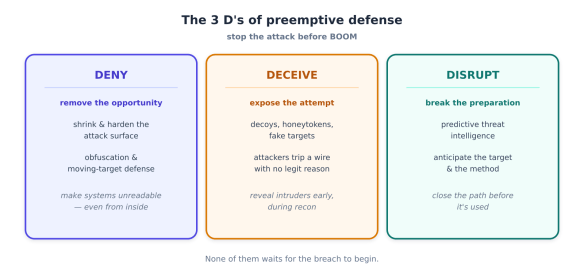
Pre-emptive cybersecurity organises around three strategies — the “3 D’s” — each aimed at stopping an attacker before they can execute.
Deny — make the attacker’s job impossible by removing what they need. This is exposure management (find and eliminate the exploitable weaknesses) plus obfuscation and moving-target techniques that make systems unreadable or invisible to unauthorised users — mitigating even ransomware and APTs that have already gotten inside, because there’s nothing legible for them to exploit.
Deceive — seed the environment with decoys, honey tokens, and fake targets. An attacker probing your network trips a tripwire that has no legitimate reason to be touched, revealing themselves early and wasting their effort on a phantom.
Disrupt — use predictive threat intelligence to anticipate the attack and interfere during its preparation phase: pre-empting an exploit before it’s weaponised against you, disrupting infrastructure, or closing the validated path the attacker was about to use.
Deny removes the opportunity, Deceive exposes the attempt, Disrupt breaks the preparation. None of them waits for boom.
Why this needs AI (and why now)
You might reasonably ask: if attackers research and prepare before striking, why hasn’t pre-emptive defence always been the norm? Because at human speed it was impossible to keep up. Validating which of 40,000 CVEs are actually exploitable in your environment, continuously, across a sprawling multi-cloud and SaaS estate — and then remediating before an adversary weaponises them within minutes — is not a human-scale task. It’s the AI uplift that makes pre-emptive defence practical in 2026: AI is what compresses “validate the exposure” from weeks to hours, and “decide what to fix first” from a guessing game to a ranked, evidence-backed plan.
Attackers got faster with AI; defenders match them not by responding faster (a race they’ll lose) but by moving the fight left of boom with AI.
From CTEM to pre-emptive exposure management
The foundation is Continuous Threat Exposure Management (CTEM) — the Gartner-defined discipline of continuously discovering and prioritising exposures rather than running periodic scans. CTEM was a real advance, but it has a gap: even mature CTEM programs discover and prioritise faster than they can remediate. You end up with an excellent, continuously-updated list of problems and a remediation backlog that adversaries outrun.
Pre-emptive Exposure Management (PEM) closes that gap. It unifies three things into one automated loop — continuous discovery, risk-based validation, and automated remediation — with the explicit objective of shrinking the remediation gap toward zero: exposures removed before threat actors can reach them.
The pipeline has four stages, and the second one is where pre-emption is won or lost:
Discover — continuously inventory assets, exposures, and the attack surface across endpoint, cloud, SaaS, and the software supply chain. With ~40,000 new CVEs a year, discovery is necessary but produces overwhelming volume.
Validate — AI confirms whether each exposure is actually reachable and exploitable in your specific environment, using attack-path analysis and breach-and-attack simulation. This is the step that turns “40,000 theoretical problems” into “the 50 an attacker could actually use against us.” One vendor reports AI cutting attack-surface validation from weeks to hours.
Prioritise — rank the validated, reachable exposures by business impact and real exploitability, not raw CVSS score. A “critical” CVE on an unreachable asset matters less than a “medium” on the path to your crown jewels.
Remediate — automatically fix, virtually patch, or harden the prioritised exposures before exploitation. After years of caution, automated remediation is getting the go-ahead in 2026, because the alternative — manual patching at human speed — loses to machine-speed weaponisation.
Conceptually, the loop gates on validation rather than firing on every finding:
def preemptive_loop(environment):
    for exposure in discover(environment):           # continuous, high-volume
        reachable = validate_exploitability(exposure, environment)  # the inflection
        if not reachable:
            continue                                 # de-prioritise: not a real path
        risk = score(exposure, blast_radius(exposure, environment))  # impact, not CVSS
        if risk >= AUTO_REMEDIATE_THRESHOLD:
            remediate(exposure)                      # fix / virtual-patch before boom
        else:
            queue_for_review(exposure, risk)         # human triage for the rest
Note what validation buys you: the expensive remediation effort is spent only on exposures that are real attack paths, not on the long tail of theoretically-scary-but-unreachable findings that drown traditional vulnerability management.
The techniques, mapped to the 3 D’s
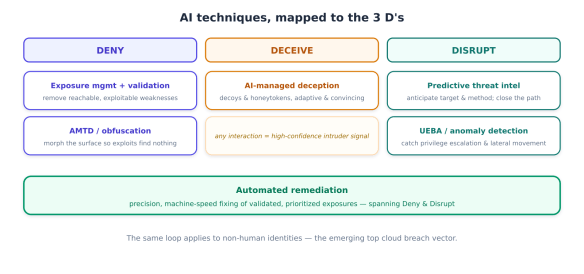
Exposure management is the backbone, but the full pre-emptive toolkit spans all three strategies. Here’s how the AI techniques line up.
Deny — remove the opportunity:
AI-driven exposure management with validation (the pipeline above) eliminates the exploitable weaknesses before attackers reach them.
Automated Moving Target Defence (AMTD) and obfuscation continuously morph the runtime attack surface — memory layout, application structure — so that even a working exploit finds nothing where it expects it. This is the “make systems unreadable” leg of Deny, and it mitigates ransomware and APTs even when the attacker is already inside, because there’s no stable target to exploit.
Deceive — expose the attempt:
AI-managed deception seeds the environment with decoys and honey tokens that legitimate users have no reason to touch. AI makes the decoys convincing and adaptive, and any interaction is high-confidence evidence of an intruder — caught during reconnaissance, long before impact.
Disrupt — break the preparation:
Predictive threat intelligence models attacker behaviour and infrastructure to anticipate what will be targeted and how, so you can close the path the adversary was about to use. This is the “attackers research and build before they strike” window, turned into a defensive advantage.
Behavioural analytics (UEBA) and anomaly detection baseline normal behaviour for users, machines, and — increasingly — non-human identities, then flag the deviations that precede damage: privilege escalation, anomalous identity behaviour, lateral movement. Catching the precursor behaviour is pre-emption applied to an attacker who’s already gotten a foothold.
Spanning Deny and Disrupt: automated remediation. Once an exposure is validated and prioritised, AI agents perform precision remediation — patch, virtual-patch, reconfigure, or revoke — at machine speed, closing the gap before it’s exploited.
The non-human-identity front
One area deserves a specific call-out because forecasts converge on it: machine identities are becoming the top cloud breach vector. Every service, workload, and AI agent is a non-human identity (NHI) with credentials, and NHIs now sprawl faster than humans can govern them. The pre-emptive answer is the same loop applied to identity: continuously discover NHIs, validate which have excessive or exploitable permissions, prioritise by what they can reach, and automatically remediate — tightening scopes and revoking standing access before an attacker (or a hijacked agent) abuses them.
The limits
Pre-emptive defence is powerful, not magical, and two cautions keep it credible. First, validation quality is everything — a pre-emptive program that miscalibrates exploitability will either drown you in false “reachable” findings or auto-remediate things that didn’t need it (and auto-remediation can break production, so the threshold for autonomous action must be set conservatively and the rest routed to humans). Second, pre-emption complements rather than replaces detection-and-response; you still need eyes right of boom for the attacks that slip the net. The shift is one of emphasis and timing — moving the centre of gravity left — not an abandonment of the reactive stack.
Why the SOC had to change too
The reactive operations centre is breaking with it. Traditional SOCs drown in alert fatigue, stitch together fragmented tools, and triage by hand — and the gap between attack speed and response speed is exactly where breaches happen. Telemetry grows faster than budgets, so teams filter data before ingestion just to control cost, dropping the very signals an attacker exploits. You cannot run a machine-speed, left-of-boom defence on a human-speed, tool-sprawled SOC.
Platformisation: SIEM becomes the orchestration layer
The first half of the answer is architectural consolidation. The old stack — separate SIEM, XDR, SOAR, threat intel, and exposure management products — is converging into unified platforms built on a shared data layer. SIEM itself is transforming: not dying, but evolving from passive log storage into the AI-driven orchestration layer for unified detection, investigation, and response. The modern SIEM market reflects the momentum, projected to grow from £5.58 billion in 2024 to £10.05 billion by 2029.
The consolidation is visible in the market moves: Palo Alto absorbed IBM QRadar SaaS customers into Cortex XSIAM; Google expanded Chronicle into Google SecOps; Microsoft unified Sentinel with Defender and Security Copilot. The buyer’s advantage is real — converged platforms eliminate separately licensing SIEM, XDR, and SOAR, and cut the integration overhead of bolting tools together. The evaluation rule that matters: look for platforms where detection, investigation, and response share a unified data layer, not capabilities stitched across product tiers.
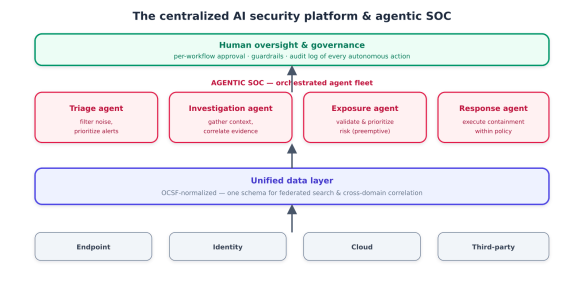
The structural enabler underneath is data normalisation. The Open Cybersecurity Schema Framework (OCSF) — now under the Linux Foundation — provides vendor-agnostic schema standardisation, which makes federated search, cross-platform correlation, and portable detection rules possible regardless of which platform you run. The principle is simple and important: AI-driven detection only works when data is normalised across sources. Garbage-in still applies, and OCSF is how you avoid it.
The agentic SOC
The second half of the answer is the agentic SOC. An agentic SOC deploys autonomous AI agents that triage alerts, investigate incidents, correlate evidence across identity/endpoint/cloud, verify suspicious activity, and execute response actions — reasoning through novel scenarios rather than just running pre-written SOAR playbooks.
The platform incumbents have all built toward this:
CrowdStrike Charlotte AI orchestrates a fleet of purpose-built agents (triage, investigation, exposure prioritisation, and more) via Charlotte Agentic SOAR, with AgentWorks letting teams build custom agents in natural language — explicitly “always under human control,” with per-workflow oversight and audit logging.
Palo Alto Cortex XSIAM / AgentiX consolidates endpoint, network, cloud, identity, and third-party data on the Cortex data lake.
Microsoft Sentinel + Security Copilot and Google SecOps (with Gemini) take the same unified-platform approach.
SentinelOne Purple AI layers agentic investigation over hyper automation, reporting 63% faster detection and 55% faster remediation, with 70% better platform-management efficiency.
The market has crystallised into recognisable architecture models: a single-agent copilot embedded in a platform (Charlotte), a multi-agent mesh of collaborating specialists, a hyper-automation-layered approach (SentinelOne), and a hybrid human-AI model where AI triages and humans own the last mile. Which one fits depends on your team’s maturity and existing stack — but every credible one keeps humans in command.
The autonomy spectrum — and keeping humans in command
The most important design decision in an agentic SOC isn’t which vendor; it’s how much autonomy you grant, on which actions. The field runs along a clear spectrum, and the right answer is rarely the far end.
The pattern that works mirrors the human-checkpoint discipline from across this whole library: AI handles the high-volume, repetitive work — filtering noise, correlating signals, triaging alerts, executing routine, pre-approved response — and humans own the judgement calls and the last mile, especially irreversible containment. The stated goal of every serious platform is to make analysts more effective, not absent: a team that operates at higher scale without higher headcount, not a team that’s been automated away. Tier the autonomy by blast radius — generous on reversible, low-risk actions; mandatory human approval on high-impact ones — and log every autonomous action for audit. (And remember: an agentic SOC is itself an agent system, so everything — least privilege, governance, decision-level audit — applies to your defenders too.)
The catch: consolidation and lock-in
We have to name the trade-off, because the consolidation that delivers the efficiency also concentrates risk. Analysts compare the current moment to the CASB and SASE waves of 2018–2020 — a category “graduating from venture experiment to enterprise category,” consolidating around a small number of well-funded players, with acquisitions of the independents widely expected. The convenience of a single converged platform comes with vendor lock-in: a deeply integrated agentic SOC is, in one analyst’s words, “an ecosystem play, not a vendor-agnostic one,” and its value can diminish sharply in a multi-vendor environment where the agents can’t reach across stacks.
The practical hedges are worth building in from the start:
Insist on OCSF-normalised data so your telemetry and detection logic stay portable if you change platforms.
Keep an integration path for existing tools rather than ripping-and-replacing everything into one vendor.
Validate at your real data volume and on your oldest assets before committing — converged pricing and agent performance both change at scale.
Watch the build-vs-buy line: some teams are building custom in-house AI security tooling precisely to avoid lock-in and tailor to their environment.
Consolidation is the right default for most teams — the efficiency and the unified data layer are genuinely how you achieve machine-speed defence — but go in with eyes open about the dependency you’re taking on.
The whole picture
Attacks went machine-speed, so reactive defence lost its window, and the answer is to move left of boom with pre-emptive defence built on the 3 D’s. AI executes that defence through a continuous discover–validate–prioritise–remediate loop plus deception, moving-target defence, and predictive intelligence. And all of it converges onto centralised, AI-native platforms with a unified data layer and an agentic SOC, where AI agents run the high-volume work at machine speed and humans stay in command.
The strategic truth underneath is simple: you fight AI-speed offence with AI-speed defence, applied before the strike rather than after it. The teams that win the next few years won’t be the ones with the fastest alarms. They’ll be the ones who moved the fight left of boom, validated what actually matters, automated the remediation of it, and kept human judgement exactly where the stakes are highest.