Why Agentic Projects Fail

Almost everything written about agentic AI is a showroom: the demo that dazzled, the workflow that now runs itself. This article is the morgue. Because the most useful thing you can study before building an agentic system isn’t the success stories — it’s the autopsies. And there are a lot of bodies.

The headline number is Gartner’s, from June 2025: over 40% of agentic AI projects will be cancelled by the end of 2027 — not scaled back, not pivoted, cancelled — citing escalating costs, unclear business value, and inadequate risk controls. It’s not a speculative warning; Gartner frames it as a structural forecast grounded in deployment realities. And the candid part, the part that should reframe how you build, is why they fail.

Where projects go to die: the production cliff

Start with the gap that defines the whole problem. Adoption looks healthy — agentic AI hit ~35% adoption in two years, faster than any prior AI wave. But adoption is not production. Deloitte’s late-2025 research found only about 14% of organisations have a solution ready to deploy, and just 11% are actually running agents in production. Meanwhile a far larger share — depending on the survey, 35–40% — are stuck experimenting and piloting.

That space between “piloting” and “in production” has a name in the trade: pilot purgatory. It’s where agentic projects go to die.

A visual representation illustrating 'The production cliff' concept, showing three sections: 'Experimenting/Interested', 'Piloting', and 'In Production' with corresponding percentages indicating project progression, highlighting challenges in moving from pilot to production.

The cliff is steep and consistent across studies. MIT’s NANDA report found that of enterprise-grade AI systems, 60% of firms evaluated them, only 20% reached a pilot, and just 5% went live. The pattern repeats everywhere: getting started with agentic AI is easy and cheap. Getting to production — reliable, governed, valuable, affordable at scale — is where the wheels come off.

The most candid finding: it’s not the model

Here is the single most important and most overlooked fact in all of this research. MIT’s “GenAI Divide: State of AI in Business 2025” studied 300 deployments, 150 executive interviews, and 350 employees, and found that 95% of enterprise GenAI pilots fail to deliver measurable impact on P&L — and the primary cause is not the capability of the AI models. It’s flawed enterprise integration.

Read that again, because it inverts the usual instinct. When an agentic project dies, the post-mortem rarely reads “the model wasn’t smart enough.” It reads “we pointed a capable model at the wrong problem, in the wrong process, with the wrong data, and no plan to get it to production.” As one manufacturing COO told the MIT researchers: “The hype on LinkedIn says everything has changed, but in our operations, nothing fundamental has shifted.” The models are good. The engineering and judgement around them are missing.

The cause of death you’ll see most: automating a broken process

The most common root cause deserves to be named first and loudly: organisations automate broken processes.

It happens like this. A process is slow, inconsistent, and poorly understood. Instead of fixing it, someone points an agent at it, because automating sounds easier than redesigning. The agent learns the broken process and executes it — faster, at scale, autonomously. You haven’t fixed anything; you’ve built a machine that makes the same mess more efficiently and at higher volume. As one analysis put it, the agents end up executing the wrong things, in the wrong ways, at the wrong times.

A broken process automated is not an improvement. It’s a faster broken process with a higher blast radius — and now it’s also a black box. This is why Gartner’s own guidance is that “rethinking workflows with agentic AI from the ground up is often the ideal path,” rather than bolting agents onto legacy flows. If your process is broken, automating it isn’t a shortcut — it’s malpractice.

The other causes on the certificate

Automating broken processes is the headline, but the death certificate usually lists several contributing causes. The honest taxonomy:

Graphic listing the causes of project failure with seven bullet points including "Automating a broken process", "No clear business value or ROI", and "Poor data quality & broken integration".
  • No clear value or ROI. “Nice, but not transformational.” The agent writes better emails or summarises a few tickets, an executive asks “where’s the actual impact?”, and there’s no answer. Without a clear path to value, nobody will fund the cost of running it at scale.
  • FOMO instead of strategy. Projects launched out of fear of being last, not because there’s a problem worth solving. Fear is what produces agents built on broken workflows, fed poor data, with no governance.
  • “Agent washing” and over-engineering. Gartner estimates only about 130 of the thousands of “agentic” vendors are real, and bluntly notes that many use cases positioned as agentic today don’t require agentic implementations. A huge share of failures are projects that built a complex autonomous agent for something a script, a workflow automation, or a simple assistant would have done better, cheaper, and more reliably.
  • Escalating and hidden costs. Teams budget the visible costs — compute, API calls, development — and miss the iterative trial-and-error engineering and the ongoing human-oversight cost. Agentic systems are tuned by deploy-observe-adjust loops, which burn far more engineering time than traditional software, and the bill arrives after the pilot’s glow fades.
  • Inadequate governance and risk controls. Over-permissioned agents acting across your stack with little oversight — a data leak or compliance failure waiting for a trigger. Gartner predicts a third of companies will harm customer experience in 2026 by deploying AI prematurely.
  • Bad data and integration. Agents act on their inputs at machine speed; feed them fragmented, dirty data and they produce confident wrong decisions, fast.

Notice what every one of these has in common: they’re human and engineering failures, not AI failures. The 40% cancellation rate isn’t the technology falling short. It’s the predictable result of choices that could have been made differently.

You probably need fewer agents than you think

One last reframe to carry forward, because it prevents a whole category of death. Gartner’s recommendation is refreshingly unglamorous: use agents when a decision is genuinely needed, automation for routine workflows, and assistants for simple retrieval. Most of what gets branded “agentic” is one of the latter two wearing a costume. The simplest tool that solves the problem is almost always the one that survives to production.

The Six Autopsies

Across the post-mortems — Gartner’s cancellation analysis, MIT’s GenAI Divide, McKinsey’s barrier list, and the well-known wreckage of projects like IBM Watson at MD Anderson and McDonald’s AI drive-thru — the same six failure modes recur. Learn to recognise each one early, because every one of them is survivable if you catch it before production.
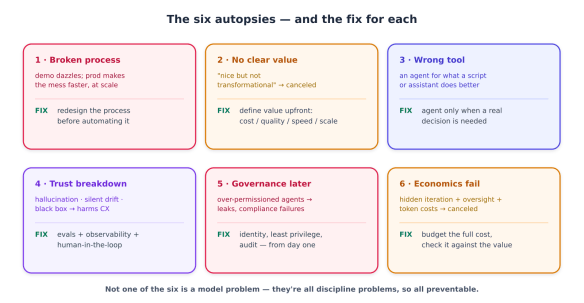
An infographic outlining six common issues in processes, titled 'The six autopsies — and the fix for each'. It details broken processes, lack of clear value, wrong tools, trust breakdown, governance later, and economic failures, along with suggested fixes for each issue.

Autopsy 1 — Automating a broken process

Symptom: The agent dazzles in the demo and falls apart in production. Worse, it doesn’t crash — it diligently does the wrong thing at scale.

Root cause: The underlying process was slow, ambiguous, or undocumented, and instead of fixing it, the team automated it. The agent faithfully learned and amplified the dysfunction.

Post-mortem lesson: Map and fix the process before you automate it. If you can’t write down the steps, the decision rules, and what “done correctly” means, an agent can’t either — it will just guess, confidently, forever. Gartner’s guidance is to rethink the workflow from the ground up rather than bolt an agent onto a broken legacy flow. The blunt test: would you hand this process, exactly as written, to a brand-new employee with no judgement and no ability to ask questions? If not, it’s not ready for an agent.

Autopsy 2 — No clear value (or the wrong ROI bar)

Symptom: A working agent that nobody can justify funding. It does something nice — better emails, summarised tickets — but when an executive asks “what did this move?”, the room goes quiet. Cancelled.

Root cause: The project optimised for “we’re doing AI,” not for a defined business outcome. Often compounded by FOMO: it was launched to avoid being last, not to solve a measured problem.

Post-mortem lesson: Define the value before you build, in terms of cost, quality, speed, or scale — and pick high-value, connected use cases over isolated party tricks. MIT’s data is pointed here: budgets pile into sales and marketing demos while the durable ROI sits in back-office and operations automation. A caveat for balance: don’t swing so far that you demand perfect ROI proof before any experimentation — emerging tech earns its returns after an iteration phase. The failure isn’t experimenting; it’s experimenting without a hypothesis about value.

Autopsy 3 — The wrong tool (“agent washing” in-house)

Symptom: A complex, brittle, expensive autonomous agent doing a job a 50-line script or a simple assistant would do better and more reliably.

Root cause: “Agentic” became the goal instead of the means. Gartner notes plainly that many use cases positioned as agentic today don’t require agentic implementations — and estimates only ~130 of thousands of “agentic” vendors are the real thing. Teams do this to themselves too, reaching for autonomy where determinism would serve.

Post-mortem lesson: Match the tool to the job. Agents when a genuine decision is needed; automation for routine, deterministic workflows; assistants for simple retrieval. Autonomy is a cost, not a feature — every degree of it adds nondeterminism, expense, and failure surface. Reach for the simplest thing that solves the problem, and add agency only where the problem genuinely demands judgement.

Autopsy 4 — Trust breakdown

Symptom: The agent hallucinates, drifts silently over time, or behaves as an unauditable black box — and eventually does something visibly wrong to a customer. McKinsey lists this as a top barrier; Gartner predicts a third of companies will harm CX with premature AI in 2026.

Root cause: The system was shipped without a way to know whether it’s right. No evaluations, no observability, no human checkpoint on consequential actions.

Post-mortem lesson: You cannot deploy what you cannot verify. Build the verification scaffolding before production: an eval suite that measures whether the whole system produces good outcomes, tracing so you can see what the agent did and why, and a human checkpoint on anything consequential.

Autopsy 5 — Governance as an afterthought

Symptom: An over-permissioned agent acting across your stack, touching sensitive data and taking actions on behalf of users with little oversight — until a rogue request or misconfigured permission causes a leak, an inappropriate action, or a compliance failure.

Root cause: Security and governance were treated as a phase-two concern, bolted on after the capability worked. By then the agent already has broad standing access.

Post-mortem lesson: Governance is a day-one requirement, not a launch-day checklist. Give every agent a scoped identity, least-privilege access to only the tools and data its task needs, and an audit trail for every action. “Inadequate risk controls” is one of Gartner’s three named cancellation causes for a reason — an ungoverned agent isn’t a feature you’ll harden later; it’s a liability you’ve already shipped.

Autopsy 6 — Economics that don’t hold

Symptom: A project cancelled for “escalating costs” — the agent works, but it costs more to build, run, and supervise than the value it returns.

Root cause: The budget counted the visible costs (compute, API calls, development) and missed the big ones: the trial-and-error engineering loop that tuning an agent requires, and the ongoing human-oversight cost. Multi-agent and tool-heavy designs compound this — recall that some multi-agent architectures use ~15× the tokens of a single call.

Post-mortem lesson: Budget the full cost before you start: iteration time, human oversight, and the token bill at production volume — then check it against the value from Autopsy 2. If the economics don’t clear with honest numbers, the project is already dead; you just haven’t held the funeral.

The pattern across all six

Step back and the six autopsies tell one story. Not one of them is “the model wasn’t capable.” Every single one is a failure of engineering discipline or business judgement: an unfixed process, an undefined value, a mismatched tool, missing verification, absent governance, unbudgeted economics. That’s the candid lesson of the whole graveyard — and it’s good news, because every one of these is a choice you control. Next, we’ll turn them into a checklist that keeps you out of the 40%.

Building Survivors

The 40% cancellation rate is not a law of nature. It’s the aggregate of avoidable choices, and the corollary is encouraging: the projects that survive aren’t luckier or better-funded — they make a recognisable, repeatable set of decisions differently. Here’s what’s in the survivor’s playbook.

1. Start with the process, not the agent

Every survivor starts in the same unglamorous place: the process, not the technology. Before anyone evaluates a model or a framework, they answer “is this process well-understood, well-defined, and worth doing at all?” If the process is broken, they fix it first — or redesign it from the ground up for agents, as Gartner recommends — because the first autopsy is also the most common cause of death. Automating a process you can’t cleanly describe is how you build a fast, scaled, autonomous version of your existing dysfunction.

The discipline here is pre-AI and boring: process mapping, clear decision rules, a written definition of “done correctly.” Boring is what survives.

2. Pick a use case that can live

Not all agentic use cases are created equal, and the survivors are ruthless about which ones they pursue. A useful lens (Trullion’s survivability matrix) scores a candidate on two axes:

  • Workflow integration — how deeply the agent embeds into a real, core process versus operating in a demo silo.
  • Domain specificity — how much it’s grounded in your actual data, rules, and context versus being a generic assistant.
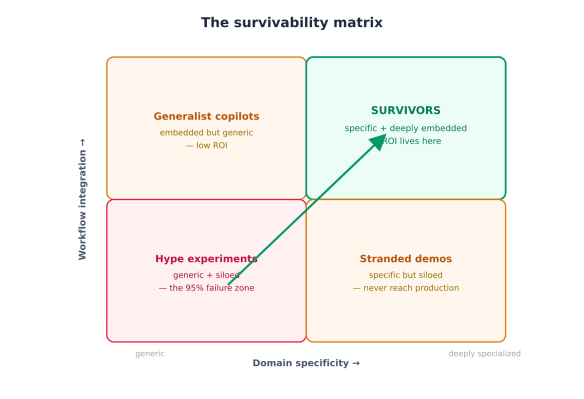
A diagram titled 'The survivability matrix', showcasing four quadrants: 'Generalist copilots', 'Hype experiments', 'Survivors', and 'Stranded demos'. Each quadrant includes descriptive text about integration and domain specificity.

The bottom-left quadrant — generic and siloed — is where the 95% of failed pilots live: flashy demos that never touch a real workflow. The survivor quadrant is top-right: deeply integrated into a core process and grounded in your specific domain. Before committing, plot your use case honestly. If it lands bottom-left, you don’t have a project — you have a demo, and demos don’t graduate to production.

3. Right-size the autonomy

Survivors reach for the least autonomy that solves the problem, because every degree of agency is a cost in nondeterminism, expense, and failure surface (Autopsy 3). The rule, made operational:

Does the task require a genuine decision under uncertainty,
across multiple steps, that can't be expressed as fixed rules?
├─ NO, it's routine and deterministic → workflow automation
├─ NO, it's just fetching/summarising → an assistant
└─ YES, it needs judgement + action → an agent (and only here)

Most “agentic” projects that die never needed to be agentic. The survivors use agents surgically — only where a decision genuinely lives — and use cheaper, more reliable automation everywhere else.

4. Engineer for production, not the demo

This is the heart of it. The gap between a demo and a production system is exactly the scaffolding that the failures lacked. Survivors build it in from day one:

  • Evals — a suite that measures whether the whole system produces good outcomes, so you’re not flying blind through a nondeterministic system (Autopsy 4).
  • Observability and tracing — see what the agent did and why; you cannot operate a black box.
  • Governance and identity — scoped identity, least privilege, audit trail per agent, from the start (Autopsy 5).
  • Cost discipline — budget iteration time, human oversight, and the production token bill; favour the cheapest mechanism that works (Autopsy 6).
  • Human checkpoints — a person at the boundary of anything consequential (merging code, spending money, touching customers).

None of this is novel or AI-specific — it’s the production-engineering discipline reliable systems have always required. Agentic projects don’t fail for lack of model capability; they fail for lack of this scaffolding. As one framing of the MIT and McKinsey findings put it: the models aren’t weak, the discipline is missing.

5. Weigh buy vs. build honestly

One of MIT’s more uncomfortable findings: externally-built solutions succeeded roughly twice as often as internal builds, largely because vendors ship adaptive, integration-ready systems while internal teams underestimate the integration and iteration work (the very thing we’ve named as the real failure cause). This isn’t a blanket “always buy” — vendor lock-in is a real strategic risk, and deeply domain-specific advantages may demand building. But the default assumption that you’ll build it yourself is one the data does not support. Be honest about whether your team has the bandwidth for the deploy-observe-adjust grind that production agents require.

6. Run a pre-mortem before you build

The single highest-leverage habit of survivors: they hold the funeral before the project starts. A pre-mortem inverts the post-mortem — you imagine the project has been cancelled in 18 months and ask “why did it die?”, then address each cause in the plan. The six autopsies make a ready-made checklist.

Checklist titled 'Pre-flight checklist — run the pre-mortem first' with seven green check marks indicating completed items.

Run down the list honestly before committing budget. Every box you can’t check is a probable cause of death you’ve just identified while it’s still cheap to fix. Projects that pass this gate are the ones that cross the production cliff; projects that skip it become the 40%.

The bottom line

The candour of this article cuts both ways. Yes, most agentic projects fail — but almost none of them fail because the technology couldn’t do the job. They fail because someone automated a broken process, couldn’t articulate the value, reached for an agent where a script would do, shipped without verification or governance, or never budgeted the true cost. Every one of those is a decision, and every decision can be made differently.

So the question agentic AI poses to your organisation isn’t “is the technology ready?” — it largely is. It’s “are we disciplined enough to deploy it well?” The surviving 11% answer yes by being relentlessly boring about the fundamentals: fix the process, prove the value, right-size the autonomy, engineer for production, and run the pre-mortem. Do that, and the 40% statistic isn’t a threat — it’s your competitive advantage, because most of your competitors won’t.

How Can AI Help My Business?

If you run a small business and you’ve been wondering whether this whole AI thing is for you, here’s the honest state of play in 2026: most of your peers have already started. Depending on which survey you read, somewhere between 82% and 89% of small businesses now use AI in some form — up from roughly a third just three years ago. The U.S. Chamber of Commerce found small firms adopting AI faster than large companies for the first time in the data’s history.

But that headline hides the part that should reassure you. When researchers look at who’s using AI well — built into how they actually operate, not just the occasional chatbot question — the number drops to around 15–20%. So the real race isn’t “have you started.” It’s “are you using it deliberately.” There is still plenty of room to get ahead, and the businesses that move thoughtfully now are the ones pulling away.

And the barrier almost certainly isn’t what you think. The single most common reason small businesses give for not using AI is that they “see no applicable use case” for their business — a perception that, in survey after survey, turns out to be a knowledge gap rather than a real limitation.

The reassuring truth about what it costs and takes

Two myths scare owners off. Let’s kill both.

“It’s expensive.” The two leading AI assistants cost about \$20–40 a month combined. A complete, capable AI toolkit for a small business runs \$200–500 a month and can be assembled one piece at a time. For comparison, the marketing output those tools can assist with would cost \$500–3,000 a month from an agency. McKinsey pegged the average small-business return on AI spending at 3.7×, and most owners recoup the cost within weeks when they point it at the right task.

“I need to be technical.” You don’t. Modern AI tools work in plain English — you type what you want the way you’d ask a capable assistant. There’s no code, no engineering team, no servers. If you can write an email, you can use them. (In fact, about three-quarters of small businesses already use AI without realising it, through features baked into software they already pay for, like their email, accounting, or online store.)

The honest catch: tools are easy, using them well is a skill. Only about a quarter of small businesses using AI have had any training, and most have no consistent approach — which is exactly why results feel inconsistent. The good news is that the skill is learnable.

The universal map: where AI helps any business

Here’s the key insight that dissolves the “no use case for my business” worry. Every business — whether you write software or fix sinks — shares the same handful of functions. AI helps with all of them. Your industry changes the details, not the map.

Diagram illustrating where AI can assist any business, featuring categories such as Customer Communication, Sales, Research & Decisions, Marketing & Content, Customer Service, and Admin & Back-Office.

1. Customer communication. Drafting emails, replying to inquiries, writing follow-ups, polishing your tone. This is the fastest place almost everyone starts, because every business writes messages all day. AI turns a 20-minute reply into a 3-minute one.

2. Marketing and content. This is the #1 use case among small businesses, and the clearest, fastest payoff. Social posts, blog articles, product descriptions, ad copy, newsletters, captions. Businesses report saving 5–15 hours a week on content work and cutting marketing-contractor costs by 50–70%.

3. Customer service. A chatbot on your website or a smart auto-responder handles common questions 24/7 — hours, pricing, availability, “where’s my order” — so you’re not answering the same thing at 9 p.m. Businesses using AI for customer service report meaningfully higher satisfaction and better retention.

4. Admin and back-office. The invisible time-sink: scheduling, invoicing, bookkeeping, data entry, summarising documents, sorting your inbox. AI quietly removes a chunk of the busywork that never felt like “real” work but ate your week anyway.

5. Research and decision support. Summarise a long contract, research a new supplier, compare your prices to the market, draft a plan, analyse your own sales data and tell you what’s selling. AI is a tireless analyst you can ask anything.

6. Sales. Following up on leads (the thing every busy owner forgets), writing proposals and quotes, keeping your customer list organised, spotting who hasn’t bought in a while.

Look at that list and the “no use case” worry evaporates. You do most of these every single day.

The one principle that keeps you out of trouble

Before the how-tos, internalise one idea that separates the businesses AI helps from the ones it embarrasses:

AI is an amplifier, not a replacement. It makes a good employee faster and a careful process smoother. It does not replace your judgement, your relationships, or your responsibility for what goes out the door.

A useful mental model: AI is a brilliant, fast, occasionally overconfident intern. It produces a great first draft of almost anything in seconds — and it will also, now and then, state something wrong with total confidence. So you let it do the heavy lifting, and you keep your hand on the wheel: you review what matters, especially anything that touches a customer, a contract, or money. Get that balance right and AI is the best-value hire you’ll ever make. Get it wrong — let it run unsupervised on things that matter — and it amplifies your mistakes just as fast as your wins.

Why it’s worth doing now

The payoff isn’t hypothetical. Across the 2026 research, AI-using small businesses report saving 5–7 hours per week per person, 26–55% productivity gains in the areas where they apply it, and — the number that matters most — they’re roughly twice as likely to report year-over-year growth than non-users. Among growing small businesses, 83% have adopted AI; among shrinking ones, just 55%. Correlation isn’t destiny, but the pattern is hard to ignore: AI use has become a reliable marker of which way a small business is heading.

You don’t need to do all six functions. You need to do one well, see the time come back, and build from there. That’s the whole strategy.

Five Businesses, Five Playbooks

The functions above are universal, but they look different in a code shop than in a kitchen. The fastest way to see your own opportunity is to watch how five very different businesses put the same toolkit to work. Find the one most like yours, borrow what fits, and ignore the rest.

A table displaying five different businesses along with their communication, marketing, service, admin strategies, and biggest wins.

1. The web design shop (IT)

Maya runs a four-person studio building websites for local businesses. Her team can code; their problem is everything around the code — proposals, client updates, documentation, and marketing their own services while billing client hours.

What AI changes for them:

  • Writing code faster. A coding assistant drafts boilerplate, suggests fixes, and explains unfamiliar code, so a junior developer ships like a mid-level one. (The catch: they review every line — confident-but-wrong code is real.)
  • Proposals and scoping. What used to be a half-day of writing a proposal is now a 30-minute edit of a solid AI first draft, built from a few bullet points about the client.
  • Client communication. Status updates, “here’s what we did this sprint” emails, and gentle nudges about overdue feedback — all drafted in seconds, in the studio’s voice.
  • Their own marketing. The shoemaker’s-children problem: agencies never market themselves. AI writes the case studies and social posts they never had time for.

The pattern: even a technical business gets its biggest wins in the non-technical work that surrounds the craft.

2. The marketing agency (semi-technical)

Devin’s six-person agency runs social media and content for a dozen clients. Their product is content, and AI is closest to a superpower here — which is also the trap.

  • Content at volume. First drafts of posts, articles, captions, and ad variations across a dozen brand voices. The agencies seeing real gains report saving 5–15 hours a week per person.
  • First-draft design. AI image and design tools produce concepts, mockups, and social graphics in minutes for the team to refine.
  • Reporting. Pulling a month of analytics into a plain-English client report — “engagement up 14%, here’s what worked” — instead of a dreaded manual slog.
  • Repurposing. One client podcast becomes a blog post, ten social snippets, and a newsletter, automatically.

The catch, sharpened: when your product is content, AI slop becomes your brand. The winning agencies use AI for the first 80% and reserve human craft and judgement for the 20% that makes it theirs — and clients pay for. Volume without taste is a liability.

3. The café (not technical at all)

Sofia owns a neighbourhood café with eight staff. She’s never written a line of code and never will. The trades-and-hospitality world has the lowest AI adoption — which means the most room to get ahead of the shop across the street.

  • Reviews and reputation. AI drafts warm, on-brand replies to every Google and Yelp review in minutes — the thing owners know they should do and never find time for.
  • Social media. A week of Instagram posts (today’s special, a staff spotlight, a weekend event) drafted from a few notes, so the feed stays alive without hiring anyone.
  • Menu and specials. Appetising descriptions for new dishes; translating the menu for tourists.
  • Scheduling and suppliers. Drafting staff schedules around availability, and writing the routine supplier and logistics emails.
  • Forecasting. Asking an assistant to look at last year’s sales and flag which weeks need extra staff or stock.

The pattern: for a non-technical local business, the wins are almost entirely admin and marketing — the after-hours paperwork that steals an owner’s evenings.

4. The plumbing business (not technical at all)

Tom runs a plumbing company with five vans. He’s on tools all day; the office work happens at night at his kitchen table. This is the classic first-mover opportunity — high-value, low-tech, barely-touched by competitors.

  • Quotes and estimates. Describe the job in a sentence; get a clean, itemised, professional-looking quote drafted in seconds. Faster quotes win more jobs.
  • Scheduling and reminders. Automated appointment confirmations and “your technician is on the way” texts cut no-shows and the phone tag that eats the day.
  • After-hours inquiries. A simple website chatbot answers “do you do emergency call-outs?” and “what areas do you cover?” at 10 p.m., capturing leads Tom would otherwise lose to a competitor who picked up.
  • Customer follow-up. “How did the repair hold up?” and review requests sent automatically — turning one-time jobs into repeat customers and referrals.
  • Invoicing and books. AI features in his accounting software categorise expenses and chase unpaid invoices.

The pattern: trades businesses win by getting their admin and customer communication off the kitchen table — and because so few competitors have, the edge is large.

5. The retail / online store (not technical)

Priya runs a boutique with a Shopify store. She competes against far bigger sellers, and AI is how a small shop punches above its weight.

  • Product descriptions. Dozens of distinct, search-friendly descriptions from a spreadsheet of product specs — a job that used to take days.
  • Personalised recommendations. The “you might also like” features built into modern e-commerce platforms; across the industry, AI recommendations drive 25–35% of revenue for stores that use them.
  • Customer service. A chatbot handles sizing, shipping, and returns questions, freeing Priya for the conversations that actually need a human.
  • Email marketing. Abandoned-cart emails, new-arrival announcements, and win-back campaigns drafted and personalised at scale.
  • Inventory and pricing. Demand forecasting and AI-assisted pricing — historically a big-company advantage — now within reach. (65% of small businesses are using or planning pricing tools.)

The pattern: retail wins by using AI to match the personalisation and responsiveness customers learned to expect from the giants.

What every example has in common

Read across the five and the same shape appears every time, exactly as predicted:

  • The biggest, fastest wins are in marketing, customer communication, and admin — the universal functions, not the industry-specific craft.
  • The less technical the business, the bigger the untapped opportunity, because adoption is lowest where the office work is heaviest and the competition is least likely to have moved.
  • The catch is always the same: AI produces the draft; you own the result. The businesses that win supervise it; the ones that get embarrassed let it run loose.
Infographic comparing AI adoption across industries, highlighting 'Higher adoption' sectors such as Professional services, Marketing & media, Retail & e-commerce, and Healthcare, versus 'Lower adoption' sectors like Trades, Construction, Food service, and Hospitality.

You’ve now seen the toolkit applied five ways. Whichever is closest to your business, the next question is the practical one: how do I actually start without wasting money or making a mess?

Getting Started Without Getting Burned

The mistake most small businesses make isn’t avoiding AI — it’s diving in with no plan, buying five tools, getting inconsistent results, and concluding “this doesn’t work for us.” The businesses that win do the opposite: they pick one high-value task, get good at it, prove the payoff, and expand. Here’s how to be one of them.

Step 1: Pick your first win

Don’t start with “how do I use AI.” Start with “what eats my time and isn’t risky to hand off.” Score your tasks on three questions:

  • How often do you do it? (Daily beats monthly.)
  • How long does it take? (Hours beat minutes.)
  • What happens if it’s a little wrong? (You want low stakes for your first win — embarrassing, not catastrophic.)

The sweet spot is the high-frequency, time-consuming, low-risk corner: drafting social posts, replying to routine emails, writing product descriptions, summarising documents, first-draft proposals. Avoid starting with anything that’s high-stakes if it’s wrong — final financial figures, legal language, medical guidance, or anything a customer sees unedited. Earn trust on safe ground first.

Step 2: Use off-the-shelf tools — you don’t need to build anything

You almost certainly do not need a developer, a custom system, or anything bespoke. The right starter stack for nearly every small business is just two things:

  1. One general AI assistant (ChatGPT, Claude, or Gemini — about \$20/month for a paid plan). This is your all-purpose “AI employee” for writing, summarising, research, and brainstorming. It’s the connective tissue across every function.
  2. The AI already inside the software you pay for. Your accounting tool, online store, email platform, and design app almost all have AI features now — about three-quarters of small businesses use AI this way without thinking of it as “adopting AI.” Turn those on before buying anything new.

That’s it to start. A median AI-using small business eventually runs about five tools, but you get there one proven win at a time — not by buying a stack on day one. Add a specialised tool (a dedicated chatbot, a marketing platform, a scheduling assistant) only when a specific recurring pain justifies it.

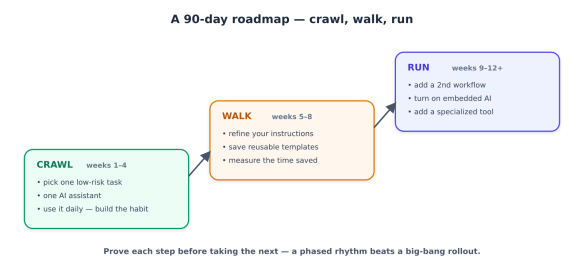
Step 3: Follow a 90-day roadmap, not a big bang

The pace that actually works for small teams is deliberately unglamorous: one workflow at a time, measured before you expand. Rushing produces tool sprawl, blown budgets, and a sceptical team.

A 90-day roadmap outlining a phased approach to implementing AI tasks, divided into three stages: Crawl (weeks 1-4), Walk (weeks 5-8), and Run (weeks 9-12+), with specific actions for each stage.
  • Crawl (weeks 1–4): Pick your one task from Step 1. Use a single assistant on it every day until it’s second nature. The goal is a habit and a feel for what the tool is good and bad at — not transformation.
  • Walk (weeks 5–8): Improve your instructions, save the prompts that work as reusable templates, and measure: how much time is this actually saving? Write the number down.
  • Run (weeks 9–12+): Add a second workflow. Turn on the embedded AI in your existing software. Consider one specialised tool if a clear pain calls for it. Then repeat the cycle.

Twelve months to get two or three areas of your business running on AI with proper habits and oversight may sound slow amid the hype. It’s the pace that compounds instead of collapsing.

Step 4: Learn the one skill that makes it work — good instructions

Most small businesses get mediocre results for one reason: they give the AI vague instructions. The fix is the highest-leverage skill, and it’s not technical — it’s just being specific and giving context. A weak prompt gets a generic answer; a good one gets something usable. The recipe:

ROLE:    Who the AI should act as.        "You're my café's social media manager."
CONTEXT: Facts about your business. "We're a family cafe in Leeds known for
sourdough and a relaxed vibe. Casual, warm tone."
TASK: Exactly what you want. "Write 5 Instagram captions for this week's
specials, each under 30 words, with a question
to drive comments."
FORMAT: How you want it back. "Number them. No emojis in the first two."

Save the instructions that work as templates you reuse — the difference between a business that gets consistent results and one that rerolls the dice every time. (Three-quarters of small businesses have no consistent approach to this, which is exactly why their results feel hit-or-miss.)

The guardrails: how not to get burned

This is the part that protects everything else. AI’s failures aren’t loud — it doesn’t crash, it confidently produces something wrong — so the guardrails are about catching that before it reaches a customer or your bank account.

Graphic titled 'Guardrails — how not to get burned', featuring five key points on the use of AI: 'Verify anything that matters', 'Protect your data', 'Never auto-send high-stakes content', 'Keep your voice', and 'Avoid tool sprawl', each accompanied by a checkmark.
  • Verify anything that matters. AI makes mistakes with total confidence — wrong facts, wrong numbers, invented details. Keep a human eye on anything customer-facing or money-related. The rule of thumb: the higher the stakes, the closer you look.
  • Protect your data. Don’t paste sensitive customer information, financial records, or anything confidential into a consumer AI tool. Use a business/paid account (the data handling is better), read the tool’s data policy, and decide deliberately what’s allowed — before an employee quietly pastes your customer list into a free tool they found online.
  • Never auto-send high-stakes content. AI can draft a contract clause, a financial summary, or health-related copy — it should never be the final word on them. Those get human sign-off, every time. When in doubt, a professional reviews it.
  • Keep your voice. Edit drafts so they sound like you, not like generic AI. Customers can increasingly tell, and “obviously AI” erodes the personal touch that’s a small business’s advantage.
  • Avoid tool sprawl. Every subscription is a cost and a login and a place your data lives. Add tools only when a specific, recurring pain justifies one.

Measure what matters

Finally, track outcomes, not activity. “We use AI now” is not a result. These are:

  • Time saved per week (the easiest, most immediate win — owners average 5–7 hours).
  • Revenue and leads — more content shipped, faster quotes, more reviews answered, recovered carts.
  • Customer satisfaction — faster responses, fewer dropped inquiries.

If a use case isn’t moving one of these after a fair trial, drop it and try another. That’s not failure; that’s the method working.

The bottom line

AI won’t run your business, and it won’t fix a broken one — it amplifies whatever you point it at. Point it at the right tasks, with good instructions and sensible guardrails, and a small team can market like a bigger one, respond faster than its competitors, and hand the evening paperwork to a tireless assistant. The owners who’ll look back on this year as a turning point aren’t the ones who bought the most tools. They’re the ones who picked one real problem, solved it with AI, measured the win, and built from there. Start there this week.

The Senior Developer Bar in 2026

A lot of my posts are about how to build with AI — agents, orchestration, the Microsoft stack, the protocols. This series steps up a level and asks a harder question aimed squarely at senior and lead developers: in mid-2026, what actually makes you valuable? Because the answer has moved, and a lot of people haven’t noticed.

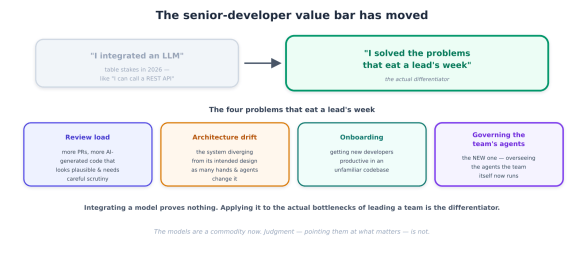
The bar is no longer “I integrated an LLM”

Two years ago, wiring an LLM into a product was a differentiator. You could stand up in a review, show a feature that called a model, and that was the value. In mid-2026 that’s table stakes — the equivalent of “I can call a REST API.” Every developer can integrate an LLM; the frameworks are mature, the SDKs are one import, and an agent scaffold is a template. Demonstrating that you can do it proves nothing any more.

The value bar for a senior or lead has shifted to something that was always the actual job: solving the problems that eat your week. Not “look what the model can do,” but “look what the team can now do that it couldn’t before.” And the problems that eat a lead’s week are stubbornly consistent.

Diagram illustrating the evolving expectations of senior developers, featuring quotes about integrating AI models and addressing core team challenges.

Review load. The volume of code a lead must review has gone up, not down, in the agent era — more pull requests, more AI-generated code that looks plausible and needs careful scrutiny, more surface area per change. The AI-slop-and-review piece in this library warned about exactly this.

Architecture drift. Systems diverge from their intended design as many hands — and now many agents — change them. Every shortcut, every “I’ll fix it later,” every agent that solved a local problem without understanding the global structure pulls the system away from its architecture. Catching that drift early is senior work.

Onboarding. Getting a new developer productive in an unfamiliar codebase is slow, expensive, and mostly falls on the leads who can least afford the time. The knowledge lives in people’s heads and scattered docs.

Governing the team’s own AI agents. This one is new. Your team now runs agents — for review, for ops, for data, for customer-facing features. Someone has to know which agents exist, what they can access, whether they still work, and whether they’re safe. That someone is you, and most teams have no answer yet.

The thesis of this series is simple: the senior developers winning in 2026 are the ones pointing AI at these four problems — not the ones with the flashiest demo. Below we cover the foundation that makes it buildable; A bit ahead, we’ll cover the shape and the discipline.

The protocol stack has solidified — build on it

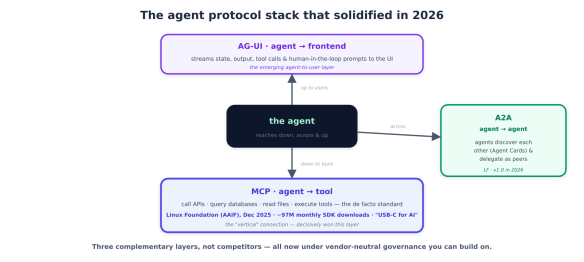
Here’s the good news that changes the calculus: the interoperability layer stopped being a mess. Through 2025 there was a cacophony of competing proposals for how agents talk to tools, to each other, and to users. In 2026 that consolidated into a clear three-layer stack, and — critically — the layers are now under neutral, community governance, so building on them is a safe bet rather than a vendor lock-in gamble.

Diagram illustrating the agent protocol stack of 2026, featuring three complementary layers: AG-UI (frontend), the agent, and MCP (tool), along with A2A communications between agents.

MCP (Model Context Protocol) is the agent-to-tool layer — the “vertical” connection by which an agent reaches down to call an API, query a database, read a file, or run a tool. It has decisively won this layer: it’s the de facto standard, with roughly 97 million monthly SDK downloads, thousands of public servers, and native support across Claude, ChatGPT, Gemini, Copilot, and Cursor. Most importantly for a lead making a bet, Anthropic donated MCP to the Agentic AI Foundation under the Linux Foundation in December 2025 — co-founded with Block and OpenAI, with AWS, Google, Microsoft, and GitHub joining — so it’s now a vendor-neutral standard governed by community process. It’s earned the nickname “the USB-C of AI.” The MCP-versus-A2A piece in this library called this early; it’s now settled.

A2A (Agent-to-Agent) is the agent-to-agent layer — the “horizontal” connection by which agents from different frameworks and vendors discover each other (via Agent Cards) and delegate tasks as peers. Google released it, and it too became a Linux Foundation project, reaching v1.0 in 2026 with broad enterprise backing. MCP and A2A are complementary, not competing — an agent uses MCP to reach its tools and A2A to coordinate with other agents, and serious systems use both.

AG-UI is the newest layer — agent-to-frontend — standardising how an agent streams its state, output, tool calls, and human-in-the-loop prompts to a user interface. It’s the piece that turns an agent from a backend process into something a user actually interacts with, and it completes the stack: down to tools, across to agents, up to users.

The Agent Harness

Once you accept that the job is solving the four problems, the next question is architectural: what shape does a system that helps take? The answer that has consolidated across serious deployments is the agent harness — and it looks nothing like the single-mega-prompt most people reach for first.

The shape: an orchestrator coordinating specialised sub-agents

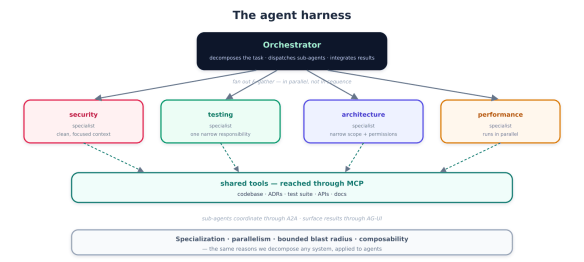
The pattern is an orchestrator that coordinates specialised sub-agents, often working in parallel. Instead of one agent with an enormous prompt trying to do everything, you have a coordinator that decomposes a task, dispatches focused sub-agents each responsible for one thing, and integrates their results. The multi-agent-orchestration piece in this library described the patterns; the harness is what they look like when they’re load-bearing.

An infographic titled 'The agent harness' depicting an orchestrator that decomposes tasks and integrates results. It illustrates four areas of specialisation: security, testing, architecture, and performance, each represented in separate boxes with descriptors. Below, there is a section labelled 'shared tools' accessed through MCP, highlighting tools like codebase and APIs. Arrows indicate relationships and coordination between the components.

Why this shape wins over one big agent comes down to four properties, each of which a senior developer will recognise as the same reasons we decompose any system:

  • Specialisation. A sub-agent responsible for one thing — checking security, say — gets a clean, focused context and clear instructions, and does that one thing far better than a generalist juggling ten concerns in a single bloated prompt. This is the context-engineering discipline applied to agents: narrow context, better output.
  • Parallelism. Independent sub-agents run at the same time, so a task that would take a single agent ten sequential steps finishes in the time of the slowest one. For a lead waiting on a review, that’s the difference between useful and ignored.
  • Bounded blast radius. Each sub-agent has a narrow scope and narrow permissions, so when one misbehaves — and they do — the damage is contained. This is the least-privilege instinct from the agent-security pieces, made structural.
  • Composability. Add a new specialist without rewriting the whole system; the orchestrator gains a capability the way a team gains a hire.

And this is exactly where the previous protocol stack pays off: sub-agents reach their tools through MCP, coordinate with each other through A2A, and surface their work to you through AG-UI. The harness is the structure; the protocols are the wiring.

Pointing the harness at the lead’s problems

The shape is only interesting if it solves the four problems. Three of them map onto a harness cleanly.

Review load. This is the canonical fit. A single “review this PR” agent produces shallow, generic feedback. A review harness fans the pull request out to specialists in parallel — one checking security, one checking test coverage and quality, one checking adherence to your architecture and conventions, one checking performance — and the orchestrator aggregates their findings into a single prioritised review that distinguishes “this is a security hole” from “this is a nit.”

A diagram illustrating a review-load harness in action, detailing the process involving a pull request, review orchestrator, and various types of reviewers, including security, tests, architecture, and performance reviewers, leading to a prioritized review and final decision by a human lead.

The crucial detail, straight from the plan-execute-verify discipline: the harness proposes, the human disposes. The review lands on your desk pre-triaged, so you spend your attention on the judgement calls instead of the mechanical scan — but you still make the call. It reduces review load, it doesn’t remove review responsibility.

Architecture drift. Point a harness at the gap between intended and actual design. One sub-agent extracts the intended architecture from your ADRs and design docs; another analyses what the code actually does; the orchestrator reports the delta — “this PR introduces a direct database call from the presentation layer, which your ADR-014 forbids.” Drift caught at the PR, when it’s cheap to fix, instead of six months later when it’s a rewrite. This is the kind of continuous architectural vigilance no lead has time to do manually across a large team.

Onboarding. A newcomer’s endless “how does X work here?” is a retrieval problem grounded in your specific codebase, docs, and history. An onboarding harness — sub-agents that search the code via MCP, read the docs, trace the git history, and explain — turns a week of interrupting senior developers into a self-serve pairing partner that answers in your codebase’s actual terms. It doesn’t replace mentorship; it absorbs the mechanical questions so mentorship can be about the things that actually need a human.

The senior judgement is in the decomposition

Here’s the part that stays a senior skill: deciding how to decompose the problem into specialists, and where the human belongs in the loop. The harness pattern is easy to draw and hard to get right — too many sub-agents and you’ve built a coordination nightmare with runaway cost; too few and you’re back to a generalist. Which specialists, what each one’s scope is, where they hand off, and which decisions require a human are architecture decisions, and making them well is exactly the senior value this series is about. The pattern is a tool; the judgement in wielding it is the job.

The differentiator isn’t more agents. It’s fewer, measured, guarded, shipped.

Here’s the shift that has quietly become the whole game. Through 2025, teams competed on quantity — who had the most agents, the biggest fleet, the most ambitious autonomous system. In 2026 the pattern among teams actually delivering value is the opposite: they instrumented a few high-value workflows with evaluation and guardrails, and shipped them. Not fifty agents; three that work, that they can measure, that they trust in production. The failures were almost never “the model wasn’t smart enough” and almost always “we couldn’t tell if it was working and we couldn’t keep it safe.”

So the senior move in 2026 isn’t building more. It’s picking the two or three workflows where an agent genuinely helps, wrapping them in the discipline that makes them dependable, and putting them in front of real users. Two disciplines make that possible.

Evaluation: you can’t ship what you can’t measure

Evaluation is the practice of measuring whether your agent actually works — systematically, repeatably, not by vibes. It’s the single biggest thing separating a demo from a production workflow, and the thing most teams skip because it’s less fun than building.

Concretely, evaluation means a golden dataset of representative inputs with known-good outcomes; task-success metrics that define what “correct” means for your workflow (did the review catch the real bug? did the answer cite the right file?); LLM-as-judge scoring for the outputs that can’t be checked mechanically; and regression testing so a model upgrade or prompt change that quietly makes things worse gets caught before your users find it. You run it offline against the golden set as you build, and online against real traffic once you ship. Without evaluation you’re flying blind — you literally cannot answer “is this better than last week?”, which means you cannot improve it and shouldn’t trust it.

Guardrails: the safety envelope that lets you ship

Guardrails are the constraints that keep an agent inside safe, intended behavior — the reason you can put it in production without lying awake. They operate at every edge of the agent: scope limits (least privilege — an MCP tool allow-list, not “here’s everything”), output validation (checking the agent’s output is well-formed and in-bounds before it acts), cost and token budgets (a runaway agent loop is a runaway bill, the green-coding piece’s point made operational), human-in-the-loop approval gates for consequential actions, and content and safety filters. Guardrails are what turn “impressive but terrifying” into “shippable.”

Flowchart illustrating a high-value workflow focused on evaluation and safety measures, featuring sections on Evaluation, Identity & Audit, and Guardrails.

Governing your team’s agents: the discipline turned inward

Now the fourth problem from above — governing the team’s own AI agents — and here’s the insight that ties the series together: governance is the same instrument-and-ship discipline applied to your own fleet. The agents your team runs are themselves high-value workflows that need evaluation, guardrails, and one thing more: accountability.

A lead governing a team’s agents needs answers to five questions, and they map exactly onto what we’ve built: an inventory (which agents exist — most teams genuinely don’t know); an identity for each (its own scoped credential, not a shared key — this is precisely the Entra Agent ID and managed-identity story from the passwordless series, one agent, one identity, least privilege); evaluation (are they still working, or did a model update silently degrade them?); guardrails (what can each actually access and do?); and an audit trail (who — which agent — did what, when?). An agent without an owner, an identity, an eval, and an audit log isn’t an asset; it’s a liability with API access. Governing the fleet is how you keep the leverage without the risk — and in 2026, it’s a core part of the senior job that didn’t exist two years ago.

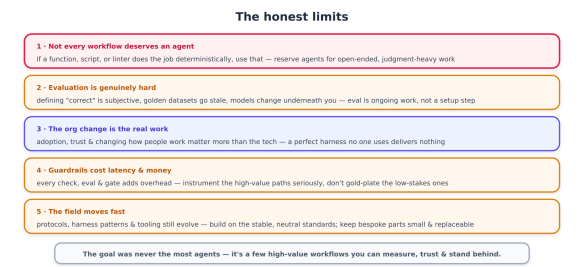
The honest limits

Five key points outlining the limitations of workflows, focusing on the need for agents in open-ended tasks, the challenges of evaluation, the importance of organisational change, the costs of guardrails, and the rapid evolution of protocols and tools.
  • Not every workflow deserves an agent. If a function, a script, or a linter does the job deterministically, use that — it’s cheaper, faster, and more reliable. Reserve agents for genuinely open-ended, judgement-heavy work. This is the plan-execute-verify discipline: the most agentic solution is rarely the best one.
  • Evaluation is genuinely hard. Defining “correct” is often subjective, golden datasets drift out of date, and the models change underneath you. Eval is ongoing work, not a setup step — budget for it as a permanent cost, not a phase.
  • The org change is the real work. Adoption, trust, and changing how people work matter more than the technology. A perfect review harness that developers route around delivers nothing. The senior skill includes bringing the team along.
  • Guardrails cost latency and money. Every validation, every eval, every approval gate adds overhead. Instrument the high-value paths seriously and don’t gold-plate the low-stakes ones — match the rigour to the stakes.
  • The field moves fast. Protocols, harness patterns, and tooling are still evolving. Mitigate by building on the stable, neutral parts (the Linux Foundation protocol stack) and keeping your bespoke logic small and replaceable.

The playbook

  1. Reframe your own value — stop demoing LLM integrations; start solving review load, architecture drift, onboarding, and agent governance.
  2. Build on the protocol stack — MCP for tools, A2A for coordination, AG-UI for surfacing — not bespoke glue.
  3. Use the harness shape — an orchestrator with a few specialised sub-agents — and put the senior judgement into the decomposition.
  4. Pick two or three high-value workflows. Resist the urge to build a fleet. Fewer, better, shipped.
  5. Instrument before you ship — a golden dataset, success metrics, and regression tests, plus scope limits, budgets, and human gates.
  6. Keep the human in the loop on consequential actions — the harness proposes, the human disposes.
  7. Govern your fleet — inventory, per-agent identity, eval, guardrails, audit. An ungoverned agent is a liability.
  8. Measure, then iterate — real traffic feeds the next round of evaluation; improve what you can now prove.

The whole picture

The bottom line for a senior or lead in 2026: the bar isn’t the model — everyone has the model. The bar is whether you can point it at the problems that actually matter, shape it into something dependable, and stand behind it in production. That’s the job it always was; the tools just changed.