
If you run a small business and you’ve been wondering whether this whole AI thing is for you, here’s the honest state of play in 2026: most of your peers have already started. Depending on which survey you read, somewhere between 82% and 89% of small businesses now use AI in some form — up from roughly a third just three years ago. The U.S. Chamber of Commerce found small firms adopting AI faster than large companies for the first time in the data’s history.
But that headline hides the part that should reassure you. When researchers look at who’s using AI well — built into how they actually operate, not just the occasional chatbot question — the number drops to around 15–20%. So the real race isn’t “have you started.” It’s “are you using it deliberately.” There is still plenty of room to get ahead, and the businesses that move thoughtfully now are the ones pulling away.
And the barrier almost certainly isn’t what you think. The single most common reason small businesses give for not using AI is that they “see no applicable use case” for their business — a perception that, in survey after survey, turns out to be a knowledge gap rather than a real limitation.
The reassuring truth about what it costs and takes
Two myths scare owners off. Let’s kill both.
“It’s expensive.” The two leading AI assistants cost about \$20–40 a month combined. A complete, capable AI toolkit for a small business runs \$200–500 a month and can be assembled one piece at a time. For comparison, the marketing output those tools can assist with would cost \$500–3,000 a month from an agency. McKinsey pegged the average small-business return on AI spending at 3.7×, and most owners recoup the cost within weeks when they point it at the right task.
“I need to be technical.” You don’t. Modern AI tools work in plain English — you type what you want the way you’d ask a capable assistant. There’s no code, no engineering team, no servers. If you can write an email, you can use them. (In fact, about three-quarters of small businesses already use AI without realising it, through features baked into software they already pay for, like their email, accounting, or online store.)
The honest catch: tools are easy, using them well is a skill. Only about a quarter of small businesses using AI have had any training, and most have no consistent approach — which is exactly why results feel inconsistent. The good news is that the skill is learnable.
The universal map: where AI helps any business
Here’s the key insight that dissolves the “no use case for my business” worry. Every business — whether you write software or fix sinks — shares the same handful of functions. AI helps with all of them. Your industry changes the details, not the map.

1. Customer communication. Drafting emails, replying to inquiries, writing follow-ups, polishing your tone. This is the fastest place almost everyone starts, because every business writes messages all day. AI turns a 20-minute reply into a 3-minute one.
2. Marketing and content. This is the #1 use case among small businesses, and the clearest, fastest payoff. Social posts, blog articles, product descriptions, ad copy, newsletters, captions. Businesses report saving 5–15 hours a week on content work and cutting marketing-contractor costs by 50–70%.
3. Customer service. A chatbot on your website or a smart auto-responder handles common questions 24/7 — hours, pricing, availability, “where’s my order” — so you’re not answering the same thing at 9 p.m. Businesses using AI for customer service report meaningfully higher satisfaction and better retention.
4. Admin and back-office. The invisible time-sink: scheduling, invoicing, bookkeeping, data entry, summarising documents, sorting your inbox. AI quietly removes a chunk of the busywork that never felt like “real” work but ate your week anyway.
5. Research and decision support. Summarise a long contract, research a new supplier, compare your prices to the market, draft a plan, analyse your own sales data and tell you what’s selling. AI is a tireless analyst you can ask anything.
6. Sales. Following up on leads (the thing every busy owner forgets), writing proposals and quotes, keeping your customer list organised, spotting who hasn’t bought in a while.
Look at that list and the “no use case” worry evaporates. You do most of these every single day.
The one principle that keeps you out of trouble
Before the how-tos, internalise one idea that separates the businesses AI helps from the ones it embarrasses:
AI is an amplifier, not a replacement. It makes a good employee faster and a careful process smoother. It does not replace your judgement, your relationships, or your responsibility for what goes out the door.
A useful mental model: AI is a brilliant, fast, occasionally overconfident intern. It produces a great first draft of almost anything in seconds — and it will also, now and then, state something wrong with total confidence. So you let it do the heavy lifting, and you keep your hand on the wheel: you review what matters, especially anything that touches a customer, a contract, or money. Get that balance right and AI is the best-value hire you’ll ever make. Get it wrong — let it run unsupervised on things that matter — and it amplifies your mistakes just as fast as your wins.
Why it’s worth doing now
The payoff isn’t hypothetical. Across the 2026 research, AI-using small businesses report saving 5–7 hours per week per person, 26–55% productivity gains in the areas where they apply it, and — the number that matters most — they’re roughly twice as likely to report year-over-year growth than non-users. Among growing small businesses, 83% have adopted AI; among shrinking ones, just 55%. Correlation isn’t destiny, but the pattern is hard to ignore: AI use has become a reliable marker of which way a small business is heading.
You don’t need to do all six functions. You need to do one well, see the time come back, and build from there. That’s the whole strategy.
Five Businesses, Five Playbooks
The functions above are universal, but they look different in a code shop than in a kitchen. The fastest way to see your own opportunity is to watch how five very different businesses put the same toolkit to work. Find the one most like yours, borrow what fits, and ignore the rest.

1. The web design shop (IT)
Maya runs a four-person studio building websites for local businesses. Her team can code; their problem is everything around the code — proposals, client updates, documentation, and marketing their own services while billing client hours.
What AI changes for them:
- Writing code faster. A coding assistant drafts boilerplate, suggests fixes, and explains unfamiliar code, so a junior developer ships like a mid-level one. (The catch: they review every line — confident-but-wrong code is real.)
- Proposals and scoping. What used to be a half-day of writing a proposal is now a 30-minute edit of a solid AI first draft, built from a few bullet points about the client.
- Client communication. Status updates, “here’s what we did this sprint” emails, and gentle nudges about overdue feedback — all drafted in seconds, in the studio’s voice.
- Their own marketing. The shoemaker’s-children problem: agencies never market themselves. AI writes the case studies and social posts they never had time for.
The pattern: even a technical business gets its biggest wins in the non-technical work that surrounds the craft.
2. The marketing agency (semi-technical)
Devin’s six-person agency runs social media and content for a dozen clients. Their product is content, and AI is closest to a superpower here — which is also the trap.
- Content at volume. First drafts of posts, articles, captions, and ad variations across a dozen brand voices. The agencies seeing real gains report saving 5–15 hours a week per person.
- First-draft design. AI image and design tools produce concepts, mockups, and social graphics in minutes for the team to refine.
- Reporting. Pulling a month of analytics into a plain-English client report — “engagement up 14%, here’s what worked” — instead of a dreaded manual slog.
- Repurposing. One client podcast becomes a blog post, ten social snippets, and a newsletter, automatically.
The catch, sharpened: when your product is content, AI slop becomes your brand. The winning agencies use AI for the first 80% and reserve human craft and judgement for the 20% that makes it theirs — and clients pay for. Volume without taste is a liability.
3. The café (not technical at all)
Sofia owns a neighbourhood café with eight staff. She’s never written a line of code and never will. The trades-and-hospitality world has the lowest AI adoption — which means the most room to get ahead of the shop across the street.
- Reviews and reputation. AI drafts warm, on-brand replies to every Google and Yelp review in minutes — the thing owners know they should do and never find time for.
- Social media. A week of Instagram posts (today’s special, a staff spotlight, a weekend event) drafted from a few notes, so the feed stays alive without hiring anyone.
- Menu and specials. Appetising descriptions for new dishes; translating the menu for tourists.
- Scheduling and suppliers. Drafting staff schedules around availability, and writing the routine supplier and logistics emails.
- Forecasting. Asking an assistant to look at last year’s sales and flag which weeks need extra staff or stock.
The pattern: for a non-technical local business, the wins are almost entirely admin and marketing — the after-hours paperwork that steals an owner’s evenings.
4. The plumbing business (not technical at all)
Tom runs a plumbing company with five vans. He’s on tools all day; the office work happens at night at his kitchen table. This is the classic first-mover opportunity — high-value, low-tech, barely-touched by competitors.
- Quotes and estimates. Describe the job in a sentence; get a clean, itemised, professional-looking quote drafted in seconds. Faster quotes win more jobs.
- Scheduling and reminders. Automated appointment confirmations and “your technician is on the way” texts cut no-shows and the phone tag that eats the day.
- After-hours inquiries. A simple website chatbot answers “do you do emergency call-outs?” and “what areas do you cover?” at 10 p.m., capturing leads Tom would otherwise lose to a competitor who picked up.
- Customer follow-up. “How did the repair hold up?” and review requests sent automatically — turning one-time jobs into repeat customers and referrals.
- Invoicing and books. AI features in his accounting software categorise expenses and chase unpaid invoices.
The pattern: trades businesses win by getting their admin and customer communication off the kitchen table — and because so few competitors have, the edge is large.
5. The retail / online store (not technical)
Priya runs a boutique with a Shopify store. She competes against far bigger sellers, and AI is how a small shop punches above its weight.
- Product descriptions. Dozens of distinct, search-friendly descriptions from a spreadsheet of product specs — a job that used to take days.
- Personalised recommendations. The “you might also like” features built into modern e-commerce platforms; across the industry, AI recommendations drive 25–35% of revenue for stores that use them.
- Customer service. A chatbot handles sizing, shipping, and returns questions, freeing Priya for the conversations that actually need a human.
- Email marketing. Abandoned-cart emails, new-arrival announcements, and win-back campaigns drafted and personalised at scale.
- Inventory and pricing. Demand forecasting and AI-assisted pricing — historically a big-company advantage — now within reach. (65% of small businesses are using or planning pricing tools.)
The pattern: retail wins by using AI to match the personalisation and responsiveness customers learned to expect from the giants.
What every example has in common
Read across the five and the same shape appears every time, exactly as predicted:
- The biggest, fastest wins are in marketing, customer communication, and admin — the universal functions, not the industry-specific craft.
- The less technical the business, the bigger the untapped opportunity, because adoption is lowest where the office work is heaviest and the competition is least likely to have moved.
- The catch is always the same: AI produces the draft; you own the result. The businesses that win supervise it; the ones that get embarrassed let it run loose.

You’ve now seen the toolkit applied five ways. Whichever is closest to your business, the next question is the practical one: how do I actually start without wasting money or making a mess?
Getting Started Without Getting Burned
The mistake most small businesses make isn’t avoiding AI — it’s diving in with no plan, buying five tools, getting inconsistent results, and concluding “this doesn’t work for us.” The businesses that win do the opposite: they pick one high-value task, get good at it, prove the payoff, and expand. Here’s how to be one of them.
Step 1: Pick your first win
Don’t start with “how do I use AI.” Start with “what eats my time and isn’t risky to hand off.” Score your tasks on three questions:
- How often do you do it? (Daily beats monthly.)
- How long does it take? (Hours beat minutes.)
- What happens if it’s a little wrong? (You want low stakes for your first win — embarrassing, not catastrophic.)
The sweet spot is the high-frequency, time-consuming, low-risk corner: drafting social posts, replying to routine emails, writing product descriptions, summarising documents, first-draft proposals. Avoid starting with anything that’s high-stakes if it’s wrong — final financial figures, legal language, medical guidance, or anything a customer sees unedited. Earn trust on safe ground first.
Step 2: Use off-the-shelf tools — you don’t need to build anything
You almost certainly do not need a developer, a custom system, or anything bespoke. The right starter stack for nearly every small business is just two things:
- One general AI assistant (ChatGPT, Claude, or Gemini — about \$20/month for a paid plan). This is your all-purpose “AI employee” for writing, summarising, research, and brainstorming. It’s the connective tissue across every function.
- The AI already inside the software you pay for. Your accounting tool, online store, email platform, and design app almost all have AI features now — about three-quarters of small businesses use AI this way without thinking of it as “adopting AI.” Turn those on before buying anything new.
That’s it to start. A median AI-using small business eventually runs about five tools, but you get there one proven win at a time — not by buying a stack on day one. Add a specialised tool (a dedicated chatbot, a marketing platform, a scheduling assistant) only when a specific recurring pain justifies it.
Step 3: Follow a 90-day roadmap, not a big bang
The pace that actually works for small teams is deliberately unglamorous: one workflow at a time, measured before you expand. Rushing produces tool sprawl, blown budgets, and a sceptical team.
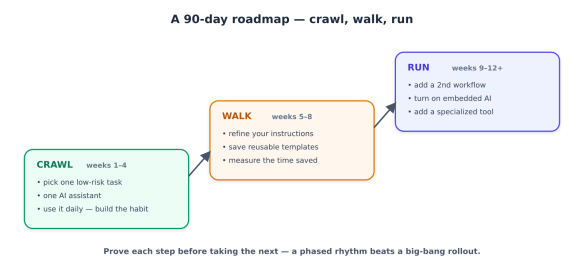
- Crawl (weeks 1–4): Pick your one task from Step 1. Use a single assistant on it every day until it’s second nature. The goal is a habit and a feel for what the tool is good and bad at — not transformation.
- Walk (weeks 5–8): Improve your instructions, save the prompts that work as reusable templates, and measure: how much time is this actually saving? Write the number down.
- Run (weeks 9–12+): Add a second workflow. Turn on the embedded AI in your existing software. Consider one specialised tool if a clear pain calls for it. Then repeat the cycle.
Twelve months to get two or three areas of your business running on AI with proper habits and oversight may sound slow amid the hype. It’s the pace that compounds instead of collapsing.
Step 4: Learn the one skill that makes it work — good instructions
Most small businesses get mediocre results for one reason: they give the AI vague instructions. The fix is the highest-leverage skill, and it’s not technical — it’s just being specific and giving context. A weak prompt gets a generic answer; a good one gets something usable. The recipe:
ROLE:    Who the AI should act as.        "You're my café's social media manager."
CONTEXT: Facts about your business.       "We're a family cafe in Leeds known for
                                           sourdough and a relaxed vibe. Casual, warm tone."
TASK:    Exactly what you want.           "Write 5 Instagram captions for this week's
                                           specials, each under 30 words, with a question
                                           to drive comments."
FORMAT:  How you want it back.            "Number them. No emojis in the first two."
Save the instructions that work as templates you reuse — the difference between a business that gets consistent results and one that rerolls the dice every time. (Three-quarters of small businesses have no consistent approach to this, which is exactly why their results feel hit-or-miss.)
The guardrails: how not to get burned
This is the part that protects everything else. AI’s failures aren’t loud — it doesn’t crash, it confidently produces something wrong — so the guardrails are about catching that before it reaches a customer or your bank account.

- Verify anything that matters. AI makes mistakes with total confidence — wrong facts, wrong numbers, invented details. Keep a human eye on anything customer-facing or money-related. The rule of thumb: the higher the stakes, the closer you look.
- Protect your data. Don’t paste sensitive customer information, financial records, or anything confidential into a consumer AI tool. Use a business/paid account (the data handling is better), read the tool’s data policy, and decide deliberately what’s allowed — before an employee quietly pastes your customer list into a free tool they found online.
- Never auto-send high-stakes content. AI can draft a contract clause, a financial summary, or health-related copy — it should never be the final word on them. Those get human sign-off, every time. When in doubt, a professional reviews it.
- Keep your voice. Edit drafts so they sound like you, not like generic AI. Customers can increasingly tell, and “obviously AI” erodes the personal touch that’s a small business’s advantage.
- Avoid tool sprawl. Every subscription is a cost and a login and a place your data lives. Add tools only when a specific, recurring pain justifies one.
Measure what matters
Finally, track outcomes, not activity. “We use AI now” is not a result. These are:
- Time saved per week (the easiest, most immediate win — owners average 5–7 hours).
- Revenue and leads — more content shipped, faster quotes, more reviews answered, recovered carts.
- Customer satisfaction — faster responses, fewer dropped inquiries.
If a use case isn’t moving one of these after a fair trial, drop it and try another. That’s not failure; that’s the method working.
The bottom line
AI won’t run your business, and it won’t fix a broken one — it amplifies whatever you point it at. Point it at the right tasks, with good instructions and sensible guardrails, and a small team can market like a bigger one, respond faster than its competitors, and hand the evening paperwork to a tireless assistant. The owners who’ll look back on this year as a turning point aren’t the ones who bought the most tools. They’re the ones who picked one real problem, solved it with AI, measured the win, and built from there. Start there this week.