C# class vs record vs struct vs record struct

Why This Matters When AI Can Just Write the Code

It’s a fair question: if you can ask an AI assistant to generate a class, a record, or a struct in seconds, why spend time learning the difference yourself?

An AI tool will happily generate any of the four — a class when you needed a record, a mutable record struct when you needed a readonly one, a struct the size of a small database row when a class would have been far cheaper to pass around. It will do this confidently and without warning you, because generating syntactically valid code isn’t the same as generating the right code for your situation. The tool doesn’t know whether your Order needs identity that persists over time or whether two orders with equal values really are “the same order.” Only you know that, because it depends on what your program actually needs to do — and that’s a design decision, not a syntax problem.

There’s also a more immediate, practical reason: you cannot evaluate, debug, or safely modify code you don’t understand — whether you wrote it or an AI did. If an AI hands you a record struct and a bug shows up because a value silently mutated somewhere it shouldn’t have, you need to already know that record struct is mutable by default to even suspect where to look. If a HashSet<T> lookup mysteriously starts failing after an update, you need to already understand the connection between mutability and hashing to diagnose it, rather than pasting the bug back into a chat window and hoping. AI is a powerful accelerant for someone who already has the judgement to steer it and the literacy to check its output — it’s a much weaker tool, and sometimes actively harmful, in the hands of someone using it as a substitute for that judgement rather than an extension of it.

The reasoning in this post — reference vs. value semantics, structural vs. identity equality, the cost of copying, the fragile-base-class-style thinking around mutability — isn’t C#-specific trivia. It’s how you’ll evaluate design tradeoffs in any language you touch for the rest of your career, AI-assisted or not. Learning to ask “does this thing have an identity, or is it just data?” is a transferable skill. Knowing the exact keyword to type is not, and that part genuinely is something a tool can help with once you already know what you’re asking for.

The Core Mental Model

Every C# type sits at the intersection of two independent ideas, and understanding these two ideas is the key to understanding everything else in this guide.

The first idea is storage and copy semantics: is the type a reference type or a value type? A reference type lives on the heap, and a variable of that type doesn’t hold the object itself — it holds a reference (essentially an address) pointing to where the object lives. When you assign one reference-type variable to another, you’re copying the address, so both variables end up pointing at the same object. A value type, by contrast, lives directly wherever it’s declared — on the stack, or inline inside an array or another object. When you assign one value-type variable to another, the entire contents get copied, producing two completely independent values.

The second idea is equality: when you compare two instances with == or .Equals(), does the language check whether they’re the same object (reference/identity equality), or whether they contain the same data (structural/value equality)?

These two axes combine to describe our four type kinds:

  • class is a reference type with reference equality by default. Two class instances with identical field values are still considered “different” unless you override equality yourself.
  • struct is a value type with value equality — but that default equality comes from System.ValueType and is implemented via reflection, which is functionally correct but noticeably slow.
  • record is a reference type, just like class, but the compiler automatically generates fast, correct, structural (value) equality for you, along with a few other conveniences.
  • record struct is a value type, just like struct, but again with the compiler automatically generating fast, correct, structural equality (no reflection this time either).

So a helpful way to think about it: a record is a class that the compiler has enriched with value semantics, and a record struct is a struct that the compiler has enriched in the same way. The “record” part of the name always means “give me generated equality, a readable ToString, and with-expressions” — it’s orthogonal to whether the underlying thing is a reference type or a value type.

Reference Types vs. Value Types, Explained Slowly

Since this distinction underlies everything else, it’s worth walking through carefully with an example, because it’s the part students get wrong most often.

class PointClass { public int X, Y; }

var a = new PointClass { X = 1, Y = 2 };
var b = a; // b now points to the SAME object as a
b.X = 99;
Console.WriteLine(a.X); // prints 99! Changing b changed a, because they're the same object

With a class, the variable a never actually contains a PointClass — it contains a reference to a PointClass sitting somewhere on the heap. When we write var b = a;, we’re copying that reference, not the object. Now a and b are two different “pointers” aimed at one shared object, so mutating through b is visible through a too.

Now compare that with a struct:

struct PointStruct { public int X, Y; }

var a = new PointStruct { X = 1, Y = 2 };
var b = a; // b gets an independent COPY of a's data
b.X = 99;
Console.WriteLine(a.X); // still prints 1 — a and b are separate values now

Here, a directly holds the X/Y values (no indirection through a heap address). When we write var b = a;, the runtime copies all of a’s bytes into b. From that point on, a and b are completely unrelated — changing one has no effect on the other. This copying happens every time you pass a struct into a method, return it from a method, or store it into a new variable, which is why struct size matters for performance: a big struct means a lot of copying.

This distinction directly explains why reference types can be null and value types generally can’t: null means “this reference doesn’t point to anything,” which is meaningless for a value type that isn’t a reference at all — it always has to hold some actual data.

record follows the class behavior above exactly (it’s a reference type), and record struct follows the struct behavior exactly (it’s a value type). Nothing about the word “record” changes this — it only changes what happens when you compare two instances or print them, which is the next topic.

Equality — Worked Examples for All Four

class: reference equality by default

class PointClass { public int X, Y; }

var a = new PointClass { X = 1, Y = 2 };
var b = new PointClass { X = 1, Y = 2 };
var c = a;

Console.WriteLine(a == b); // False: different objects, even though the data matches
Console.WriteLine(a.Equals(b)); // False: same reason
Console.WriteLine(a == c); // True: c is literally the same object as a

This often surprises beginners: a and b look identical on paper, but == returns false. That’s because class equality by default asks “are these the exact same object in memory?” — not “do these objects contain the same values?” If you want value-based comparison on a plain class, you have to override Equals, GetHashCode, and optionally ==/!= yourself, which is real, non-trivial boilerplate that’s easy to get subtly wrong (forgetting a field, mishandling null, inconsistent hash codes, etc.).

struct: value equality, but slow by default

struct PointStruct { public int X, Y; }

var a = new PointStruct { X = 1, Y = 2 };
var b = new PointStruct { X = 1, Y = 2 };

Console.WriteLine(a.Equals(b)); // True — value equality, as you'd hope
// But notice:
// Console.WriteLine(a == b); // Compile error! CS0019 — a struct doesn't even get a `==` operator by default

Good news: Equals does compare values correctly out of the box, because struct inherits it from System.ValueType, which uses reflection to inspect and compare every field. Bad news: reflection is slow — noticeably so if this Equals gets called in a hot loop or inside a HashSet/Dictionary. There’s also no == operator generated at all, so you can’t even write the natural comparison syntax without adding it yourself. In professional code you’d typically implement IEquatable<T> plus operator overloads by hand for any struct you plan to compare often — which is precisely the boilerplate record struct eliminates.

record: fast, compiler-generated value equality

record PointRecord(int X, int Y);

var a = new PointRecord(1, 2);
var b = new PointRecord(1, 2);

Console.WriteLine(a == b); // True — the compiler generated a real == operator for us
Console.WriteLine(a.Equals(b)); // True
Console.WriteLine(ReferenceEquals(a, b)); // False — they're still two separate heap objects

Notice the last line: a and b are still distinct objects living at different heap addresses (record is a reference type, remember), but the compiler-generated Equals/== compare their contents rather than their addresses, so the comparison behaves the way most people intuitively expect.

Records also correctly take runtime type into account when there’s inheritance involved, which matters a lot once you start building hierarchies:

record Animal(string Name);
record Dog(string Name, string Breed) : Animal(Name);

Animal a = new Dog("Rex", "Lab");
Animal b = new Dog("Rex", "Lab");
Animal c = new Animal("Rex"); // same Name, but a plain Animal, not a Dog

Console.WriteLine(a == b); // True — same runtime type (Dog) and same field values
Console.WriteLine(a == c); // False — even though "Name" matches, the runtime types differ

record struct: fast value equality, no reflection

record struct PointRecordStruct(int X, int Y);

var a = new PointRecordStruct(1, 2);
var b = new PointRecordStruct(1, 2);

Console.WriteLine(a == b); // True — compiler-generated, field-by-field comparison, no reflection involved

This is the “best of both worlds” case for equality: you get the value semantics of a struct (no heap allocation, independent copies) combined with the fast, correct, compiler-written comparison logic that record provides. You never have to write Equals/GetHashCode/== by hand, and you never pay the reflection tax that plain struct equality incurs.

ToString() — Why Records Are So Much Nicer to Debug

When you print a plain class or struct without overriding ToString(), you get almost nothing useful:

class PersonClass { public string Name = "Alice"; public int Age = 30; }
Console.WriteLine(new PersonClass());
// Output: PersonClass <- just the type name, no data at all

Records generate a genuinely useful ToString() automatically, listing every property and its current value:

record PersonRecord(string Name, int Age);
Console.WriteLine(new PersonRecord("Alice", 30));
// Output: PersonRecord { Name = Alice, Age = 30 }

The exact same thing happens for record struct. This might look like a small convenience, but in practice it’s one of the biggest quality-of-life differences students notice immediately: when you’re debugging, logging, or writing a failing test assertion, seeing PersonRecord { Name = Alice, Age = 30 } printed straight to the console instead of just PersonRecord saves an enormous amount of time you’d otherwise spend writing Console.WriteLine($"{p.Name}, {p.Age}") by hand, or attaching a debugger just to inspect field values.

Mutability & with-Expressions

record is immutable by default

When you declare a record using the concise positional syntax, each parameter becomes a property that can only be set once, at construction time (technically, it’s init-only rather than get; set;):

record Person(string Name, int Age);

var alice = new Person("Alice", 30);
// alice.Age = 31; // Compile error! Age can only be set during initialization, never after

This is a deliberate design choice, not an accident. Once you’ve built a Person, nothing else in your program can quietly reach in and change its Age behind your back — which eliminates an entire category of bugs where one part of a codebase mutates shared data and another part is surprised by it. It also makes instances inherently safe to share across threads, since there’s no mutable state to synchronise.

But you still need a way to “change” a value conceptually — for example, “give me a copy of Alice, but one year older.” That’s what with is for:

var olderAlice = alice with { Age = 31 }; // creates a brand-new object
Console.WriteLine(alice);      // Person { Name = Alice, Age = 30 } — completely unchanged
Console.WriteLine(olderAlice); // Person { Name = Alice, Age = 31 } — a new, separate instance

with takes the original object, copies every property you didn’t mention, overwrites the ones you did mention, and hands you a new object — all in one expression, with no manual copy-constructor to write or maintain.

record struct is MUTABLE by default — the single biggest gotcha in this whole topic

Students coming from record naturally assume record struct behaves the same way. It does not, and this trips up almost everyone the first time:

record struct Point(int X, int Y);

var p = new Point(1, 2);
p.X = 99; // Perfectly legal! record struct properties are ordinary mutable get/set by default
Console.WriteLine(p); // Point { X = 99, Y = 2 }

Unless you explicitly say otherwise, a record struct’s positional properties are regular, mutable { get; set; } properties — the exact opposite of what record does. If you want a record struct to behave immutably, the way record does automatically, you need to add the readonly modifier yourself:

readonly record struct Point(int X, int Y);

var p = new Point(1, 2);
// p.X = 99; // Now this is a compile error, exactly like the record case
var moved = p with { X = 99 }; // use `with` instead, same syntax as before

The practical takeaway for students: when in doubt, write readonly record struct, not just record struct, unless you have a specific, deliberate reason to want a mutable value type (a common one being a small “accumulator” struct you intentionally mutate in place inside a tight loop to avoid allocating a new instance on every iteration).

class and struct have no with support at all

Neither plain class nor plain struct gets any of this for free. If you want non-destructive “copy with one field changed” behaviour on a class, you write it by hand:

class PersonClass
{
public string Name; public int Age;
public PersonClass Clone(int newAge) => new PersonClass { Name = Name, Age = newAge };
}

This works, but it’s boilerplate that has to be manually kept in sync every time you add a new field — miss one, and your “clone” silently drops data. This is exactly the class of bug the compiler-generated with on records eliminates.

Inheritance — What’s Allowed and What Isn’t

class supports the full, familiar inheritance model you’d expect from an object-oriented language: unlimited depth, abstract base classes, virtual/override methods, sealed to stop further derivation, and so on.

class Shape
{
public virtual double Area() => 0;
}
class Circle : Shape
{
public double Radius;
public override double Area() => Math.PI * Radius * Radius;
}

record also supports inheritance, but with one important restriction: a record can only inherit from another record, never from a plain class (and vice versa). Within that restriction, it behaves a lot like class inheritance, and it pairs beautifully with pattern matching for modelling a fixed set of related shapes — often called “algebraic data type” style modelling:

abstract record Shape;
record Circle(double Radius) : Shape;
record Rectangle(double Width, double Height) : Shape;

Shape s = new Circle(2.0);
var area = s switch
{
Circle c => Math.PI * c.Radius * c.Radius,
Rectangle r => r.Width * r.Height,
_ => 0
};

struct and record struct, on the other hand, cannot inherit from anything (other than implementing interfaces) and are implicitly sealed. This isn’t a missing feature so much as a direct consequence of being a value type: inheritance relies on the idea that a Derived object can be substituted anywhere a Base reference is expected, which only makes sense when you’re dealing with references pointing at objects on the heap. Value types don’t have that kind of substitutability, so the language doesn’t offer struct inheritance at all. Both struct and record struct can still implement interfaces, though:

interface IShape { double Area(); }
record struct Circle(double Radius) : IShape
{
public double Area() => Math.PI * Radius * Radius;
}

Pattern Matching & Deconstruction

Because positional records generate a Deconstruct method automatically, you can immediately unpack them into separate variables, or use them in pattern-matching expressions, without writing any extra code:

record Point(int X, int Y);

var p = new Point(3, 4);
var (x, y) = p; // automatic deconstruction, thanks to the compiler-generated Deconstruct
Console.WriteLine($"{x},{y}"); // 3,4

if (p is (3, 4))
Console.WriteLine("Origin offset match!");

if (p is { X: > 0, Y: > 0 })
Console.WriteLine("In the first quadrant");

The same automatic deconstruction applies equally to record struct. A plain class or struct, by contrast, gets none of this unless you write a Deconstruct method yourself:

class PointClass
{
public int X, Y;
public void Deconstruct(out int x, out int y) => (x, y) = (X, Y);
}

Property patterns (the { X: > 0, Y: > 0 } syntax above) work on all four kinds of types — that part isn’t record-specific — but the tuple-style positional patterns and automatic var (x, y) = p; deconstruction specifically rely on the Deconstruct method that only records generate for you automatically.

Boxing — A Hidden Performance Trap for Value Types

“Boxing” is what happens when a value type gets wrapped up and placed on the heap so it can be treated as an object or through an interface reference. It’s easy to trigger without realising it:

struct PointStruct { public int X, Y; }

PointStruct p = new() { X = 1, Y = 2 };
object boxed = p; // BOXING happens here — a heap allocation is created
IComparable c = someComparableStruct; // also boxes, if the struct implements IComparable and is assigned through the interface

// The exact same thing can happen with record struct:
record struct PointRS(int X, int Y);
object boxedRs = new PointRS(1, 2); // also boxed

This matters because one of the main reasons people choose a value type in the first place is to avoid heap allocation — but if that value type frequently gets stored in a non-generic collection, assigned to an object variable, or passed through an interface, it quietly gets boxed anyway, and you lose the performance benefit you were trying to gain. class and record, being reference types already, never have this problem — assigning one to an object or interface variable is just copying a reference, with no extra allocation. This is one of the concrete reasons to think carefully before reaching for struct/record struct in code where the value will be stored generically or passed around as an interface a lot.

Performance Rule of Thumb: When Struct Copying Gets Expensive

Value types are copied every time they’re assigned, passed into a method, or returned from one. For a small struct like two ints, that copy is essentially free — a couple of machine words. But as a struct grows larger, that “free” copy stops being free:

// Cheap to copy — a reasonable struct candidate (16 bytes: two doubles)
readonly record struct Vector2D(double X, double Y);

// A poor struct candidate — copying this on every assignment, every method call,
// and every time it's added to a collection is expensive:
struct BigDataStruct
{
public Guid Id;
public string[] Tags; // this field is a reference, but the struct itself is still copied wholesale
public DateTime Created;
public decimal[] Amounts;
public byte[] Payload;
}
// -> this should be a `class` or `record` instead, so only a reference gets copied around

A commonly cited (though not strict) guideline is that once a value type grows past roughly 16 bytes, or gets copied very frequently, the copying overhead tends to outweigh the benefit of avoiding heap allocation, and you’re usually better off switching to a reference type (class/record).

Nullability

Because reference types are, at their core, just an address pointing at something, it’s entirely reasonable for that address to point at “nothing” — that’s exactly what null represents:

class PersonClass { }
record PersonRecord;

PersonClass? c = null; // fine
PersonRecord? r = null; // fine — record is a reference type under the hood

Value types don’t have this option, because there’s no “address” to leave empty — the variable directly is the data, and it must contain some value at all times:

struct PersonStruct { }
record struct PersonRecordStruct { }

PersonStruct s = null; // compile error, CS0037
PersonRecordStruct rs = null; // compile error, CS0037

PersonStruct? sNullable = null; // fine — wrapping in Nullable<T> adds an explicit "has no value" flag
PersonRecordStruct? rsNullable = null; // fine, same reasoning

PersonStruct? isn’t magic — it’s shorthand for Nullable<PersonStruct>, a small wrapper type that stores your value plus a separate boolean flag saying whether a value is actually present. This is a fundamentally different mechanism from reference-type null, even though the ? syntax looks identical in both cases.

Records vs. Record Structs — Revisiting the Immutability Difference

It’s worth returning to this point one more time, in its own section, because it’s the detail students most often get wrong on an exam or in a code review: a plain record’s positional properties are init-only, meaning they can only be assigned during construction and never again — so a record is immutable by default with no extra effort. A record struct’s positional properties, on the other hand, are ordinary mutable get; set; properties by default, so a record struct is not immutable unless you explicitly add the readonly modifier, either on the whole declaration (readonly record struct Point(int X, int Y);) or on individual members. Only once you’ve added readonly does a record struct become truly immutable and forbid reassigning its properties after construction, matching what record does automatically. If your goal is an immutable value object, the safe habit is to always write readonly record struct rather than relying on memory to add it later.

Choosing the Right Type — How to Decide

Start by asking yourself two questions about the type you’re designing, in order.

Question one: does this thing have an identity that matters independently of its data, and might it change over time? If you’re modelling a Customer, an Order, a background EmailService, or a DbContext, the answer is yes — two customers with the same name genuinely are two different customers, and an order’s status legitimately changes as it moves through your system. In that case, reach for a class. You want reference semantics (so everyone sharing the object sees the same updates) and you don’t need — and probably don’t want — structural equality baked in by default.

If instead the thing you’re modelling is really just data — where two instances containing the same values genuinely represent the same thing, like a Money amount, a coordinate, an event that happened, or a request/response payload — move to question two.

Question two: is this data small and copied frequently enough that avoiding heap allocation actually matters for performance, and do you not need inheritance? If yes — think coordinates, small math/geometry types, keys used heavily in a HashSet/Dictionary, currency values computed millions of times in a pricing loop — reach for readonly record struct. You get value-type performance (no GC pressure, independent copies) plus all the record conveniences (fast equality, readable ToString, with, deconstruction) with none of the reflection-based slowness a plain struct would give you by default.

If the answer to question two is no — the data is large, needs inheritance/polymorphism (for example, an abstract record Shape hierarchy), or will frequently be boxed/stored as object or through an interface — reach for a plain record instead. You keep all the same record conveniences, but as a reference type, so large payloads aren’t copied wholesale and boxing is never a concern.

Plain struct still has a place, but it’s a narrower one in modern C# (10 and later): reach for it specifically when you need low-level control that record struct doesn’t give you as cleanly — for example, precise interop layouts for P/Invoke via [StructLayout], or you’re intentionally avoiding the extra generated members for some specific reason. Absent one of those specific reasons, prefer readonly record struct over plain struct for new value types, since it gives you everything struct does plus fast equality, ToString, and with for free.

Full Syntax Reference

// ---- class ----
public class Car
{
public string Model { get; set; }
public Car(string model) => Model = model;
}

// ---- struct ----
public struct Car
{
public string Model { get; set; }
public Car(string model) => Model = model;
}
public readonly struct ImmutableCar
{
public string Model { get; }
public ImmutableCar(string model) => Model = model;
}

// ---- record (class) ----
public record Car(string Model); // positional, immutable, concise
public record class Car(string Model); // identical, explicit "class" keyword
public record Car { public string Model { get; init; } } // non-positional form

// ---- record struct ----
public record struct Car(string Model); // mutable properties by default!
public readonly record struct Car(string Model); // fully immutable — usually what you want

// ---- inheritance example (records only) ----
public abstract record Shape;
public sealed record Circle(double Radius) : Shape;
public sealed record Square(double Side) : Shape;

When and Why Use class

Use it when the type represents something with identity, lifecycle, or behaviour — not just a bundle of data.

Reach for class whenever identity matters more than value. Two Customer objects with the same name and email are still two different customers in the real world — reference equality is the correct semantic here, not a limitation to work around:

class Customer { public string Name; public string Email; }
var c1 = new Customer { Name = "Alice", Email = "a@x.com" };
var c2 = new Customer { Name = "Alice", Email = "a@x.com" };
// c1 and c2 are two distinct customer records in your system, even though the data matches.
// Reference equality (c1 == c2 is false) is exactly what you want here.

class is also the natural choice whenever a type has mutable state that changes over time — services, controllers, repositories, caches, connections, and anything else that gets updated in place (order.Status = OrderStatus.Shipped;). It’s the right tool whenever inheritance and polymorphism are core to the design: class hierarchies with virtual/override, abstract base classes, template-method patterns, and dependency-injected services implementing interfaces all rely on class semantics. It also fits large or complex object graphs well, since passing these around by reference avoids expensive copying, and lets multiple parts of the code share and mutate one instance (a DbContext, a Logger, a UI ViewModel). Finally, class is a reasonable default whenever you simply don’t need structural equality, or are willing to hand-roll Equals/GetHashCode for the rare cases where you do.

Typical uses: domain entities with a persistent identity (User, Order, Account), services (EmailService, PaymentGateway), ASP.NET Core controllers, ViewModels, repositories, anything wired through DI containers.

Avoid it when the type is just a small, interchangeable data value where two instances with equal data really are “the same thing” — that’s what record/struct are for.

When and Why Use record

Use it when the type represents an immutable value or a piece of data whose identity IS its content.

The clearest signal that you want a record is when value equality is the natural semantic for the thing you’re modelling. A Money(100, "USD") is the same value as another Money(100, "USD") — there’s no meaningful sense in which they’re “different objects”:

record Money(decimal Amount, string Currency);
var price1 = new Money(9.99m, "USD");
var price2 = new Money(9.99m, "USD");
Console.WriteLine(price1 == price2); // True — exactly the semantic you want

Immutability by default is another major reason to reach for record: because a record’s positional properties can’t be silently changed elsewhere in the code, you get compiler-enforced protection against a whole class of aliasing bugs, plus thread-safety for free, since immutable objects are inherently safe to share across threads without locking. On top of that, with-expressions make transformations concise and safe, replacing manual copy-constructor boilerplate with a single clear expression:

record OrderLine(string Sku, int Qty, decimal Price);
var line = new OrderLine("ABC123", 2, 19.99m);
var updated = line with { Qty = 3 }; // clear intent, no manual copy-constructor boilerplate

Records also give you a genuinely useful ToString() and equality out of the box, which pays off enormously in logging, debugging, and testing — Assert.Equal(expected, actual) on records “just works” structurally, with no need to compare field-by-field or override Equals in test fixtures. That combination makes record a natural fit for DTOs, API request/response models, events, and messages — anything that’s really “data plus identity-by-value,” where a UserCreatedEvent(Guid UserId, string Email) published twice with identical values should be treated as equal. Finally, records pair beautifully with pattern matching for algebraic-data-type-style modeling: an abstract record Shape with sealed record Circle/Rectangle subclasses lets you branch exhaustively and type-safely with a switch expression.

Typical uses: DTOs, API contracts, CQRS commands/queries, domain events, configuration snapshots, value objects in DDD (Address, Money, DateRange), discriminated-union-style modeling.

Avoid it when you need mutable, long-lived state, or your object has a distinct identity that persists independent of its field values — use class for those instead.

When and Why Use struct

Use it when you need a small, simple, performance-sensitive value type and don’t need any of the modern conveniences records add — or you’re targeting an older language version.

The most common reason to reach for struct is that avoiding heap allocation and GC pressure genuinely matters. In hot paths — tight loops, high-throughput services, game loops, numerical code — allocating thousands of small objects per second creates GC pauses that can hurt performance noticeably. A struct lives on the stack (or inline in an array or containing object) and simply doesn’t generate garbage the way repeatedly allocating small classes would:

struct Vector3 { public float X, Y, Z; }
Vector3[] particles = new Vector3[1_000_000]; // one contiguous block, no per-element heap allocation

struct is also the right choice when value copy semantics are exactly what you want: passing a struct to a method automatically gives that method its own independent copy, so there’s no risk of the callee mutating your data unexpectedly unless you explicitly pass it by ref. It’s essentially required for interop with unmanaged code and fixed memory layouts — struct supports [StructLayout], is necessary for P/Invoke signatures matching C structs, and works naturally with Span<T>/stackalloc scenarios. And of course, if you’re working in an older C# version (pre-C# 10) where record struct doesn’t exist yet, plain struct is your only option for value semantics. Finally, struct is a reasonable choice if you need default equality but don’t care about the reflection-based performance cost, or you’re planning to override Equals/GetHashCode/IEquatable<T> yourself anyway.

Typical uses: DateTime, Guid, TimeSpan-style primitives, math/graphics types (Vector2, Matrix4x4), pixel/colour structs, small fixed-size buffers, P/Invoke interop structs, enum-like value wrappers.

Avoid it when the type is large (rule of thumb: bigger than roughly 16 bytes), gets boxed frequently, needs inheritance, or you’d benefit from the auto-generated ToString/equality/with support that record struct provides. In nearly all new code targeting C# 10 or later, prefer record struct over a plain struct unless you have a specific reason not to, such as needing full manual control over generated members or interop attributes that conflict with the record struct’s generated code.

When and Why Use record struct

Use it when you want everything a struct gives you (stack allocation, value/copy semantics, no GC pressure) plus everything a record gives you (fast generated equality, readable ToString, with-expressions, deconstruction) — which is most of the time you’d reach for a struct in modern C#.

The strongest case for record struct is small immutable value objects that get compared or hashed a lot. Coordinates, money amounts, IDs, RGB colors, ranges — anything you’ll put in a HashSet<T> or use as a Dictionary<TKey, TValue> key benefits enormously from the compiler-generated, allocation-free Equals/GetHashCode:

readonly record struct Point(int X, int Y);
var visited = new HashSet<Point>();
visited.Add(new Point(1, 2));
visited.Contains(new Point(1, 2)); // True, fast, no boxing, no reflection

More broadly, record struct is the right choice whenever you want the ergonomics of records — concise positional syntax, with, ToString, deconstruction — without paying for heap allocation. This is the main reason record struct was added to the language in C# 10: plain struct never got these features, and hand-writing them for every small value type was tedious and error-prone. It’s an especially good fit for high-frequency value objects in performance-sensitive code that still benefit from readability — for example, a readonly record struct Money(decimal Amount, string Currency) used millions of times in a pricing engine gets no GC churn, but still keeps with, equality, and nice debug output.

The one thing to always keep in mind is the mutability gotcha covered earlier: pair record struct with readonly (readonly record struct) almost every time, unless you specifically want in-place field mutation — for example, a mutable accumulator struct updated in a tight loop to avoid allocating a new struct every iteration:

// Deliberately mutable — used as a scratch accumulator in a hot loop
record struct RunningTotal(decimal Sum, int Count)
{
    public void Add(decimal value) { Sum += value; Count++; }
}

Typical uses: geometry/math value types (Point, Vector2, Rect), currency/measurement value objects, small immutable keys for collections, tuples-with-names replacing (int, int) value tuples when you want named, equality-friendly semantics, hot-path DTOs in performance-critical services.

Avoid it when the type is large, needs inheritance/polymorphism, or is frequently boxed or stored as object/interface — those scenarios favour record (a reference type) instead.

Summary

If you remember nothing else from this guide, remember this: class and record are reference types that live on the heap and get copied by reference; struct and record struct are value types that live inline and get copied by value. The word “record” — on either kind — means “the compiler will generate fast structural equality, a readable ToString(), and with-expression support for you.” record is immutable by default because its positional properties are init-only; record struct is not immutable by default, because its positional properties are ordinary mutable properties — so write readonly record struct when you want a truly immutable value type, which is most of the time. Choose class when identity and mutable state matter; choose record when a piece of data’s value is its identity and you don’t need to avoid heap allocation; choose struct/record struct when the data is small, copied frequently, and you want to avoid GC pressure — and in modern C#, default to readonly record struct over plain struct unless you have a specific reason not to.

C# 14 Deep Dive

C# 14 (shipping with .NET 10) is not a paradigm-shifting release. It’s a refinement release: a set of focused changes that remove long-standing boilerplate and close gaps that forced you into workarounds. Two of them change how you write members, and they’re the ones you’ll reach for daily.

The field keyword: the missing middle of properties

For twenty years, C# properties had exactly two states and nothing in between. The auto-property, concise and logic-free:

public string Name { get; set; }   // compiler generates a hidden backing field, but you can't touch it

And the full property, the moment you needed any logic — validation, change notification, lazy init — which meant hand-declaring a backing field and both accessors:

private string _name;                                  // boilerplate
public string Name
{
get => _name;
set => _name = value ?? throw new ArgumentNullException(nameof(value));
}

That gap was pure friction. In roughly 95% of cases the manual field did nothing interesting, and — worse — that _name field was now visible to the rest of the class, so any method could bypass your validation by writing to it directly.

C# 14 introduces the field contextual keyword, which refers to the compiler-synthesized backing field from inside a property accessor. The middle state finally exists — the “semi-auto property”:

public string Name
{
get => field; // 'field' is the generated backing store
set => field = value ?? throw new ArgumentNullException(nameof(value));
}

// you can also implement just ONE accessor and let the compiler generate the other:
public int Age
{
get; // compiler-generated getter
set => field = value >= 0 ? value : throw new ArgumentOutOfRangeException(nameof(value));
}
Illustration of the three states of a C# property: Auto-property, Full property, and Semi-auto property. Each state is described with code examples and key characteristics, highlighting aspects like validation and field accessibility.

Three things make this more than sugar. It eliminates the boilerplate field declaration. It preserves encapsulation — the backing store is reachable only through the accessors, so validation can’t be bypassed elsewhere in the class. And it’s the natural fit for the two most common property-logic scenarios: validation (as above) and change notification in MVVM view models:

public string Title
{
get => field;
set { field = value; OnPropertyChanged(); } // raise INotifyPropertyChanged, no manual field
}

Two facts to file away. field is a contextual keyword — it only has special meaning inside a property or indexer accessor, so existing code compiles unchanged. But that creates the release’s most-cited breaking change: if you already have a symbol named field in scope, inside an accessor it now resolves to the backing field, not your symbol. The fix is to disambiguate with @field or this.field, or simply rename the symbol — and the pragmatic advice is to avoid naming anything field. (This feature shipped as a C# 13 preview behind LangVersion=preview; C# 14 makes it official.)

Extension members: beyond extension methods

Extension methods have been a cornerstone since C# 3, but they were always just methods — and always instance-style. You could not write an extension property, an extension operator, or a static extension. Want an IsEmpty that reads like a property on IEnumerable<T>? You were stuck writing IsEmpty(this IEnumerable<T> source) and calling it as a method. C# 14’s extension members remove that ceiling.

The new syntax is the extension block — you declare the receiver once on the block, and everything inside extends it:

public static class EnumerableExtensions
{
// instance-style: receiver has a name, members act like instance members of IEnumerable<T>
extension<T>(IEnumerable<T> source)
{
public bool IsEmpty => !source.Any(); // extension PROPERTY
public T FirstOr(T fallback) => source.FirstOrDefault() ?? fallback; // extension method
}

// static-style: receiver is a type only (no name) — members act like static members of the type
extension<T>(IEnumerable<T>)
{
public static IEnumerable<T> Empty() => []; // static extension method
}
}

// used exactly like real members:
bool empty = numbers.IsEmpty; // reads like an instance property
var xs = IEnumerable<int>.Empty(); // reads like a static method on the type

The receiver form is the key distinction: extension<T>(IEnumerable<T> source) — a named receiver — produces members that behave like instance members; extension<T>(IEnumerable<T>) — a type-only receiver — produces members that behave like static members of the type. You can even declare extension operators, letting you add + or - to a type you don’t own.

A graphic illustrating extension members in programming, highlighting their block and boundary in C# 14, including supported and unsupported features such as methods, properties, and constructors.

Because the user’s interest is extending interfaces: yes — this works, and it’s one of the most useful cases. The IEnumerable<T> examples above are interface extensions. You can add methods, properties, and operators to any interface you don’t control, which previously required either awkward method-only extensions or wrapper types.

One precise correction worth making, since it’s easy to over-claim: C# 14 extension members cover methods, properties, and operators — instance and static. They do not yet support events, fields, indexers, nested types, or constructors; those are acknowledged as future work. (If you’ve seen “extension events” mentioned, it’s likely a conflation with C# 14’s separate partial events feature — a code-generation aid covered later — which is unrelated to extensions.) Two more rules matter: extension members only fill gaps — they never override or shadow a real instance member, and are considered only when no instance member matches — and the classic this-parameter syntax still works and coexists with blocks, so you don’t have to convert anything. The one breaking change: extension is now a contextual keyword, so a type or alias named extension must be renamed (error CS9306).

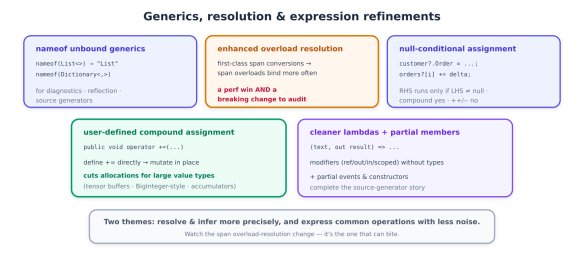
Generics, Resolution, and Expression Polish

Where previous features changed how you declare members, the next features change how the compiler resolves and how you express everyday operations. Several are small; one — overload resolution — is subtle enough to bite you, so it gets the most attention.

nameof for unbound generics

A small, welcome fix. Before C# 14, nameof required a closed generic type — you had to invent a placeholder type argument just to get a name:

// before: you had to supply a throwaway type argument
string n = nameof(List<int>); // "List" — but why should you need <int>?

C# 14 lets nameof accept an unbound generic type, so you write what you mean:

string list = nameof(List<>);          // "List"
string dict = nameof(Dictionary<,>); // "Dictionary"

It returns the name of the generic type definition — no type arguments required. This is squarely aimed at logging, diagnostics, reflection, source generators, and analyzers, where you want a type’s name without caring about (or having) its type parameters. It’s minor, but it removes a papercut that showed up constantly in framework and tooling code.

Enhanced overload resolution: a feature and a trap

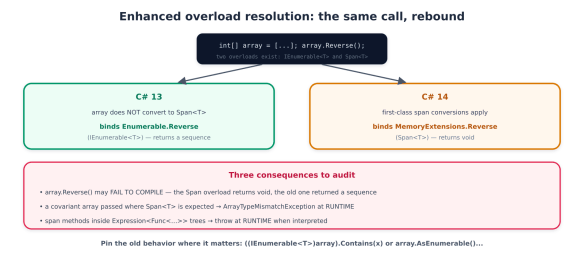
This is the one to read carefully. C# 14 introduces first-class support for Span<T> and ReadOnlySpan<T> — new implicit conversions between T[], Span<T>, and ReadOnlySpan<T>, plus the ability for spans to act as extension receivers and participate in generic inference. The everyday benefit is real: array-to-span code just works, with fewer explicit .AsSpan() calls:

void ProcessSpan(ReadOnlySpan<int> data) { /* ... */ }

int[] array = [1, 2, 3];
ProcessSpan(array); // implicit T[] → ReadOnlySpan<T>, no .AsSpan()

ReadOnlySpan<char> chars = "hello"; // implicit string → ReadOnlySpan<char>

But making span overloads applicable in more scenarios means the compiler now sometimes picks a different overload than it did in C# 13 — and that is a genuine, documented behavioral breaking change, not a footnote. The canonical example: in C# 13, an extension method taking a Span<T> receiver did not apply to a T[], so calls on arrays bound to the System.Linq.Enumerable (IEnumerable<T>) overloads. In C# 14, the span-based System.MemoryExtensions overloads become applicable — and win.

A diagram explaining enhanced overload resolution in C#, comparing C# 13 and C# 14. It illustrates changes in method binding for array reversal, highlighting updates to array handling and consequences for developers.

The concrete ways this surfaces are worth memorizing, because some fail loudly and some fail silently at runtime:

// 1. Compile break: the Span<T> overload returns void, the Enumerable one returned a sequence
_ = strings.Reverse(); // C#13: Enumerable.Reverse (IEnumerable<T>); C#14: MemoryExtensions.Reverse (void) → error

// 2. Runtime throw: a covariant array can't convert to Span<object>
void M(object[] arr) => Util.Do(arr); // C#14 binds Span<T> overload → ArrayTypeMismatchException at runtime

// 3. Pin the old behavior explicitly when you need it:
_ = ((IEnumerable<int>)array).Contains(x); // force the Enumerable overload
_ = array.AsEnumerable().Contains(x); // same, more readable

And the nastiest case: span-based methods now bind inside Expression<Func<...>> lambdas, where they compile fine but throw at runtime when the expression is interpreted rather than compiled. If you build LINQ expression trees (ORMs, query providers), audit them. The practical guidance: after upgrading, review span-heavy code and expression trees, lean on analyzer/ReSharper inspections that flag the change, and pin the old binding with an explicit IEnumerable<T> cast where behavior matters. This is the price of the performance win — worth it, but not free.

Null-conditional assignment

A clean ergonomic win. The null-conditional operators ?. and ?[] can now appear on the left side of an assignment or compound assignment — the mirror of the null-conditional read you already use:

// before
if (customer is not null)
customer.Order = GetCurrentOrder();

// C# 14
customer?.Order = GetCurrentOrder(); // assigns only if customer != null; RHS evaluated only then
orders?[i] += delta; // compound assignment works too

The right-hand side is evaluated only when the left side is non-null — so GetCurrentOrder() isn’t even called if customer is null, which matters when the RHS has side effects. One restriction: this works with assignment and compound operators (+=, -=, …) but not with increment/decrement (++, --).

User-defined compound assignment operators

Previously, x += y on your own type always meant x = x + y — the compiler synthesized the compound form from your binary + operator, allocating a new instance every time. For large value types that’s wasteful. C# 14 lets you define the compound operator directly, as an instance operator that mutates the receiver in place:

public struct BigAccumulator
{
private long[] _buffer;
// user-defined += : mutates in place instead of allocating a new BigAccumulator
public void operator +=(BigAccumulator other)
{
for (int i = 0; i < _buffer.Length; i++)
_buffer[i] += other._buffer[i]; // no new allocation
}
}

The payoff is allocation reduction for big value holders — think tensor buffers, BigInteger-style number types, or accumulators in a tight loop, where the old copy-on-+= behavior was pure GC pressure. This connects directly the allocation-free theme (and to the green-coding series’ point that efficient code is cheaper and greener). C# 14 also allows user-defined ++ and --.

Cleaner lambda parameters

Finally, a syntax polish: lambda parameters can now carry modifiers — ref, in, out, ref readonly, scopedwithout forcing you to write the parameter types:

// before: modifiers required explicit types
TryParse<int> parse = (string text, out int result) => int.TryParse(text, out result);

// C# 14: modifiers with inferred types
TryParse<int> parse = (text, out result) => int.TryParse(text, out result);

One breaking change rides along: scoped is now a reserved word in lambda parameter position, so an identifier named scoped needs @scoped.

A related code-generation feature completes the picture: partial events and partial constructors. C# 13 made properties and indexers partial; C# 14 finishes the set, so a source generator can supply the implementation of an event or constructor whose declaration you wrote by hand — the same separation-of-definition-and-implementation pattern that makes generated code clean.

An illustration discussing generics, overload resolution, and expression refinements in programming, highlighting various features such as unbound generics, enhanced overload resolution, user-defined compound assignment, null-conditional assignment, and cleaner lambdas with partial members.

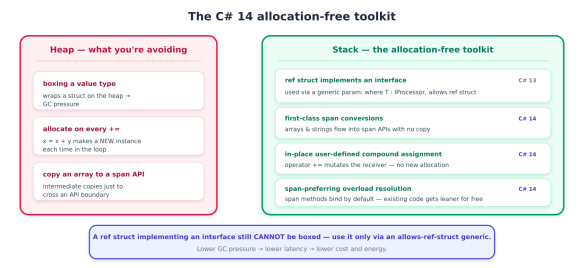
A recurring goal across recent C# versions is letting you write allocation-free code — code that keeps data on the stack, avoids heap churn, and so avoids the garbage-collection pressure that shows up as latency spikes and, per the green-coding series in this library, as wasted cost and energy. C# 14 advances that goal on several fronts. But it does so on top of work that landed in C# 13, and a deep dive should be precise about which is which — so let’s draw that line clearly.

Setting the record straight: ref struct interfaces are C# 13

The headline “ref struct interfaces” capability — the ability for a ref struct (a stack-only type like Span<T>) to implement an interface, and the allows ref struct anti-constraint that lets a ref struct be used as a generic type argument — arrived in C# 13, not C# 14. It’s foundational to the allocation-free story, so it belongs in this discussion, but calling it new in C# 14 would be wrong.

Here’s what C# 13 unlocked, because C# 14’s features build directly on it:

// C# 13: a ref struct can implement an interface
public interface IProcessor { void Process(); }

public ref struct SpanProcessor : IProcessor // stack-only type, now polymorphic
{
private readonly ReadOnlySpan<byte> _data;
public SpanProcessor(ReadOnlySpan<byte> data) => _data = data;
public void Process() { /* work over _data without copying to the heap */ }
}

// C# 13: 'allows ref struct' lets a ref struct be a generic type argument
public static void Run<T>(T proc) where T : IProcessor, allows ref struct
{
proc.Process(); // no boxing, no heap allocation
}

The significance: before this, a ref struct couldn’t participate in generic or interface-based polymorphism at all — you had to abandon stack-only types or abandon abstraction. Now you can write generic, abstracted, allocation-free code over Span<T> and your own ref structs. Note the crucial constraint that keeps it safe: a ref struct implementing an interface still cannot be boxed — you can only use it through a generic parameter constrained with allows ref struct, never as the interface type directly (that would require a heap allocation, defeating the purpose).

What C# 14 actually adds to the allocation-free toolkit

C# 14’s contribution is to make the surrounding code allocation-free and natural, and there are three pieces, each seen earlier in the series and now viewed through the performance lens.

First-class span conversions. The implicit T[]Span<T>/ReadOnlySpan<T> and stringReadOnlySpan<char> conversions from earlier aren’t just ergonomics — they let you thread arrays and strings through span-based APIs without intermediate copies or allocations, and let spans act as extension receivers and inference targets. That’s the connective tissue that makes ref-struct/span code read like ordinary code.

In-place user-defined compound assignment. The operator += from earlier that mutates the receiver instead of allocating a new instance is, fundamentally, an allocation-reduction feature — it turns a hot-loop sum += v over a large value type from N allocations into zero.

Overload resolution that prefers spans. The (breaking) resolution change from above means span-based library methods now bind by default in more places — so your existing code often gets more allocation-free without you rewriting it, which is exactly why the breaking change is worth tolerating.

A visual comparison of heap and stack allocation in C#. The heap section highlights issues like boxing a value type, allocation on every assignment, and copying an array to a span API. The stack section presents alternative solutions such as using ref structs, first-class span conversions, in-place user-defined assignment, and span-preferring overload resolution, emphasising lower garbage collection pressure.

Put together, a modern allocation-free pattern looks like this — stack-only data, interface abstraction, generic dispatch, no heap:

ReadOnlySpan<byte> payload = GetBuffer();          // no copy
var processor = new SpanProcessor(payload); // ref struct on the stack
Run(processor); // generic dispatch via allows ref struct — zero allocations

The honest limits

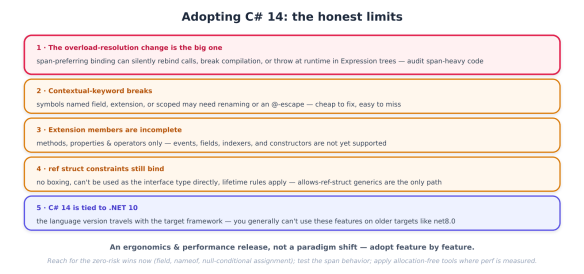
C# 14 is a strong release, but a deep dive owes you the edges — and there are several worth planning around.

Infographic titled 'Adopting C# 14: the honest limits' outlining five key changes and considerations regarding C# 14, including overload-resolution, contextual-keyword breaks, extension members, struct constraints, and framework compatibility.
  • The overload-resolution change is the real risk. As previously detailed, span-preferring binding can silently rebind calls, break compilation where return types differ, throw ArrayTypeMismatchException on covariant arrays, and — worst — throw at runtime inside interpreted Expression trees. This is the one thing to actively test after upgrading; the rest of C# 14 is additive.
  • Contextual-keyword breaks. field, extension, and scoped all became contextual/reserved in their positions. Existing symbols with those names need @-escaping or renaming. Cheap to fix, easy to miss.
  • Extension members are incomplete. Methods, properties, and operators only. Events, fields, indexers, nested types, and constructors are not supported yet — so don’t design an API assuming extension events exist (they don’t; that’s the separate partial events feature).
  • ref struct constraints still apply. Implementing an interface doesn’t make a ref struct heap-friendly: no boxing, no using it as the interface type, and the usual lifetime/scoped rules. The allows ref struct generic path is the only way to abstract over them.
  • C# 14 is tied to .NET 10. The language version travels with the target framework, so you generally can’t sprinkle C# 14 features onto a project still targeting net8.0. In practice, adopting C# 14 means adopting .NET 10 — which, per the previous series, is a forced move this year anyway.

The adoption playbook

  1. Adopt .NET 10 first — C# 14 rides with it, and the November 2026 support cliff (previous series) already forces that move.
  2. Turn on the analyzers. Let Roslyn and your IDE flag the span overload-resolution change; treat those inspections as a migration checklist, not noise.
  3. Audit span-heavy code and Expression trees specifically — this is where the behavioral break hides. Pin the old binding with IEnumerable<T> casts where behavior matters.
  4. Escape or rename any field, extension, or scoped identifiers.
  5. Reach for the ergonomic wins immediatelyfield in properties, nameof(List<>), null-conditional assignment — they’re zero-risk and cut boilerplate today.
  6. Introduce extension members where they read better than method-only helpers (extension properties on interfaces especially), staying inside the methods/properties/operators boundary.
  7. Apply the allocation-free tools where they pay — in-place compound assignment and span APIs in hot paths and high-throughput services; don’t micro-optimize cold code.

Upgrading to .NET 10 LTS: Why This Is a Forced-Decision Year

If you run anything on .NET 8 or .NET 9, there’s a single date that turns “we should upgrade eventually” into “we have to upgrade this year”: November 10, 2026. On that day, both .NET 8 and .NET 9 reach end of support — simultaneously. After it, Microsoft stops shipping servicing updates, security fixes, and technical support for either version.

That simultaneity is not a typo, and it’s the crux of this series. Ordinarily you’d expect the newer release to outlive the older one. Here they converge, because of a deliberate policy change: Microsoft extended Standard Term Support from 18 to 24 months. .NET 8, a Long Term Support release from November 2023, gets its full 36 months and lands on November 10, 2026. .NET 9, a Standard Term Support release from November 2024, now gets 24 months instead of 18 — and lands on exactly the same day.

A timeline graph illustrating support periods for .NET versions 8, 9, and 10, highlighting the end of support for both .NET 8 and .NET 9 on November 10, 2026, and showing the support duration for .NET 10 until November 10, 2028.

The consequence is a genuine forcing function. It doesn’t matter which strategy you picked — the conservative shop that stayed on .NET 8 LTS and the fast-moving shop that jumped to .NET 9 are now in exactly the same boat, with the same deadline and the same target: .NET 10. Every .NET application in your portfolio needs to be on .NET 10 by November 2026, and the runway is shorter than it looks once you account for testing, third-party dependencies, and change-freeze windows.

Why “unsupported” is a real problem, not a nag

It’s tempting to treat end-of-support as a soft recommendation. It isn’t, for three concrete reasons:

  • No more security patches. After November 10, 2026, a newly disclosed CVE in the runtime or base libraries simply won’t be fixed for .NET 8 or .NET 9. You’d be running a known-vulnerable runtime with no official remedy — Microsoft’s own guidance is blunt that using out-of-support software puts your applications, data, and environment at risk.
  • Compliance failure. For regulated shops — financial services, healthcare, government contractors — running an unsupported runtime is often an automatic audit finding. “We’re planning to upgrade” doesn’t satisfy an auditor looking at a production system on an EOL framework.
  • Emergency-patching spiral. Teams that miss the deadline don’t escape the work; they just do it later, under pressure, during an incident. That’s the most expensive possible time to migrate.

There’s one release-valve worth knowing about: third-party extended-support vendors will sell you post-EOL security patches for .NET 8/9 to buy time for a genuinely un-migratable app. Treat that as a bridge for the exceptional case, not a strategy — it’s a way to stop the security clock on a mission-critical system while you finish the real migration, not a substitute for it.

How the cadence works — so this never surprises you again

Understanding the release model turns the deadline from a shock into a predictable planning input. .NET ships a new major version every November, and the parity of the version number tells you the support length:

Infographic illustrating the .NET release cadence with release dates and support durations for .NET 8 to .NET 12, highlighting LTS and STS versions.

Even-numbered releases are LTS (three years of support): .NET 8, .NET 10, .NET 12. Odd-numbered releases are STS (now two years): .NET 9, .NET 11. Crucially, Microsoft is explicit that the quality of LTS and STS releases is identical — the only difference is the length of the free support window. So the strategic question isn’t “is LTS more stable?” (it isn’t) but “how often do I want to be forced to upgrade?” For most enterprise shops the answer is LTS-to-LTS — .NET 8 → .NET 10 → .NET 12 — which minimises forced migrations and gives you the longest predictable runway each time. That’s exactly the move on the table now.

Beyond avoiding the cliff: .NET 10 earns the upgrade

Here’s the good news that makes this less of a chore: even if there were no deadline, .NET 10 would be worth moving to. It’s one of the largest .NET releases ever, and — unusually — a big chunk of the value lands for free the moment you retarget and rebuild.

The headline is that the runtime got materially faster without any code changes on your part. .NET 10 brings improvements to JIT inlining, method devirtualisation, stack allocation, and loop optimisation, plus hardware acceleration (AVX10.2 on Intel, Arm64 SVE) and write-barrier improvements that cut GC pause times by roughly 8–20%. These apply automatically at startup — you re-target, rebuild, run your existing benchmarks, and the numbers improve. In an era where every team is watching cloud spend and energy (the subject of the green-coding-and-cost series in this library), a faster runtime is a direct infrastructure-cost reduction you get for the price of an upgrade.

What’s New

.NET 10 bundles language, runtime, security, AI, web, and data improvements into a single release. Rather than an exhaustive changelog, here’s the map that matters for an upgrade decision — the things that change how you build.

Overview of new features in .NET 10, including updates in language, runtime, AI, security, web, data, and orchestration.

C# 14: productivity, not paradigm shift

C# 14 is a refinement release — no new mental model, just less friction. The standouts:

  • Field-backed properties via the field contextual keyword. This closes a long-standing annoyance: the moment you needed any custom logic in an accessor, you had to hand-write a backing field. Now the compiler generates it and you reference it as field:
// C# 14: custom logic with no explicit backing field
public string Name
{
get => field;
set => field = value?.Trim() ?? ""; // 'field' is the compiler-generated backing store
}
  • Extension members — the biggest addition. Extension blocks now support static extension methods and both static and instance extension properties, not just the instance methods C# has always had. It makes extending types you don’t own far more natural.
  • Null-conditional assignment: customer?.Address = newAddress; assigns only if customer is non-null — the mirror image of the null-conditional read you already use.
  • File-based apps: a single .cs file you run directly with dotnet run, with top-of-file directives for SDK and package references — and, new in .NET 10, they support dotnet publish and even NativeAOT. It collapses the distance between “script” and “app” and is a genuinely nice on-ramp for tooling and newcomers.

One practical note: existing projects compile unchanged, but to use new C# 14 syntax you set <LangVersion> to 14 (it’s the default with the .NET 10 SDK, but worth knowing when multi-targeting).

Runtime and NativeAOT: the free performance

As previously stressed, the runtime improvements are the ones you get without writing code — JIT inlining, method devirtualisation, better stack allocation and loop optimisation, AVX10.2 and Arm64 SVE acceleration, and GC pause reductions of 8–20%. Re-target, rebuild, re-run your benchmarks, and hot paths get cheaper. NativeAOT also advances: smaller, faster ahead-of-time-compiled binaries with improved struct-argument codegen — attractive for startup-sensitive workloads (serverless, CLIs, containers) where you want no JIT warm-up and a small footprint. The one caveat: NativeAOT trims aggressively, so re-run your trimming analysis if you rely on reflection.

The native AI story: the Microsoft Agent Framework

This is the headline feature and the reason “AI” now belongs in a .NET release note. Historically, adding AI to a .NET app meant bolting on external SDKs. .NET 10 brings a first-class, layered AI stack, anchored by the Microsoft Agent Framework (MAF), which reached 1.0 GA in April 2026 — a production-ready, open-source SDK for building agents and multi-agent workflows that unifies Semantic Kernel’s enterprise foundations with AutoGen’s orchestration.

Diagram illustrating the native AI stack in .NET 10, featuring sections on connectivity, Microsoft Agent Framework 1.0, Microsoft.Extensions.AI, and enterprise plumbing.

The layering is the point, and it maps directly onto the agent patterns from earlier series in this library:

  • Microsoft.Extensions.AI is the vendor-neutral abstraction layer — chat, embeddings, and tool-calling behind interfaces, so you can swap model providers without rewriting your app. This is the “don’t hard-code your model” discipline made into a framework.
  • MAF builds agents and multi-agent orchestration on top, with pluggable memory, middleware pipelines, and enterprise plumbing (OpenTelemetry observability, DefaultAzureCredential, Azure AI Foundry integration, a browser-based DevUI debugger).
  • MCP support is GA — your agents dynamically discover and invoke external tools over Model Context Protocol servers instead of hand-writing an HTTP wrapper per API. That’s the exact protocol the MCP series in this library covered, now native in .NET. A2A (agent-to-agent, cross-runtime) is in preview.

Two things worth flagging for the security-minded: MAF ships with guardrails that echo the agent-security series — server-initiated MCP sampling is denied by default, and file-access tools require approval — and because these APIs are young, they still see breaking changes between versions. And on the data side, EF Core 10 adds vector search for SQL Server 2025 and Azure SQL, so embeddings and similarity queries run in the database — the retrieval layer from the RAG series, now first-class in your ORM.

Post-quantum cryptography: prepare now, adopt deliberately

.NET 10 is, by Microsoft’s own description, the most significant cryptography release in years, because it brings post-quantum algorithms into the base libraries. The two that matter: ML-KEM (FIPS 203, key encapsulation) and ML-DSA (FIPS 204, digital signatures), with simplified APIs and Windows CNG backend acceleration (a cross-platform managed implementation covers Linux and macOS):

// ML-DSA (FIPS 204) post-quantum signatures — simplified .NET 10 API
using var key = MLDsa.GenerateKey(MLDsaAlgorithm.MLDsa65);
byte[] signature = key.SignData(dataToSign);
bool valid = key.VerifyData(dataToSign, signature);

The most important primitive for real migrations is Composite ML-DSA, which combines a post-quantum algorithm with a classical one in a single signature — the hybrid pattern standards bodies recommend, so you gain quantum resistance without betting everything on newer algorithms. This connects to the digital-provenance and confidential-computing series: signing and attestation are exactly where “harvest now, decrypt later” threats bite, and financial, government, and healthcare shops are already being asked for quantum-resistant roadmaps.

The honest framing, which I’ll reinforce later: PQC support is preparatory. Having the primitives in the box lets you plan, prototype, and satisfy a compliance checkbox — but adopting them in production requires interoperability testing and threat modelling. It is not a flip-the-switch change, and you shouldn’t rip out working crypto to chase it before your partners and platforms are ready.

Web, data, and orchestration

Rounding out the release: ASP.NET Core 10 focuses on Blazor (WebAssembly preloading for faster perceived load, automatic memory-pool eviction to stop long-lived servers accumulating stale memory), OpenAPI v2, and Identity. EF Core 10 adds named query filters — finally allowing multiple global filters per entity (the long-standing soft-delete-plus-multi-tenancy pain) that you can selectively disable per query. Aspire 13 advances code-first orchestration for microservices and containers, with an aspire update command that scans your AppHost and packages, validates compatibility, and upgrades safely. And JSON serialisation gains strictness options — disallowing duplicate properties, stricter settings, PipeReader support — that quietly remove distributed-systems footguns.

The Migration

The good news up front: a .NET 8-or-9 to .NET 10 upgrade is, for most well-maintained applications, a retarget-and-fix exercise, not a rewrite. (Migrating from .NET Framework 4.x is a genuinely different and larger effort — a separate project involving extracting logic into .NET Standard libraries and replacing System.Web/WCF — so this I assume you’re already on modern .NET.) The workflow is well-trodden and increasingly tool-assisted.

A flowchart demonstrating the .NET 10 migration workflow, outlining six key steps: Assess, Retarget, Update packages, Fix breaks, Test, and Ship. The bottom section mentions tooling support including the .NET Upgrade Assistant and AI-powered tools.

The workflow, step by step

1. Assess. Inventory every app, its target framework, and its dependencies. The critical gate here is third-party package compatibility — a NuGet dependency without a .NET 10 build will block you. List what’s outdated before you touch anything:

dotnet list package --outdated        # see what needs bumping
dotnet list package --vulnerable # and what's a security liability today

2. Retarget. Change the Target Framework Moniker. During a phased rollout, multi-targeting keeps the old target building while you validate the new one:

<!-- straight retarget -->
<PropertyGroup>
<TargetFramework>net10.0</TargetFramework>
</PropertyGroup>

<!-- or multi-target during the transition (recommended for libraries) -->
<PropertyGroup>
<TargetFrameworks>net9.0;net10.0</TargetFrameworks>
</PropertyGroup>

3. Update packages. Bump every Microsoft.Extensions.*, Microsoft.AspNetCore.*, and Microsoft.EntityFrameworkCore.* reference to 10.0.x (or update Directory.Packages.props if you use Central Package Management), then dotnet restore. Watch for a few .NET-10-specific NuGet behaviors: NU1510 flags a package you can now delete because it moved into the shared framework; a PackageReference with no Version is now an error; and restore audits transitive dependencies, so you may see new vulnerability warnings worth heeding.

4. Fix breaking changes. .NET categorises these as source-incompatible (won’t compile), binary-incompatible (won’t bind), and behavioural (compiles and runs, but acts differently — the dangerous kind). Common ones on this hop: obsoletions SYSLIB0058SYSLIB0062, System.Linq.Async superseded by the built-in IAsyncEnumerable, OpenAPI v2 API changes, some cryptography renames, and — in containers — a Debian-to-Ubuntu base-image change in the official .NET images. The single best defence is to fail loudly:

<PropertyGroup>
<TreatWarningsAsErrors>true</TreatWarningsAsErrors> <!-- obsolete-API warnings become build failures you must address -->
</PropertyGroup>

5. Test and benchmark. Run your full suite, and — because it’s free money — benchmark the .NET 10 build against your .NET 9 baseline with BenchmarkDotNet. The runtime gains from previous apply automatically, so this step both validates the upgrade and quantifies the performance win for your stakeholders.

6. Deploy. Update CI images, build agents, and Dockerfiles to the .NET 10 SDK, then ship.

Let the tooling carry the load

Two tools make this dramatically less manual, and using them is the norm in 2026, not a shortcut.

The .NET Upgrade Assistant (dotnet tool install -g upgrade-assistant, then upgrade-assistant upgrade MyProject.csproj) analyzes the project, updates the TFM and package versions, applies known fixes, and generates a report. It runs in-place, side-by-side, or incremental mode.

The bigger leap is the AI-powered modernize-dotnet agent for GitHub Copilot, which follows an assess → plan → execute model: it analyzes dependencies and configuration, generates a migration plan flagging specific breaking changes, then executes the transformations — updating package versions, fixing namespace changes, resolving compiler errors. Critically, it creates a Git commit at each stage, so you can review diffs, roll back individual steps, or cherry-pick, and it runs identically from VS Code, the Copilot CLI, or a GitHub pull request. This is the “AI participates in structured engineering workflows” pattern from the agentic-engineering series, pointed squarely at migration drudgery — with a human reviewing every commit rather than a black-box rewrite.

A pre-migration hygiene tip that pays off: if you’re still on Newtonsoft.Json, consider moving to System.Text.Json first, as a separate mechanical change — it’s faster, avoids a class of deserialisation vulnerabilities, and removes a variable from the main upgrade.

The honest gotchas

An upgrade this broad has real edges. None are blockers; all deserve planning.

An infographic detailing five key challenges related to modern .NET development, including topics on breaking changes, package lag, AOT compatibility, post-quantum crypto preparation, and timing considerations.
  • Behavioural breaking changes are the sneaky ones. Source and binary breaks announce themselves at build time; behavioural changes compile cleanly and misbehave at runtime. Your test suite and warnings-as-errors are the safety net.
  • Third-party lag can gate you. With 478,000+ NuGet packages, not all update on day one. One un-migrated critical dependency blocks the whole app — which is why compatibility assessment comes first, not after you’ve retargeted.
  • NativeAOT isn’t universal. Its aggressive trimming breaks reflection-heavy and dynamic-code patterns. If you adopt it, re-run trimming analysis; if your app leans on reflection, it may not be a fit — and that’s fine, AOT is opt-in.
  • PQC is a roadmap item, not a rebuild. As I’ve previously said: the primitives are in the box for planning and prototyping, but production adoption needs interop testing and threat modelling. Don’t destabilise working cryptography to chase quantum-resistance before your ecosystem is ready.
  • Timing cuts both ways. Don’t wait until November 2026 — testing, dependency chases, and change-freeze windows consume the runway fast. But don’t carelessly rush a mission-critical system either. Pilot a representative non-critical service first, profile it, learn the breaking changes on low stakes, then roll out.

The adoption playbook

  1. Inventory now. List every app, its TFM, and its dependencies; the runway to November 2026 is shorter than it looks.
  2. Assess third-party compatibility first — one blocking package can stall the whole plan, so find it early.
  3. Pilot a non-critical service end to end to learn the breaking changes cheaply.
  4. Lean on the tooling — Upgrade Assistant for the mechanics, the modernize-dotnet Copilot agent for AI-assisted, commit-by-commit migration you can review.
  5. Retarget, update packages, build with warnings-as-errors, and work the breaking-change list.
  6. Test hard and benchmark against your .NET 9 baseline to validate correctness and capture the free performance win.
  7. Sequence LTS-shaped work deliberately — adopt the runtime gains and framework updates now; treat PQC and NativeAOT as opt-in roadmap items where they fit.
  8. Update CI, containers, and DevOps tooling to the .NET 10 SDK as part of the rollout, not after.
  9. Keep a bridge only for true exceptions — third-party extended support for a genuinely un-migratable app, never as the plan.

The whole picture

Step back and there is one clear decision. .NET 8 and .NET 9 both hit end of support on November 10, 2026, which makes moving to .NET 10 LTS (supported to November 2028) a forced decision this year, not a someday-maybe. But it’s a forced decision worth making, because .NET 10 is one of the largest releases ever — free runtime performance, C# 14, a native AI stack in the Microsoft Agent Framework, post-quantum cryptography, and updates across web, data, and orchestration. And the migration itself is a tractable, well-tooled retarget-and-fix for modern .NET apps, provided you assess dependencies early, pilot first, lean on the Upgrade Assistant and the AI modernisation agent, and respect the honest gotchas.