
C# 14 Deep Dive

C# 14 (shipping with .NET 10) is not a paradigm-shifting release. It’s a refinement release: a set of focused changes that remove long-standing boilerplate and close gaps that forced you into workarounds. Two of them change how you write members, and they’re the ones you’ll reach for daily.

The field keyword: the missing middle of properties

For twenty years, C# properties had exactly two states and nothing in between. The auto-property, concise and logic-free:

public string Name { get; set; }   // compiler generates a hidden backing field, but you can't touch it

And the full property, the moment you needed any logic — validation, change notification, lazy init — which meant hand-declaring a backing field and both accessors:

private string _name;                                  // boilerplate
public string Name
{
get => _name;
set => _name = value ?? throw new ArgumentNullException(nameof(value));
}

That gap was pure friction. In roughly 95% of cases the manual field did nothing interesting, and — worse — that _name field was now visible to the rest of the class, so any method could bypass your validation by writing to it directly.

C# 14 introduces the field contextual keyword, which refers to the compiler-synthesized backing field from inside a property accessor. The middle state finally exists — the “semi-auto property”:

public string Name
{
get => field; // 'field' is the generated backing store
set => field = value ?? throw new ArgumentNullException(nameof(value));
}

// you can also implement just ONE accessor and let the compiler generate the other:
public int Age
{
get; // compiler-generated getter
set => field = value >= 0 ? value : throw new ArgumentOutOfRangeException(nameof(value));
}
Illustration of the three states of a C# property: Auto-property, Full property, and Semi-auto property. Each state is described with code examples and key characteristics, highlighting aspects like validation and field accessibility.

Three things make this more than sugar. It eliminates the boilerplate field declaration. It preserves encapsulation — the backing store is reachable only through the accessors, so validation can’t be bypassed elsewhere in the class. And it’s the natural fit for the two most common property-logic scenarios: validation (as above) and change notification in MVVM view models:

public string Title
{
get => field;
set { field = value; OnPropertyChanged(); } // raise INotifyPropertyChanged, no manual field
}

Two facts to file away. field is a contextual keyword — it only has special meaning inside a property or indexer accessor, so existing code compiles unchanged. But that creates the release’s most-cited breaking change: if you already have a symbol named field in scope, inside an accessor it now resolves to the backing field, not your symbol. The fix is to disambiguate with @field or this.field, or simply rename the symbol — and the pragmatic advice is to avoid naming anything field. (This feature shipped as a C# 13 preview behind LangVersion=preview; C# 14 makes it official.)

Extension members: beyond extension methods

Extension methods have been a cornerstone since C# 3, but they were always just methods — and always instance-style. You could not write an extension property, an extension operator, or a static extension. Want an IsEmpty that reads like a property on IEnumerable<T>? You were stuck writing IsEmpty(this IEnumerable<T> source) and calling it as a method. C# 14’s extension members remove that ceiling.

The new syntax is the extension block — you declare the receiver once on the block, and everything inside extends it:

public static class EnumerableExtensions
{
// instance-style: receiver has a name, members act like instance members of IEnumerable<T>
extension<T>(IEnumerable<T> source)
{
public bool IsEmpty => !source.Any(); // extension PROPERTY
public T FirstOr(T fallback) => source.FirstOrDefault() ?? fallback; // extension method
}

// static-style: receiver is a type only (no name) — members act like static members of the type
extension<T>(IEnumerable<T>)
{
public static IEnumerable<T> Empty() => []; // static extension method
}
}

// used exactly like real members:
bool empty = numbers.IsEmpty; // reads like an instance property
var xs = IEnumerable<int>.Empty(); // reads like a static method on the type

The receiver form is the key distinction: extension<T>(IEnumerable<T> source) — a named receiver — produces members that behave like instance members; extension<T>(IEnumerable<T>) — a type-only receiver — produces members that behave like static members of the type. You can even declare extension operators, letting you add + or - to a type you don’t own.

A graphic illustrating extension members in programming, highlighting their block and boundary in C# 14, including supported and unsupported features such as methods, properties, and constructors.

Because the user’s interest is extending interfaces: yes — this works, and it’s one of the most useful cases. The IEnumerable<T> examples above are interface extensions. You can add methods, properties, and operators to any interface you don’t control, which previously required either awkward method-only extensions or wrapper types.

One precise correction worth making, since it’s easy to over-claim: C# 14 extension members cover methods, properties, and operators — instance and static. They do not yet support events, fields, indexers, nested types, or constructors; those are acknowledged as future work. (If you’ve seen “extension events” mentioned, it’s likely a conflation with C# 14’s separate partial events feature — a code-generation aid covered later — which is unrelated to extensions.) Two more rules matter: extension members only fill gaps — they never override or shadow a real instance member, and are considered only when no instance member matches — and the classic this-parameter syntax still works and coexists with blocks, so you don’t have to convert anything. The one breaking change: extension is now a contextual keyword, so a type or alias named extension must be renamed (error CS9306).

Generics, Resolution, and Expression Polish

Where previous features changed how you declare members, the next features change how the compiler resolves and how you express everyday operations. Several are small; one — overload resolution — is subtle enough to bite you, so it gets the most attention.

nameof for unbound generics

A small, welcome fix. Before C# 14, nameof required a closed generic type — you had to invent a placeholder type argument just to get a name:

// before: you had to supply a throwaway type argument
string n = nameof(List<int>); // "List" — but why should you need <int>?

C# 14 lets nameof accept an unbound generic type, so you write what you mean:

string list = nameof(List<>);          // "List"
string dict = nameof(Dictionary<,>); // "Dictionary"

It returns the name of the generic type definition — no type arguments required. This is squarely aimed at logging, diagnostics, reflection, source generators, and analyzers, where you want a type’s name without caring about (or having) its type parameters. It’s minor, but it removes a papercut that showed up constantly in framework and tooling code.

Enhanced overload resolution: a feature and a trap

This is the one to read carefully. C# 14 introduces first-class support for Span<T> and ReadOnlySpan<T> — new implicit conversions between T[], Span<T>, and ReadOnlySpan<T>, plus the ability for spans to act as extension receivers and participate in generic inference. The everyday benefit is real: array-to-span code just works, with fewer explicit .AsSpan() calls:

void ProcessSpan(ReadOnlySpan<int> data) { /* ... */ }

int[] array = [1, 2, 3];
ProcessSpan(array); // implicit T[] → ReadOnlySpan<T>, no .AsSpan()

ReadOnlySpan<char> chars = "hello"; // implicit string → ReadOnlySpan<char>

But making span overloads applicable in more scenarios means the compiler now sometimes picks a different overload than it did in C# 13 — and that is a genuine, documented behavioral breaking change, not a footnote. The canonical example: in C# 13, an extension method taking a Span<T> receiver did not apply to a T[], so calls on arrays bound to the System.Linq.Enumerable (IEnumerable<T>) overloads. In C# 14, the span-based System.MemoryExtensions overloads become applicable — and win.
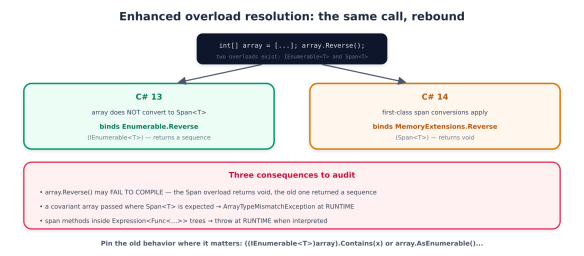
A diagram explaining enhanced overload resolution in C#, comparing C# 13 and C# 14. It illustrates changes in method binding for array reversal, highlighting updates to array handling and consequences for developers.

The concrete ways this surfaces are worth memorizing, because some fail loudly and some fail silently at runtime:

// 1. Compile break: the Span<T> overload returns void, the Enumerable one returned a sequence
_ = strings.Reverse(); // C#13: Enumerable.Reverse (IEnumerable<T>); C#14: MemoryExtensions.Reverse (void) → error

// 2. Runtime throw: a covariant array can't convert to Span<object>
void M(object[] arr) => Util.Do(arr); // C#14 binds Span<T> overload → ArrayTypeMismatchException at runtime

// 3. Pin the old behavior explicitly when you need it:
_ = ((IEnumerable<int>)array).Contains(x); // force the Enumerable overload
_ = array.AsEnumerable().Contains(x); // same, more readable

And the nastiest case: span-based methods now bind inside Expression<Func<...>> lambdas, where they compile fine but throw at runtime when the expression is interpreted rather than compiled. If you build LINQ expression trees (ORMs, query providers), audit them. The practical guidance: after upgrading, review span-heavy code and expression trees, lean on analyzer/ReSharper inspections that flag the change, and pin the old binding with an explicit IEnumerable<T> cast where behavior matters. This is the price of the performance win — worth it, but not free.

Null-conditional assignment

A clean ergonomic win. The null-conditional operators ?. and ?[] can now appear on the left side of an assignment or compound assignment — the mirror of the null-conditional read you already use:

// before
if (customer is not null)
customer.Order = GetCurrentOrder();

// C# 14
customer?.Order = GetCurrentOrder(); // assigns only if customer != null; RHS evaluated only then
orders?[i] += delta; // compound assignment works too

The right-hand side is evaluated only when the left side is non-null — so GetCurrentOrder() isn’t even called if customer is null, which matters when the RHS has side effects. One restriction: this works with assignment and compound operators (+=, -=, …) but not with increment/decrement (++, --).

User-defined compound assignment operators

Previously, x += y on your own type always meant x = x + y — the compiler synthesized the compound form from your binary + operator, allocating a new instance every time. For large value types that’s wasteful. C# 14 lets you define the compound operator directly, as an instance operator that mutates the receiver in place:

public struct BigAccumulator
{
private long[] _buffer;
// user-defined += : mutates in place instead of allocating a new BigAccumulator
public void operator +=(BigAccumulator other)
{
for (int i = 0; i < _buffer.Length; i++)
_buffer[i] += other._buffer[i]; // no new allocation
}
}

The payoff is allocation reduction for big value holders — think tensor buffers, BigInteger-style number types, or accumulators in a tight loop, where the old copy-on-+= behavior was pure GC pressure. This connects directly the allocation-free theme (and to the green-coding series’ point that efficient code is cheaper and greener). C# 14 also allows user-defined ++ and --.

Cleaner lambda parameters

Finally, a syntax polish: lambda parameters can now carry modifiers — ref, in, out, ref readonly, scoped — without forcing you to write the parameter types:

// before: modifiers required explicit types
TryParse<int> parse = (string text, out int result) => int.TryParse(text, out result);

// C# 14: modifiers with inferred types
TryParse<int> parse = (text, out result) => int.TryParse(text, out result);

One breaking change rides along: scoped is now a reserved word in lambda parameter position, so an identifier named scoped needs @scoped.

A related code-generation feature completes the picture: partial events and partial constructors. C# 13 made properties and indexers partial; C# 14 finishes the set, so a source generator can supply the implementation of an event or constructor whose declaration you wrote by hand — the same separation-of-definition-and-implementation pattern that makes generated code clean.
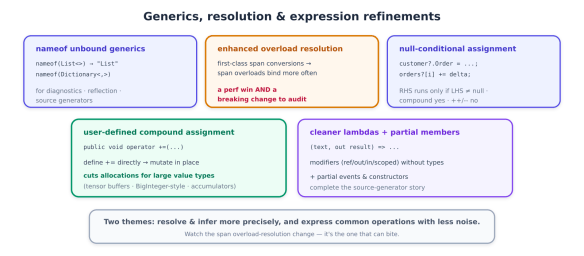
An illustration discussing generics, overload resolution, and expression refinements in programming, highlighting various features such as unbound generics, enhanced overload resolution, user-defined compound assignment, null-conditional assignment, and cleaner lambdas with partial members.

A recurring goal across recent C# versions is letting you write allocation-free code — code that keeps data on the stack, avoids heap churn, and so avoids the garbage-collection pressure that shows up as latency spikes and, per the green-coding series in this library, as wasted cost and energy. C# 14 advances that goal on several fronts. But it does so on top of work that landed in C# 13, and a deep dive should be precise about which is which — so let’s draw that line clearly.

Setting the record straight: ref struct interfaces are C# 13

The headline “ref struct interfaces” capability — the ability for a ref struct (a stack-only type like Span<T>) to implement an interface, and the allows ref struct anti-constraint that lets a ref struct be used as a generic type argument — arrived in C# 13, not C# 14. It’s foundational to the allocation-free story, so it belongs in this discussion, but calling it new in C# 14 would be wrong.

Here’s what C# 13 unlocked, because C# 14’s features build directly on it:

// C# 13: a ref struct can implement an interface
public interface IProcessor { void Process(); }

public ref struct SpanProcessor : IProcessor // stack-only type, now polymorphic
{
private readonly ReadOnlySpan<byte> _data;
public SpanProcessor(ReadOnlySpan<byte> data) => _data = data;
public void Process() { /* work over _data without copying to the heap */ }
}

// C# 13: 'allows ref struct' lets a ref struct be a generic type argument
public static void Run<T>(T proc) where T : IProcessor, allows ref struct
{
proc.Process(); // no boxing, no heap allocation
}

The significance: before this, a ref struct couldn’t participate in generic or interface-based polymorphism at all — you had to abandon stack-only types or abandon abstraction. Now you can write generic, abstracted, allocation-free code over Span<T> and your own ref structs. Note the crucial constraint that keeps it safe: a ref struct implementing an interface still cannot be boxed — you can only use it through a generic parameter constrained with allows ref struct, never as the interface type directly (that would require a heap allocation, defeating the purpose).

What C# 14 actually adds to the allocation-free toolkit

C# 14’s contribution is to make the surrounding code allocation-free and natural, and there are three pieces, each seen earlier in the series and now viewed through the performance lens.

First-class span conversions. The implicit T[] → Span<T>/ReadOnlySpan<T> and string → ReadOnlySpan<char> conversions from earlier aren’t just ergonomics — they let you thread arrays and strings through span-based APIs without intermediate copies or allocations, and let spans act as extension receivers and inference targets. That’s the connective tissue that makes ref-struct/span code read like ordinary code.

In-place user-defined compound assignment. The operator += from earlier that mutates the receiver instead of allocating a new instance is, fundamentally, an allocation-reduction feature — it turns a hot-loop sum += v over a large value type from N allocations into zero.

Overload resolution that prefers spans. The (breaking) resolution change from above means span-based library methods now bind by default in more places — so your existing code often gets more allocation-free without you rewriting it, which is exactly why the breaking change is worth tolerating.
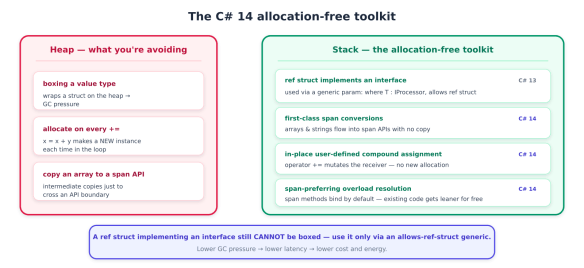
A visual comparison of heap and stack allocation in C#. The heap section highlights issues like boxing a value type, allocation on every assignment, and copying an array to a span API. The stack section presents alternative solutions such as using ref structs, first-class span conversions, in-place user-defined assignment, and span-preferring overload resolution, emphasising lower garbage collection pressure.

Put together, a modern allocation-free pattern looks like this — stack-only data, interface abstraction, generic dispatch, no heap:

ReadOnlySpan<byte> payload = GetBuffer();          // no copy
var processor = new SpanProcessor(payload); // ref struct on the stack
Run(processor); // generic dispatch via allows ref struct — zero allocations

The honest limits

C# 14 is a strong release, but a deep dive owes you the edges — and there are several worth planning around.
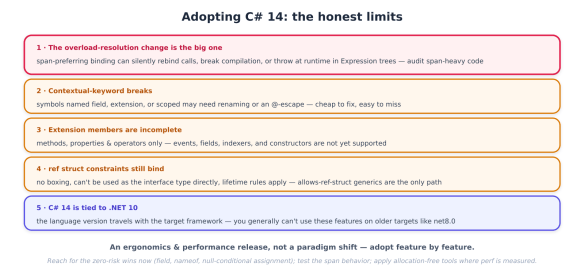
Infographic titled 'Adopting C# 14: the honest limits' outlining five key changes and considerations regarding C# 14, including overload-resolution, contextual-keyword breaks, extension members, struct constraints, and framework compatibility.
  • The overload-resolution change is the real risk. As previously detailed, span-preferring binding can silently rebind calls, break compilation where return types differ, throw ArrayTypeMismatchException on covariant arrays, and — worst — throw at runtime inside interpreted Expression trees. This is the one thing to actively test after upgrading; the rest of C# 14 is additive.
  • Contextual-keyword breaks. field, extension, and scoped all became contextual/reserved in their positions. Existing symbols with those names need @-escaping or renaming. Cheap to fix, easy to miss.
  • Extension members are incomplete. Methods, properties, and operators only. Events, fields, indexers, nested types, and constructors are not supported yet — so don’t design an API assuming extension events exist (they don’t; that’s the separate partial events feature).
  • ref struct constraints still apply. Implementing an interface doesn’t make a ref struct heap-friendly: no boxing, no using it as the interface type, and the usual lifetime/scoped rules. The allows ref struct generic path is the only way to abstract over them.
  • C# 14 is tied to .NET 10. The language version travels with the target framework, so you generally can’t sprinkle C# 14 features onto a project still targeting net8.0. In practice, adopting C# 14 means adopting .NET 10 — which, per the previous series, is a forced move this year anyway.

The adoption playbook

  1. Adopt .NET 10 first — C# 14 rides with it, and the November 2026 support cliff (previous series) already forces that move.
  2. Turn on the analyzers. Let Roslyn and your IDE flag the span overload-resolution change; treat those inspections as a migration checklist, not noise.
  3. Audit span-heavy code and Expression trees specifically — this is where the behavioral break hides. Pin the old binding with IEnumerable<T> casts where behavior matters.
  4. Escape or rename any field, extension, or scoped identifiers.
  5. Reach for the ergonomic wins immediately — field in properties, nameof(List<>), null-conditional assignment — they’re zero-risk and cut boilerplate today.
  6. Introduce extension members where they read better than method-only helpers (extension properties on interfaces especially), staying inside the methods/properties/operators boundary.
  7. Apply the allocation-free tools where they pay — in-place compound assignment and span APIs in hot paths and high-throughput services; don’t micro-optimize cold code.

MCP vs A2A: Two Protocols, Two Different Problems

If you’ve built anything with AI agents recently, you’ve heard two acronyms thrown around constantly, often with wildly conflicting takes: “MCP is the USB-C of AI.” “A2A replaces MCP.” “You need both.” “Neither is production-ready.”

Most of that noise comes from a single confusion. MCP and A2A solve completely different problems, and treating them as competitors — or worse, as interchangeable — is one of the most common and most expensive architecture mistakes in the space right now. Get the distinction wrong and your system fights you at every layer: you’ll find yourself wrapping databases as “agents,” building bespoke RPC glue between services that should just speak a standard, or reaching for the heavier protocol when the lighter one was the right call.

Here’s the entire thesis of this series in two sentences:

MCP handles how an agent talks to tools. A2A handles how agents talk to each other.

Everything else follows from that. Let’s make it precise.

Two problems that look similar and aren’t

Before either protocol existed, two distinct pain points kept showing up in agentic systems.

Problem 1 — tool integration. A single agent needs to do things in the world: query a database, hit an API, read a file, send an invoice. Every integration was a bespoke one-off. If you had M agent applications and N tools, you were maintaining M×N custom integrations, each inventing its own auth, schema, and error handling. This is a vertical problem — it’s about one agent reaching down to capabilities.

Problem 2 — agent coordination. As teams built multi-agent systems, there was no standard way for agents to discover each other, advertise what they could do, or hand off work. If you had a research agent and a writing agent, wiring them together meant gluing orchestration logic into application code. Swap one agent for another and you rewrote the integration. This is a horizontal problem — it’s about agents reaching across to peers.

MCP is the purpose-built answer to Problem 1. A2A is the purpose-built answer to Problem 2. Understanding that they sit on different axes is the key to everything else.

A diagram comparing MCP (Model Control Protocol) and A2A (Agent to Agent) communication, featuring two perpendicular axes. The diagram includes three agents (Agent B, Your Agent, and Agent C) connected by A2A links, and shows how the Your Agent communicates with a database, API, and files via MCP.

MCP: the vertical protocol

The Model Context Protocol (MCP), created by Anthropic and released in November 2024, standardizes how an AI agent connects to external tools, data, and services. Think of it as a universal connector — the analogy people reach for is USB-C: one standard plug instead of a drawer full of proprietary cables.

Concretely, an MCP server exposes capabilities through three primitives — Tools (actions the model can invoke), Resources (read-only data it can fetch), and Prompts (reusable templates) — and any MCP-compatible host can discover and use them without bespoke integration code. The M×N integration explosion collapses into M+N: build a server once, and every MCP-aware host can use it.

MCP is, at its core, synchronous and request-response: the agent asks the tool to do something and gets an answer back, usually in the same breath. (An experimental Tasks primitive for longer-running work arrived in the late-2025 spec, but the model’s center of gravity is still fast, synchronous tool calls.)

A2A: the horizontal protocol

The Agent2Agent protocol (A2A), created by Google and released in April 2025 with 50+ launch partners, standardizes how independent agents — built by different teams, on different frameworks, hosted on different networks — discover each other, delegate tasks, and exchange results.

Its defining trait is the opposite of MCP’s. A2A is intentionally stateful and asynchronous: it assumes tasks can be long-running, multi-step, and human-in-the-loop from the start. A client agent delegates work to a remote agent, and — crucially — the remote agent does that work without access to the client’s internal context, memory, or tools. That opacity is a feature: it respects the autonomy and privacy boundaries you need when one company’s agent calls another’s. The analogy here is HTTP: it doesn’t care whether the other side runs Rails, Django, or Go; it just defines the shape of the conversation.

They are designed to compose, not compete

The single most important takeaway: these protocols are complementary. Most real production multi-agent systems use both — A2A to coordinate between agents, and MCP so each agent can reach its own tools and data. They live on perpendicular axes, so they never actually overlap:

MCPA2A
Question it answersHow does my agent use a tool?How does my agent talk to another agent?
AxisVertical (agent → tools/data)Horizontal (agent ↔ agents)
RelationshipAgent → capabilityPeer ↔ peer
Interaction styleSynchronous request/responseStateful, async, long-running
Context sharingTool runs inside the agent’s contextRemote agent has no access to caller’s context
Created byAnthropic (Nov 2024)Google (Apr 2025)
On the wireJSON-RPC 2.0 over stdio / Streamable HTTPJSON-RPC 2.0 over HTTP(S) + SSE
Unit of workA tool callA Task (with a lifecycle)

Both are now neutral, governed standards

A fair worry in 2025 was vendor lock-in: MCP was “an Anthropic thing,” A2A “a Google thing.” That’s no longer the situation, and it matters for adoption decisions.

Both protocols now live under the Linux Foundation’s Agentic AI Foundation (AAIF). Google contributed A2A to the Linux Foundation in mid-2025, and Anthropic donated MCP in December 2025. Both have crossed the production-maturity threshold: MCP’s current spec revision is the November 2025 release, with 10,000+ public servers and native support across every major model provider; A2A reached a stable v1.0 in early 2026, with signed Agent Cards, SDKs in five languages, and 150+ production organizations. Neither is a moving target anymore, and neither is owned by a single vendor.

When you’re staring at a design decision, ask one question:

Is the thing on the other end a capability, or is it a peer?

  • A database, an API, a file system, a payment processor, a search index — those are capabilities. They reach down. Use MCP.
  • Another autonomous agent — owned by a different team or vendor, running its own logic, that you want to delegate a goal to and get a result back from — that’s a peer. It reaches across. Use A2A.

And when you have a fleet of agents that each need their own tools? You use both, on their respective axes.

MCP in Practice — How an Agent Talks to Tools

MCP gives a model a standardized contract for reaching the outside world. Instead of every host hand-coding every integration, a server declares what it can do, describes it with schemas, and any MCP-compatible host can discover and use it.

The architecture: host, client, server

MCP has three roles, and keeping them straight prevents most confusion:

  • Host — the AI application the user interacts with (Claude Desktop, Claude Code, Cursor, your own app). The host owns the model and the conversation.
  • Client — a connector the host instantiates, one per server, that manages a single stateful session. A host talking to three servers runs three clients.
  • Server — a program that exposes capabilities. It can run locally (a subprocess on your machine) or remotely (a hosted HTTPS service).

Underneath, MCP is JSON-RPC 2.0 split into two layers: a data layer (the message schema and primitives) and a transport layer (how those messages travel). That separation is why the same primitives work identically whether the server is a local subprocess or a remote service.

Diagram illustrating the MCP architecture and message flow, showing Host and Server interactions, including the Model and Client roles.

The three server primitives

Everything a server offers falls into exactly three buckets. Getting the mapping right is most of good MCP design.

Tools are functions the model can invoke to perform actions — they have side effects, like POST endpoints. Discovered via tools/list, executed via tools/call.

Resources are read-only data the model can fetch for context — no side effects, like GET endpoints. Discovered via resources/list, read via resources/read.

Prompts are reusable templates that structure a recurring interaction. Discovered via prompts/list, retrieved via prompts/get. (In practice this is the least-used primitive — most teams keep prompts in host-side code — but it’s the right tool for domain-specific servers that want to enforce a house workflow.)

A clean way to remember it: Tools do, Resources show, Prompts guide.

Here’s a complete small server using FastMCP (the standard Python library, 3.x as of 2026). It models a tiny CRM:

from fastmcp import FastMCP

mcp = FastMCP("crm-server")

# TOOL — an action with side effects (the model can invoke it)
@mcp.tool()
def create_lead(name: str, email: str, source: str = "web") -> dict:
"""Create a new sales lead and return its record."""
lead = db.insert("leads", {"name": name, "email": email, "source": source})
return {"id": lead.id, "status": "created"}

# RESOURCE — read-only context (the model can fetch it, no side effects)
@mcp.resource("crm://customers/{customer_id}")
def customer_record(customer_id: str) -> str:
"""Return a customer's record as JSON."""
return json.dumps(db.get("customers", customer_id))

# PROMPT — a reusable template that guides a workflow
@mcp.prompt()
def qualify_lead(lead_id: str) -> str:
"""Guide the model through qualifying a lead."""
return (f"Review lead {lead_id}. Assess fit on budget, authority, "
f"need, and timeline. Recommend next action.")

if __name__ == "__main__":
mcp.run(transport="stdio") # local; swap to "streamable-http" to host remotely

Notice what you didn’t write: no JSON-RPC plumbing, no schema by hand. The SDK infers each tool’s input schema from the function signature and advertises name, description, and schema to any client that connects. That’s the whole point — the contract is generated from ordinary typed Python.

The two transports

MCP deliberately supports only two transports, and the choice is about where the server runs, not what it does.

stdio — the host launches the server as a subprocess and exchanges JSON-RPC frames over standard in/out. No network, no ports, OS-level identity for security. This is the default for local tools — it’s how Claude Desktop and Claude Code run filesystem and git servers.

Streamable HTTP — the server is a network endpoint: a single HTTPS URL that accepts HTTP POST for requests, with optional Server-Sent Events for streaming. This is the transport for remote, multi-user, or cloud-hosted servers. It was introduced in the 2025-03-26 spec and replaced the older HTTP+SSE transport, which is being sunset across major providers through 2026 — so if you see two-endpoint HTTP+SSE examples online, they’re stale.

A practical rule: local dev tool → stdio; anything multi-tenant or hosted → Streamable HTTP behind OAuth 2.1, which is the recommended auth for remote servers. If you’re deploying serverless, prefer a stateless server (omit the Mcp-Session-Id header) so it scales horizontally without sticky sessions — stateless operation is the headline item on MCP’s 2026 roadmap.

The reverse primitives: what makes MCP interactive

Most people think of MCP as one-directional — host calls server. The feature that surprises people is that servers can call back to the host. These client-side primitives are what make MCP interactive rather than a static function catalog:

  • Sampling (sampling/createMessage) — the server asks the host to run an LLM completion on its behalf. Why? So an agentic server can reason without bundling its own model SDK or API key. A GitHub server that needs to classify an issue’s severity can ask the host to run that classification with whatever model the user is already paying for. The server stays model-independent; the user owns the billing and the approval.
  • Elicitation — the server asks the user, through the host’s UI, for missing input or confirmation. A payments server can surface “Is the user OK paying $4.99 for this?” right in the chat thread.
  • Roots — the host advertises trusted filesystem boundaries to the server.

These reverse calls always route through the host, which must show the user what’s being asked and let them edit or reject it. That consent boundary is core to MCP’s security model.

Connecting from a host

On the host side, the lifecycle is: connect → discover → invoke. Conceptually:

# Pseudocode for the host/client side
session = connect("stdio", command=["python", "crm_server.py"])
await session.initialize() # capability handshake

tools = await session.list_tools() # tools/list — dynamic discovery
result = await session.call_tool( # tools/call
"create_lead", {"name": "Ada", "email": "ada@example.com"})

schema = await session.read_resource("crm://customers/42") # resources/read

Discovery is dynamic: the host calls tools/list at runtime, so a server can add or remove tools and notify the host with a notifications/tools/list_changed message rather than requiring a redeploy. From there, when the model decides to act, the host issues tools/call with arguments matching the advertised schema, gets structured output back, and feeds it to the model. That loop — discover, decide, call, observe — is the entirety of an agent using a tool over MCP.

Where MCP stops

Notice what we still didn’t see: we never had one agent ask another agent to accomplish a goal. Every interaction was an agent reaching down to a capability it controls, inside its own context. The CRM server isn’t an autonomous peer — it’s a typed set of actions and data, and the agent is fully in charge.

The moment you want to hand a goal to an independent agent — one you don’t control, possibly run by another team or vendor, that will work asynchronously and report back without sharing your context — MCP is the wrong tool. That’s a horizontal, peer-to-peer interaction, and it’s exactly what A2A is built for.

A2A in Practice & When to Use Which

The four core concepts

A2A is built on four objects. Learn these and the protocol falls into place:

  • Agent Card — a public JSON document, served at /.well-known/agent.json, that describes an agent: its name, version, endpoint URL, the skills it offers, the input/output formats it accepts, and how to authenticate. It’s a machine-readable business card. A client fetches it (directly or via a registry) to learn who can do what and how to connect.
  • Task — the fundamental unit of work, identified by a unique taskId. Unlike an MCP tool call, a Task has an explicit, trackable lifecycle and can run for seconds or days.
  • Message — the unit of exchange inside a Task. Each message has a role (user or agent) and a body that’s an array of Parts — which can mix text, files, binary, and structured data, making A2A multimodal by design.
  • Artifact — the output of a Task: a PDF invoice, a JSON analysis, an image. Delivered to the client when the work completes.

The interaction model is client agent → remote agent. The client delegates; the remote agent executes autonomously and returns results without ever seeing the client’s internal context, memory, or tools. That isolation is the whole point of the horizontal axis — it’s what lets agents from different vendors collaborate without trusting each other with their internals.

Discovery: the Agent Card

An agent advertises itself with a card like this, served at a well-known URL:

{
"name": "research-agent",
"description": "Performs literature reviews and synthesizes findings.",
"url": "https://research.example.com/a2a",
"version": "1.0.0",
"capabilities": { "streaming": true, "pushNotifications": true },
"defaultInputModes": ["text/plain"],
"defaultOutputModes": ["application/json", "text/markdown"],
"securitySchemes": {
"oauth2": { "type": "oauth2", "flows": { "clientCredentials": { "...": "..." } } }
},
"skills": [
{
"id": "literature-review",
"name": "Literature Review",
"description": "Given a topic, returns a synthesized review with citations.",
"inputModes": ["text/plain"],
"outputModes": ["text/markdown"]
}
]
}

A client fetches this card to decide whether this agent can help and how to call it. A2A v1.0 (early 2026) added Signed Agent Cards — a cryptographic signature proving the card was issued by the domain owner. Without it, an attacker could stand up a forged card and redirect callers to a malicious endpoint (a “card forgery” attack). For any cross-organization deployment, verify the signature.

Delegating a task

With the card in hand, the client sends a message via JSON-RPC over HTTPS. The current method is message/send (for synchronous or pollable work) or message/stream (for streaming updates over SSE):

{
"jsonrpc": "2.0",
"id": 1,
"method": "message/send",
"params": {
"message": {
"role": "user",
"parts": [
{ "kind": "text", "text": "Review recent work on retrieval-augmented generation." }
],
"messageId": "9c1f...e7"
}
}
}

The remote agent responds with a Task object carrying a status. Because the work may be long-running, the client tracks progress through the task lifecycle rather than blocking on a single response. Using the Python a2a-sdk, the same exchange is roughly:

from a2a.client import A2AClient

# 1. Discover: fetch and (in production) verify the signed Agent Card
client = await A2AClient.from_agent_card_url(
"https://research.example.com/.well-known/agent.json",
auth=oauth_credentials,
)

# 2. Delegate: hand over a goal, not a function call
task = await client.send_message(
"Review recent work on retrieval-augmented generation."
)

# 3. Track: poll or stream until a terminal state
while task.status.state not in ("completed", "failed", "canceled", "rejected"):
task = await client.get_task(task.id) # tasks/get
await asyncio.sleep(2)

# 4. Collect the Artifact
if task.status.state == "completed":
review = task.artifacts[0] # e.g. markdown review

For real-time progress you’d use message/stream and consume SSE events instead of polling; for fire-and-forget work you’d register a push-notification webhook so the remote agent calls you back when it’s done.

The task lifecycle

The thing that most distinguishes A2A from MCP is that work is stateful. Every Task moves through an explicit lifecycle, and long-running, human-in-the-loop, and async patterns are first-class:

A flowchart illustrating the A2A task lifecycle, showing the progression of tasks from 'submitted' to various states like 'working', 'completed', 'failed', 'canceled', and 'rejected'.

A few consequences worth internalizing. A task can pause at input-required (the remote agent needs more from you) or auth-required (it needs credentials) and resume — this is how human-in-the-loop works natively. The four terminal states (completed, failed, canceled, rejected) are final: a terminal task can’t be restarted; you start a new one. And retry and circuit-breaking are deliberately left to the client — the protocol governs state and messaging, not your resilience policy.

How the two protocols compose

Here’s where the “they’re complementary” claim becomes concrete. A2A and MCP operate on perpendicular axes, so a single agent uses both at once: it speaks A2A horizontally to its peers and MCP vertically to its own tools.

Picture an orchestrator that delegates a literature review to the research agent above. That research agent, internally, is itself an MCP host: to actually do the review, it calls an arXiv search tool, a PDF-reader tool, and a vector-store resource — all over MCP. The orchestrator never sees any of that. It handed over a goal via A2A; the tools the remote agent used to satisfy it are private, on the vertical axis, exactly where MCP belongs.

Diagram illustrating the relationship between an Orchestrator agent, a Research Agent, and a Writing Agent, highlighting their roles and private tools like arXiv API, Vector store, Docs API, and Style DB, within a framework of A2A and MCP.

That picture is the answer to “do I need both?” In any non-trivial multi-agent system: yes, and they never collide, because one runs across and the other runs down.

When to use which: the decision framework

Carry one question into every design decision: is the thing on the other end a capability, or a peer?

Reach for MCP when:

  • Your agent needs to call an API, query a database, read files, or trigger an action you control.
  • The interaction is synchronous — ask, get an answer, continue.
  • The “other side” has no agency of its own; it’s a typed set of actions and data.
  • You want the tool to operate inside your agent’s context.

Reach for A2A when:

  • You’re delegating a goal to an autonomous agent, not calling a function.
  • That agent is owned by a different team, vendor, or codebase, and you shouldn’t share your internal context with it.
  • The work is long-running, async, or needs human-in-the-loop checkpoints.
  • You want to swap one agent for another without rewriting orchestration — discovery via Agent Cards gives you that.

Use both whenever you have multiple agents that each need their own tools — which is most production systems. Coordinate across with A2A; equip each agent with MCP.

The mistakes this series exists to prevent

Each of these is a real, common error, and each is just the capability/peer question answered wrong:

  • Exposing a database or API as an “agent” over A2A. It’s a capability, not a peer. That’s an MCP server. You’ve added a coordination protocol, an Agent Card, and a task lifecycle to something that should be a synchronous tool call.
  • Hand-rolling bespoke RPC between heterogeneous agents instead of using A2A. You’ll reinvent discovery, auth, and task state — badly — and re-glue it every time an agent changes.
  • Wrapping every tool as an agent because A2A feels newer or more powerful. Over-engineering: you pay statefulness and discovery overhead for a function call.
  • Trying to use MCP to coordinate independent agents across a trust boundary. MCP has no concept of an autonomous peer working without your context; you’ll end up leaking context or faking agency.

The protocols are not rivals and the choice is rarely ambiguous once you ask the right question. MCP is how your agent talks to tools. A2A is how your agents talk to each other. Build on the correct axis and the architecture stops fighting you.

Build and Deploy Anywhere with GPT-5.3-Codex


Software engineering has always evolved alongside its tools. Compilers turned human ideas into executable programs. Integrated development environments improved productivity and debugging. Version control systems enabled collaboration at scale. Continuous delivery pipelines made rapid and reliable deployment possible.

In early 2026, another major step appeared: agentic coding systems capable of participating in the engineering process itself.


One of the most advanced examples of this new class of tools is GPT-5.3-Codex, OpenAI’s latest coding-focused model designed to reason across repositories, plan multi-step changes, execute development tasks, and collaborate with engineers across the full software lifecycle.

Unlike traditional autocomplete-style coding assistants, GPT-5.3-Codex is capable of operating across entire workflows: scaffolding projects, editing multiple files, generating diffs, interacting with terminal commands, and assisting in code review or refactoring tasks.

This article walks through a realistic development scenario using Codex from the command line — illustrating how an agentic coding system can participate in building a modern data-driven web application.

Beginning the Journey: Launching Codex

The process begins in a terminal.

The developer installs the Codex CLI and launches it inside a working directory.

npm install -g @openai/codex
mkdir poddata
cd poddata
codex

(Alternatively, Codex can be invoked without installation using npx @openai/codex.)

Once started, the CLI connects to the gpt-5.3-codex model and begins operating within the current workspace.

The Codex sandbox is a controlled execution environment where the Codex agent can safely read files, generate code, and run commands while limiting what it can access on your system. Think of it as a temporary “mini computer” or container that Codex uses to perform coding tasks without risking your machine or infrastructure.

You can change the model and effort by using the /model command:

The developer, then, can issue a high-level request:

Create a React project that analyses podcast metrics from data/data.csv, using D3 to build several charts.

Instead of producing a single snippet of code, Codex analyses the request in the context of the workspace and begins incrementally constructing the project. If it doesn’t find the specified data.csv file, it creates a sample one.

The terminal displays the actions it performs. When finished, it asks permission to install dependencies:

It then attempts to run the project for verification:

Finally, a summary is presented:

Results may vary widely, due to the nature of LLMs:

If the project is not yet under version control, initializing Git is recommended so Codex can produce structured diffs during future iterations:

git init
git add .
git commit -m "Initial scaffold"

You might run into the following error:

This comes from Git’s security feature introduced after the CVE-2022-24765 vulnerability. Git refuses to operate on repositories whose ownership differs from the current user, because this could allow a malicious repo to execute hooks or config under another user.

This happens frequently when:

  • using containers / sandboxes
  • using WSL
  • using Docker volumes
  • running tools like Codex CLI
  • accessing repos created by another user or root
  • mounting drives from another OS

The solution is in the error message itself and marks this repository as safe.

Creating a git repository is a simple step that dramatically improves the agent’s ability to reason about code changes.

Static Diffs and Multi-File Refactoring

A major strength of agentic coding systems is the ability to modify multiple files simultaneously.

For example, suppose the developer requests:

Add zoom and pan behaviour to the charts.

Codex analyses the existing chart components and introduces a reusable utility.

The resulting diff might look like this:

And the final summary:

Visual Editing and Multimodal Context

When Codex is used within environments that support multimodal inputs — such as IDE integrations or visual interfaces — it can incorporate annotated screenshots into its reasoning process.

For example, imagine the dashboard contains an introductory paragraph that the developer wants removed. An annotated screenshot pointing to the text may produce a patch like this:

--- a/src/App.jsx
+++ b/src/App.jsx
@@ -8,9 +8,6 @@ export default function App() {

<div className="container">

<h1>Podcast Metrics Dashboard</h1>

- <p className="intro">
- This dashboard explores episode performance and guest behavior.
- </p>

<Charts />

</div>

This workflow illustrates how modern coding agents can bridge visual design feedback and source code modifications.

Feature Development: Search by Guest

To explore a full feature lifecycle, the developer asks Codex to implement a guest search filter. Codex goes to work:

Once implemented, the system rebuilds and the dashboard now filters charts dynamically based on the selected guest. In real development environments, Codex can assist with generating diffs, running builds, and suggesting improvements such as input debouncing for large datasets.

Parallel Implementations and Experimentation

In cloud-based development pipelines, agentic systems can be used to generate multiple candidate implementations of a feature.

For example, when adding tooltip interactions to charts, two implementations might be explored: a simple static tooltip component and a dynamic cursor-tracking tooltip approach using a useTooltip hook. Developers can evaluate these alternatives in preview environments before selecting the preferred implementation.

This workflow transforms feature development from a single-attempt process into iterative experimentation.

Code Review and Collaboration

Agentic models can also assist during code review. When examining a pull request, Codex may analyze diffs and flag potential issues.

For example:

The SVG overlay used for zoom interaction appears above the chart elements and may intercept pointer events, preventing hover detection. Consider adjusting element ordering or pointer-events settings.

These types of observations mirror issues often caught during human code reviews. The difference is that the analysis can occur immediately after changes are generated, helping developers identify problems earlier in the workflow.

The Emergence of an Engineering Partner

Across the scenarios described in this article — scaffolding projects, generating visualization components, performing multi-file refactoring, integrating UI feedback, and assisting with review — one theme becomes clear: modern coding systems like GPT-5.3-Codex do not simply generate snippets of code. They participate in the engineering process itself.

The developer remains the architect and decision-maker, but the agent becomes a powerful collaborator capable of analysing repository context, generating structured diffs, coordinating multi-file changes, assisting with debugging and review, and accelerating experimentation.

For many years, AI coding tools were judged primarily by the quality of individual code suggestions. Today the bar is higher.

The new question is not:

Can an AI write code?

The real question is:

Can it participate meaningfully in the engineering workflow?

GPT-5.3-Codex represents a step toward that future. By combining reasoning, repository awareness, and tool interaction, it moves beyond simple autocomplete and toward a model that can collaborate with developers throughout the lifecycle of software creation.

The result is not automation replacing engineers — but a new kind of human-agent engineering partnership.