AI Slop & Review at Scale

Sonar’s 2026 State of Code Developer Survey put a hard figure on a feeling every engineer already had: 96% of developers don’t fully trust that AI-generated code is functionally correct. That’s the stat that made headlines. But the more revealing one sits right next to it: only 48% always verify AI code before committing.

Sit with that gap. Nearly everyone distrusts the output, and barely half consistently check it. Sonar calls the space between those numbers the verification gap — and AWS CTO Werner Vogels gave the accumulating consequence a name at re:Invent in December 2025: verification debt.

The pressure behind it is only growing. AI already writes about 42% of committed code, a figure developers expect to hit 65% by 2027. Generation has become nearly free. Trust has not. This series is about the discipline that closes the gap — engineering code review so it scales with the flood of machine-written code instead of drowning in it.

What “AI slop” actually is

“AI slop” is the catch-all term for output that looks like good code without being good code. It’s worth being precise, because each variety fails review differently:

  • Looks-correct-but-isn’t. The signature failure. 61% of developers in Sonar’s survey agreed AI often produces code that looks correct but isn’t reliable. It compiles, it reads cleanly, it passes the happy-path test — and it’s subtly wrong.
  • “Almost right, but not quite.” Stack Overflow’s 2025 survey of ~49,000 developers found this is the #1 daily frustration, named by 66%. It’s the most expensive failure mode precisely because it survives a casual review — the diff looks reasonable, so it gets approved, and the defect ships.
  • Hallucinated APIs and packages. The model invents a function that doesn’t exist, or imports a package that isn’t real — which has spawned slopsquatting, where attackers register the plausible-sounding names models hallucinate, turning a hallucination into a supply-chain attack.
  • Edge-case blindness. The happy path is handled; the timeout, the empty list, the concurrent write, the malformed input are not.
  • Security vulnerabilities. Multiple 2026 analyses put the share of AI-generated code containing vulnerabilities in the 40–48% range, with a large majority undefended against common classes like cross-site scripting.
  • Duplicative and unnecessary code. 40% of developers cite AI generating redundant code; it re-implements what your codebase already has because it never saw your codebase.
A diagram titled 'The anatomy of AI slop', showcasing various issues related to AI-generated code. It includes elements such as 'Looks correct, isn't', 'Almost right, not quite', 'Edge-case blindness', 'Hallucinated packages', 'Security vulnerabilities', and 'Duplicative code'. The central focus is 'AI SLOP', emphasising that all aspects pass a casual read.

The unifying property is the dangerous one: slop passes a casual read. It’s confident, idiomatic, and well-formatted. That’s exactly what makes it harder to review than a human’s bug, which usually looks like a mistake.

Why slop breaks code review specifically

Here’s the counterintuitive finding that reframes the whole problem. You’d expect AI to lighten the review load. The data says the opposite: 38% of developers report that reviewing AI-generated code takes more effort than reviewing code written by their human colleagues.

Why would reviewing be harder? Three reasons:

  1. No author intent to interrogate. When a colleague writes code, you can ask “why did you do it this way?” and their answer reveals their mental model — and its gaps. AI code arrives with no intent behind it. The reviewer has to reconstruct the reasoning from scratch.
  2. A false sense of security. AI output compiles cleanly and passes basic tests, which creates an illusion of readiness. Human bugs often announce themselves with rough edges; slop is camouflaged as competence.
  3. Volume. A human writes a few hundred lines a day and you review at that pace. An agent generates thousands of lines in seconds. The review surface explodes while the number of qualified reviewers stays fixed.

The market data confirms the bottleneck is real and measurable. LinearB’s 2026 benchmark of 8.1 million pull requests across 4,800 teams found that AI-generated PRs have a 32.7% acceptance rate versus 84.4% for human-authored ones, and wait 4.6× longer for review. Two-thirds of AI PRs need significant rework or get rejected — after a reviewer has already spent time on them.

The toil swap

The promise was that AI would eliminate grunt work. What actually happened is what Sonar’s data calls a toil swap: the effort saved during code creation reappeared during code review. Developers still spend roughly 24% of their work week on toil — checking, fixing, and validating output — and that number is essentially unchanged whether they use AI heavily or not. The work didn’t disappear. It moved downstream, from your fingers to your judgement.
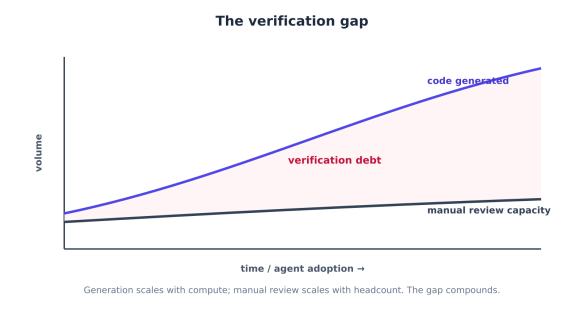
A graph illustrating 'The verification gap', showing the relationship between time/agent adoption and volume. It features two curves: one representing 'code generated' and another indicating 'manual review capacity', with a red area labelled 'verification debt' highlighting the growing disparity.

This is the shape of the problem. Generation scales with compute; manual review scales with headcount. Point an agent fleet at a codebase and the gap between the two curves — the verification debt — grows without bound unless you change how review works.

The reframe: trust is the new bottleneck

Sonar’s CEO framed the shift bluntly: value in software is no longer defined by the speed of writing code, but by the confidence in deploying it. The same survey found the single most important skill developers now name for the AI era isn’t prompting — it’s “reviewing and validating AI-generated code for quality and security” (47%, the top answer).

That’s the thesis for the rest of this series. When generation is commoditised, verification is the discipline that creates value. And there’s evidence it pays: teams pairing AI generation with systematic automated verification report markedly better outcomes — in Sonar’s data, teams using a dedicated verification platform were 44% less likely to suffer AI-caused outages and reported 24% lower vulnerability rates than teams relying on ad-hoc checks.

The teams that win the agentic era won’t be the ones generating the most code. They’ll be the ones who can trust the most code — because they engineered review to keep pace.

Building the Review Pipeline

The instinct when faced with untrustworthy AI code is “review it more carefully.” That doesn’t scale, and we previously showed why: review effort is already the bottleneck. The answer isn’t more human review — it’s a pipeline where each layer catches the slop it’s best at, so that by the time a human looks, only the things requiring human judgement remain.

There are three layers, and the most important design decision is knowing which kind of problem each one owns.

A flowchart illustrating a multi-layer review pipeline consisting of three stages: Blocks, Advises, and Judges. The Blocks stage includes deterministic gates such as static analysis, linters, dependency scans, and checks. The Advises stage involves semantic AI review for logic errors, architectural drift, missed edge cases, and more. The Judges stage concerns human review focusing on business logic and risk assessments.

Layer 1 — Deterministic gates (these block)

The first layer is rule-based static analysis, and its defining property is that it’s deterministic: the same code always produces the same finding. That makes it the only layer you can use as a hard gate — something that mechanically blocks a merge — because it never flakes and never hallucinates a violation.

This layer owns the slop categories that are mechanically detectable: security patterns, complexity, duplication, style, dependency risk. Tools like SonarQube, Semgrep, and the linter family (ESLint, Pylint, RuboCop) live here.

GATES = [
Gate("format", ["ruff", "format", "--check", "."]),
Gate("lint", ["ruff", "check", "."]),
Gate("types", ["mypy", "."]),
Gate("sast", ["semgrep", "--config", "auto", "--error"]), # security patterns
Gate("deps", ["pip-audit"]), # known-CVE deps
Gate("dup", ["sonar-scanner"]), # duplication, complexity
]

But generic gates miss the slop that’s specific to AI. Two checks earn their place in any AI-era pipeline:

Hallucinated-package detection. Slop invents imports. Before anything else, verify every new dependency actually exists — and is the one you meant, not a slopsquatted look-alike registered to catch exactly this mistake:

def check_new_dependencies(new_deps: list[str]) -> list[Finding]:
findings = []
for dep in new_deps:
meta = registry_lookup(dep) # query npm / PyPI
if meta is None:
findings.append(Finding("error", f"package '{dep}' does not exist — "
"likely hallucinated (possible slopsquatting target)"))
elif meta.age_days < 30 or meta.weekly_downloads < 50:
findings.append(Finding("warn", f"'{dep}' is new/obscure — confirm it's the "
"intended package, not a typosquat"))
return findings

Contract and schema checks. “Looks right but isn’t” often means the code violates an interface the rest of the system depends on. If you have an OpenAPI spec, a DB schema, or typed contracts, validate the diff against them — a deterministic way to catch a whole class of subtle wrongness.

The rule for this layer: if a check is deterministic and the failure is unambiguous, it blocks. No human time is spent on a missing return type or a hallucinated import.

Layer 2 — Semantic AI review (this triages)

Deterministic gates can’t read intent. They’ll never catch “this function silently swallows the timeout error that two callers depend on” — that requires understanding the code’s meaning and its neighbours. This is the job of an LLM-backed reviewer (CodeRabbit, Greptile, Qodo, Claude Code Review, Copilot’s reviewer), and it catches the context-dependent slop the first layer can’t express as a rule: logic errors, architectural drift, missed edge cases, misread requirements.

The critical caveat: semantic review is variable, so it advises — it does not block. An LLM reviewer that hard-gates merges will eventually block on a hallucinated objection, and your team will route around it. Use it to triage and surface, not to enforce.

def ai_review(diff: str, repo_context: str) -> list[Finding]:
system = (
"You are a senior reviewer. Review this diff for LOGIC, ARCHITECTURE, and "
"EDGE-CASE issues a linter would miss. For each, give file:line, severity "
"(error/warn/note), and a one-line rationale. Do NOT report style or "
"formatting — gates already cover those. Return JSON only."
)
user = f"REPO CONTEXT:\n{repo_context}\n\nDIFF:\n{diff}"
return parse_findings(call_model(system, user))

Two things make this layer pay off rather than annoy:

Give it repo context. A reviewer that sees only the diff catches generic issues. One that sees the surrounding code, conventions, and call graph catches your issues — the violated invariant, the bypassed auth layer. (This is exactly the context engineering from the companion series: the reviewer is only as good as the context you feed it.)

Manage signal-to-noise ruthlessly. Review tools trade precision against recall, and the trade matters. In 2026 benchmarks, CodeRabbit favours precision (few false positives, so fewer misses get dismissed) while Greptile favours recall (catches more bugs at the cost of more noise). Pick deliberately: a noisy reviewer trains your team to ignore all its comments, including the true ones. Tune severity thresholds, scope it to the diff, and suppress the categories Layer 1 already owns.

The “AI-reviews-AI” pattern

Notice that the author of the code and the reviewer of the code should not be the same model instance with the same context. Letting an agent grade its own output is a conflict of interest — it’s confident about exactly the things it got wrong. The robust pattern is a separate reviewer model, with its own fresh context, critiquing the author’s output before any human sees it:

def review_pipeline(pr) -> ReviewResult:
findings = []
findings += run_deterministic_gates(pr) # Layer 1 — may block
if blocking(findings):
return ReviewResult(lane="RED", findings=findings) # don't waste later layers

findings += check_new_dependencies(pr.new_deps)
findings += ai_review(pr.diff, pr.repo_context) # Layer 2 — independent reviewer
return triage(findings, pr) # route to a human

This is the same independence principle that makes human peer review work, applied at machine speed: the grader is structurally separate from the author. Anthropic reported its own agentic reviewer marked under 1% of findings as incorrect and — the number worth showing a manager — raised the share of PRs receiving a substantive review from 16% to 54%. The point isn’t that AI review replaces humans; it’s that it clears the mechanical backlog so humans review more of what matters, not less.

Layer 3 — Human review (this judges)

The final layer is a human, and the pipeline’s whole purpose is to make sure they spend their attention only where human judgement is irreplaceable. The earlier layers handle correctness, security patterns, and context-dependent bugs. What’s left is what tools fundamentally can’t assess:

  • Business logic and intent. AI reviewers can’t read your Jira, your Slack threads, or your product docs. They review code without knowing why it exists or what problem it’s meant to solve. A human confirms the code does the right thing, not just a correct thing.
  • Architecture fit. Does this belong here? Does it set a precedent the team wants? Is there a simpler approach the agent didn’t consider?
  • Acceptable-risk calls. Whether a known trade-off is worth shipping is a judgement, not a finding.

The reviewer should never receive a raw diff. They should receive a structured packet: what the gates found, what the AI reviewer flagged (and dismissed), what changed, and the blast radius. That packet — and how to route it by risk so humans aren’t reviewing everything — is next.

Routing, Trust & Governance

The previous pipeline catches slop, but it doesn’t by itself solve the scale problem from above. When an agent fleet opens thousands of pull requests, even a great pipeline ends with “route to a human” — and you don’t have thousands of humans. The missing piece is deciding which PRs need a human at all, and how much of one. That decision is risk-based routing, and it’s what makes review tractable at agent scale.

Stop reviewing everything equally

The reflex of treating every PR the same is what breaks under volume. A one-line copy fix and a change to the payments authorisation path get the same review queue, so either the trivial change waits behind deep reviews or the dangerous change gets the same skim as the trivial one. Both outcomes are bad.

The fix is to route by risk, not by volume. A practical and widely-adopted scheme is three lanes — Green, Yellow, Red — assigned by what a change touches, not how big it is:
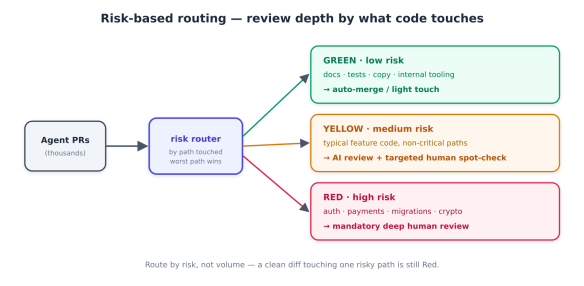
Flowchart illustrating risk-based routing for review depth in code changes, categorising paths into green (low risk), yellow (medium risk), and red (high risk) based on the type of code touched.
  • Green — low risk. Passed every deterministic gate, touches only low-blast-radius areas (docs, tests, internal tooling, copy). Auto-merge or a light human acknowledgement. Spending senior-reviewer time here is the waste you’re trying to eliminate.
  • Yellow — medium risk. Typical feature code in non-critical paths. Gets the full AI review from before plus a targeted human spot-check guided by the structured findings — the reviewer looks where the pipeline pointed, not at the whole diff.
  • Red — high risk. Touches authentication, authorisation, payments, data migrations, cryptography, or other security-sensitive surfaces. Mandatory deep human review, every time, no matter how clean it looks — because this is exactly where “looks right but isn’t” is catastrophic.

The risk map is just code, versioned in the repo — a CODEOWNERS-style file that classifies paths:

# review-risk.yml — risk lane by path (most-specific wins)
"**": yellow # default
"docs/**": green
"**/*.test.ts": green
"src/marketing/**": green
"src/auth/**": red
"src/payments/**": red
"**/migrations/**": red
"infra/**": red
def lane_for(pr, gate_findings) -> str:
if blocking(gate_findings):
return "RED" # gate failure is always deep-review
risk = max(risk_of_path(f) for f in pr.files_changed) # worst path wins
return risk # green / yellow / red

Note the “worst path wins” rule: a PR that touches docs and src/auth/ is Red. Slop hides in the one risky file inside an otherwise boring diff.

Make human reviewers effective, not just present

Routing decides who reviews. The other half of scaling is making each human review fast and high-signal. A reviewer handed a raw 600-line agent diff will skim and approve — the failure mode behind the previous verification gap. A reviewer handed a structured packet reviews with precision.

The packet for every Yellow/Red PR should contain, in priority order: what the deterministic gates found, what the AI reviewer flagged and what it explicitly dismissed, the blast radius (which risky paths and call sites are affected), and a tight diff summary — not the raw diff first. Pair it with a short, enforceable checklist the reviewer can actually complete:

AI-PR review checklist (reviewer answers YES to merge):
[ ] I understand WHY this change exists (linked issue / intent is clear)
[ ] Every new dependency is real, maintained, and the intended package
[ ] Error paths and edge cases are handled, not just the happy path
[ ] No auth / validation / data-access pattern was bypassed
[ ] It reuses existing utilities rather than re-implementing them
[ ] Tests exercise the actual behaviour, not just that it runs
[ ] Business logic matches intent (not merely "a correct thing")

The checklist encodes the slop taxonomy from above as questions. It turns “review this” — vague and skippable — into a finite, answerable task.

Measure trust, not speed

You manage what you measure, and measuring the wrong thing is how teams convince themselves AI is working while quality erodes. The trap is real: 2026 benchmark data found senior developers were actually 19% slower with AI on some tasks while feeling faster — a perception gap that hides the cost.

So retire raw velocity as the headline metric and track trust instead:

  • Trusted-merge rate — share of PRs that pass the pipeline and merge without later revert or hotfix.
  • Escaped-defect rate — slop that reached production, traced back to lane and cause. This is the number that tells you if your risk map is right.
  • Substantive-review rate — share of PRs that got a real review, not a rubber stamp. (Anthropic moved this from 16% to 54% with agentic review; it’s a strong health signal.)
  • AI-PR acceptance vs human baseline — LinearB’s benchmark put AI PRs at 32.7% acceptance against 84.4% for humans; watching your own ratio tells you whether your generation and review are improving.

The reframe from above, made operational: value isn’t lines shipped, it’s code you can deploy with confidence.

Govern it — including the AI you can’t see

Two governance realities bite at scale. First, shadow AI: 35% of developers in Sonar’s survey access AI tools through personal accounts, outside any sanctioned workflow — code entering your repos from tools your security team can’t see. Risk-based routing helps here, because it gates on what the code touches regardless of how it was produced. Second, policy has to be enforceable, not aspirational. Version your review policy and risk map in the repo; align your gates to a recognized standard (the OWASP LLM Top 10, NIST SP 800-218A); and make the pipeline — not a wiki page — the thing that enforces it. The payoff is measurable: teams with systematic verification reported 44% fewer AI-caused outages than those relying on ad-hoc checks.

Close the loop

The final move turns review from a cost into a compounding asset. Every piece of slop a reviewer catches is a lesson the system can keep. When a human rejects a PR for bypassing the auth layer, that shouldn’t just fix one PR — it should become a deterministic gate (a Semgrep rule), a line in the agent’s context file (AGENTS.md: “all handlers go through withAuth()“), or an entry in the risk map. The slop caught today becomes the slop prevented tomorrow.

Flowchart illustrating the review process at agent scale, depicting agents generating code, a pipeline with AI review, risk routing, human review, and trust metrics. Highlights a feedback loop for continuous improvement.

That feedback loop is what makes review scale sub-linearly with generation. Without it, every new agent adds review burden forever. With it, the burden per PR falls as the system learns your patterns — the gates get smarter, the context files get sharper, and more PRs land safely in the Green lane.

The bottom line

Generating code is no longer the hard part, and it’s no longer where value lives. The 96% who don’t trust AI output are right to be cautious — but caution without infrastructure is just the verification gap. The teams that turn AI speed into shipped value are the ones that engineer review to scale: deterministic gates that block, semantic review that triages, humans routed by risk to where judgement matters, trust measured instead of speed, and a loop that turns every caught defect into a prevented one. Slop is inevitable at agent volume. Shipping it is a choice — and a solvable one.

Context engineering as a software discipline

You ask your coding agent to add a new endpoint. It churns for a minute and produces beautiful, idiomatic code that compiles on the first try. You merge it. Then you deploy, and three services fall over. The agent ignored your authentication layer, bypassed the validation patterns every other handler uses, and pulled in a dependency that conflicts with your stack.

None of that was in your prompt. You assumed the agent would just know — it’s been trained on millions of repositories, after all. But it had never seen your repository, your conventions, or your production constraints. The prompt was fine. The context was the problem.

This is the realisation that reorganised how serious teams work with coding agents in 2026: the bottleneck is no longer the model’s ability to write code. Claude Code, Cursor, and Copilot can all generate code fluently. Their ceiling is the quality, relevance, and durability of the context they receive. Managing that context is an engineering discipline in its own right, and it has a name.

What context engineering is

Anthropic formalised the term in September 2025, and the definition that’s stuck is deliberately economical: context engineering is finding “the smallest possible set of high-signal tokens that maximise the likelihood of some desired outcome.” The academic framing (Mohsenimofidi et al., October 2025) is broader — “the deliberate process of designing, structuring, and providing relevant information to LLMs” — and by early 2026 Gartner had its own enterprise version. They all point at the same thing.

The cleanest contrast is with the discipline it replaced:

  • Prompt engineering optimises the phrasing of a single request. It’s a writing skill.
  • Context engineering optimises the entire information environment the model sees across a multi-step session — system instructions, tool definitions, retrieved code, memory, prior tool outputs, and the task itself. It’s a systems engineering discipline.

The punchline that makes the distinction land: a perfect prompt inside a bloated, irrelevant context still produces mediocre output, while a mediocre prompt inside a surgically curated context often produces great output. Once you’ve seen that a few times, you stop polishing prompts and start engineering context.

The mental model: context is RAM

Andrej Karpathy, who helped popularise the term in mid-2025, offers the analogy that makes it click: an LLM is like a new kind of operating system. The model is the CPU, and its context window is the RAM — the working memory. Just as an operating system carefully curates what fits into limited RAM, context engineering decides what fits into the limited context window on every single turn.

That framing reframes the whole job. You’re not writing instructions; you’re managing a scarce, shared resource — working memory — under contention from many sources, all competing for the same finite space.

Diagram illustrating the context window as the agent's working memory (RAM), detailing components such as system prompt, context files, tool definitions, retrieved code, memory, tool outputs, and task.

Why more space doesn’t solve it: context rot

The natural objection is “context windows are huge now — just put everything in.” This is the most expensive mistake in the field, because of a phenomenon called context rot: model accuracy measurably degrades as the input grows, regardless of the window’s size.

Chroma’s 2025 study tested 18 frontier models and found all of them degrade as context lengthens — through “lost in the middle” (information buried mid-context gets overlooked), attention dilution, and distractor interference (irrelevant tokens actively pull the model off course). Bigger windows raise the ceiling; they do not repeal the rot.

Graph illustrating 'context rot' showing how accuracy declines as context length increases. Labels indicate 'high-signal zone', 'context-rot zone', and factors like 'lost-in-the-middle', 'attention dilution', and 'distractors'.

The practical consequence is counterintuitive but firm: filling the window hurts you. A 15-step refactor — tool calls, file reads, shell output, sub-agent hand-offs — can balloon past 100,000 tokens before the model does any real thinking, and quality drops accordingly. Even with a 2-million-token window, you want the model to see only what’s useful for the current step, because latency, cost, and rot all scale with what you load. The job is curation, not accumulation.

The four strategies (the map for this series)

LangChain’s Lance Martin distilled the community’s practices into a four-strategy taxonomy that has become the standard vocabulary. Every technique in this series is one of these four:

  • Write — persist context outside the window so the agent can pull it back later. Context files (Claude Code’s CLAUDE.md, Cursor/Windsurf rules files), scratchpads (todo.md), and memory stores live here.
  • Select — pull the right context in at the right moment: retrieval over your codebase, memory selection, choosing which files matter for this task.
  • Compress — keep only the tokens a step actually needs: summarisation, compaction, returning references instead of blobs.
  • Isolate — separate unrelated context to prevent interference: sub-agents with their own windows, per-task stores, the file system as external memory.
Diagram illustrating the four strategies of context engineering: Select, Write, Isolate, and Compress, all connected through a central context window.

What you’re actually supplying

This series is organised around the four kinds of context the model can’t get from pretraining — the things that make code yours:

  1. Coding style & conventions — your house patterns, architecture invariants, the “never do X” rules. (Mostly Write)
  2. Internal libraries & code — your private APIs, utilities, and the right way to call them. (Mostly Select / retrieval )
  3. Institutional knowledge — why decisions were made, runbooks, tribal knowledge that lives in people’s heads. (Write + Select, plus memory)
  4. Production data — real schemas, configs, and live state, supplied safely. (Select + Isolate, under governance)

A coding agent that compiles but takes down production is one that received zero of these. The discipline is making sure it receives exactly the right slice of each, on each turn, without drowning in the rest.

Write: context files that actually change behavior

The simplest, highest-leverage context engineering you can do is also the most under-used: write down what the agent should know in a file it reads on every session. Claude Code calls this CLAUDE.md; Cursor and Windsurf use rules files; and a cross-tool convention, AGENTS.md, has emerged so the same context works across agents. This is procedural memory — the standing instructions that encode how your team builds software.

The mistake teams make is treating these files like documentation. They’re not docs; they’re a token budget you’re spending on the agent’s behavior, so every line has to earn its place (remember context rot from above — a 5,000-line CLAUDE.md is itself bloat). Good context files are short, specific, and imperative.

# AGENTS.md — payments-service

## Architecture invariants (never violate)
- All money is integer minor units (cents). Never use floats for currency.
- Every handler goes through `withAuth()` and `validate(schema)` — no exceptions.
- DB access only via `src/db/repo.ts`. Never write raw SQL in handlers.

## Conventions
- Errors: throw `AppError(code, msg)`, never return null on failure.
- Tests: co-located `*.test.ts`, use the `makeFixture()` factory.
- Logging: `logger.info({event, ...fields})` — structured, never `console.log`.

## Project facts
- Default branch `main`; CI is GitHub Actions; Node 22.
- Public API contract lives in `openapi.yaml` — update it when routes change.

## Never
- Add a dependency without checking `package.json` for an existing one.
- Touch `legacy/` — it's frozen pending migration.

Notice what this does: it front-loads the invariants (the auth and validation rules whose absence took down production in previous story), states conventions as commands, and ends with explicit prohibitions. It’s the institutional knowledge that normally lives in a senior engineer’s head, made machine-actionable.

Layer your context files. Context isn’t monolithic — it cascades from broad to specific, and the agent should load the relevant layers for wherever it’s working:

A diagram illustrating layered context files from broad to specific, featuring four levels: Organization (GLOBAL.md), Repository (AGENTS.md), Directory (AGENTS.md), and AGENT, with brief descriptions for each layer.

A practical loader concatenates the layers from general to specific, so the most local rules win:

from pathlib import Path

def build_context_files(target_file: Path, repo_root: Path) -> str:
"""Compose context from org → repo → directory, most-specific last."""
layers = []
org = Path.home() / ".agent" / "GLOBAL.md"
if org.exists():
layers.append(("organisation", org.read_text()))
repo_md = repo_root / "AGENTS.md"
if repo_md.exists():
layers.append(("repository", repo_md.read_text()))
# walk from repo root down to the target's directory, picking up local rules
for parent in [target_file.parent, *target_file.parents]:
if parent < repo_root:
break
local = parent / "AGENTS.md"
if local.exists() and local != repo_md:
layers.append((f"local:{parent.name}", local.read_text()))
return "\n\n".join(f"<!-- {name} -->\n{body}" for name, body in layers)

Write also covers scratchpads. For state within a long task, have the agent persist a todo.md or plan file outside the window and reload only the summary. This is how agents track multi-step progress without carrying every intermediate thought in context — a Write strategy that directly fights the bloat as seen before.

Select: retrieving your internal libraries

Context files handle the knowledge that fits in a page. They can’t hold your entire codebase — and they shouldn’t try. For “how do we call the internal billing client?” the agent needs retrieval: pulling the relevant code into context on demand. This is where teams reach for RAG, and where a naive implementation quietly fails.

The trap: embedding search alone doesn’t scale on code. As Windsurf’s team documented, indexing is not retrieval. Embedding-based similarity search becomes an unreliable heuristic as a codebase grows — semantically similar code isn’t necessarily the code you need, and chunking by line count shreds functions mid-body. The fix the strong code agents converged on is a hybrid pipeline:

Diagram illustrating a hybrid code retrieval process with three retrievers: keyword/grep for exact symbols, embedding search for semantic chunks, and code-graph for caller-callee relationships. The flow includes merging results to de-duplicate, re-ranking by true relevance, and applying a context window.

The three retrievers cover each other’s blind spots: grep nails exact symbol names, embeddings catch “code that does something similar,” and the code graph follows real relationships (who calls this, what it imports). A re-ranking pass then orders the merged candidates by genuine relevance so only a tight top-k enters context — keeping the window small and high-signal.

def retrieve_code(query: str, k: int = 8) -> list[Snippet]:
# 1. fan out to complementary retrievers
by_keyword = grep_search(query) # exact symbols, fast, precise
by_meaning = embedding_search(query, chunks) # AST-aware chunks, semantic
by_graph = code_graph_neighbours(query) # callers/callees/imports

# 2. merge and de-duplicate candidates
candidates = dedupe(by_keyword + by_meaning + by_graph)

# 3. re-rank by true relevance, then take a tight top-k
ranked = rerank(query, candidates) # cross-encoder or LLM judge
return ranked[:k]

Two implementation notes that matter more than the retriever choice. Chunk along AST boundaries (whole functions/classes), never fixed line counts, so a retrieved snippet is self-contained. And return the smallest useful unit — a function plus its signature and docstring, not the whole 2,000-line file — because what you retrieve, you pay for in context-rot terms.

You can expose this pipeline to the agent as a tool it calls (search_code(query)), or wire an existing code-graph source through MCP. Either way, the agent now pulls your internal libraries on demand instead of hallucinating their interfaces.

Select: institutional knowledge and memory

The third kind of context — why things are the way they are, runbooks, decisions, tribal knowledge — is partly Write (put durable facts in context files) and partly memory: knowledge that accumulates across sessions and is selected back when relevant.

For semantic memory (a growing store of facts and relationships), you select with the same retrieval machinery as code, indexed by embeddings or a knowledge graph. A few frameworks exist — mem0 and Letta are the visible ones — but most production teams build a thin memory layer over a key-value store plus a summarisation pass, because requirements vary. The pattern:

def recall(task: str, store, k: int = 5) -> str:
"""Select only memories relevant to the current task."""
hits = store.search(task, k=k) # semantic match
return "\n".join(f"- {m.text}" for m in hits) # inject just these

def remember(fact: str, store):
"""Write a durable fact learned this session for future selection."""
store.upsert(fact, embedding=embed(fact))

The discipline is selective recall. Don’t dump the whole memory store into context — that’s how you recreate context rot. Select the handful of memories relevant to the task, the same way you select code. (And beware over-eager memory: an agent that silently injects stale or irrelevant “facts” is worse than one with none.)

Putting Write and Select together

A well-contexted coding agent, at the start of a task, assembles: the layered context files for where it’s working (Write), the top-k retrieved code for the symbols it’ll touch (Select), and the relevant memories about prior decisions (Select) — and nothing else. That assembled context is small, specific, and high-signal. The same agent without this receives a generic prompt and guesses — which is exactly how you get idiomatic code that ignores your auth layer.

Compress: fighting context rot in long sessions

Everything from above degrades over a long session. Each tool call, file read, and shell output adds tokens, and by step 15 you’re back in the context-rot zone — accuracy sliding as the window fills with spent material. Compress keeps the window lean by retaining only what each step still needs.

Three techniques, in rough order of how often you’ll reach for them:

Compaction is the workhorse. When a session approaches the context limit, summarise the conversation so far at high fidelity and restart a fresh window seeded with that summary. Long-range coherence survives; the token-heavy raw history doesn’t. Most production agents do this automatically, but you control what the summary preserves — and that’s a context-engineering decision: keep decisions, open threads, and invariants; drop resolved sub-tasks and verbose tool dumps.

def maybe_compact(messages, model, limit=120_000):
if count_tokens(messages) < limit:
return messages
summary = model.summarize(
messages,
keep="decisions made, current plan, open questions, files modified, "
"invariants discovered; DROP resolved steps and raw tool output",
)
system = messages[0]
return [system, {"role": "user", "content": f"[Compacted context]\n{summary}"}]

Offloading moves bulky content out of the window and keeps a reference. Compress a 50,000-token file or webpage to a 500-token summary plus a path/URL; the agent retrieves the full content only if a later step needs it. Teams report agents naturally adopting this with todo.md and scratch files — the file system as recoverable, near-infinite memory.

Structured tool outputs. Design tools to return the smallest useful result — an ID, a count, a path — not a giant JSON blob the agent has to carry. A tool that returns {"matches": 412, "sample": [...3 items...]} is far kinder to the window than one that returns all 412 rows.

Isolate: sub-agents with their own windows

Some work doesn’t belong in the main agent’s context at all. Isolate gives a sub-task its own fresh window, so its intermediate tokens never pollute the parent’s working memory. The parent delegates a goal and gets back only the result.

The payoff is large and well-documented: Anthropic’s multi-agent research system divided work among sub-agents that each explored independently with their own context windows, then had a lead agent synthesise — a 90.2% performance improvement over the single-agent baseline on their evaluation, precisely because each sub-agent reasoned in a clean, focused window instead of one shared, crowded one. (It used more total tokens — isolation trades token volume for quality and parallelism, which is usually the right trade for hard tasks.)

Isolation shines for parallelisable, mostly read-only work: “find every call site of this deprecated API,” “research how three modules implement caching,” “review these twelve files for the same issue.” Each becomes a sub-agent with a narrow brief and a clean window; the parent stays uncluttered.

def isolated_subtask(brief: str, tools) -> str:
"""Run a sub-agent in its own fresh window; return only the distilled result."""
sub = Agent(system=focused_system_prompt(brief), tools=tools) # clean context
result = sub.run(brief)
return result.summary # only this crosses back into the parent's window

The judgement call: isolate when a sub-task’s process is verbose but its result is compact. Don’t isolate tightly-coupled work where the parent needs the intermediate reasoning — you’ll just pay coordination overhead.

Supplying production data — safely

The fourth kind of context from before — real schemas, configs, live state — is the most valuable and the most dangerous. An agent that can see production data can be far more accurate; an agent that can see too much production data is a breach waiting to happen. Supply it under hard controls:

  • Read-only, least-privilege access. The agent gets a scoped, read-only credential to exactly the tables/resources the task needs — never a broad production role, never write access by default. This is the same containment discipline a shell agent needs, applied to data.
  • Redaction and PII handling at the boundary. Strip or tokenise secrets and personal data before it enters the context window. A retrieval tool over production should return schemas and shapes, sampled/synthetic rows, and aggregates — not raw customer records.
  • Prefer metadata over payloads. Most of the time the agent needs the schema (“what columns exist, what types”), not the data. Supply the structure; withhold the contents unless a task genuinely requires them.
  • Audit every access. Log what the agent read, when, and why. Production-data access through an agent should be as auditable as any other privileged access.

Route this through a controlled tool or an MCP server with these guarantees built in, rather than handing the agent a live connection string. Production data is exactly the kind of governed, cross-trust-boundary access where a structured, auditable interface earns its overhead.

ContextOps: govern it like code

Here’s the part that separates teams that win with coding agents from teams that generate expensive technical debt. The context you’ve built — files, retrieval config, memory, data policies — is infrastructure, and infrastructure needs governance. The gap is real: ~91% of engineering organisations have adopted at least one AI coding tool, but few have governance matching that adoption, and roughly 48% of AI-generated code has been found to carry security vulnerabilities. Ungoverned context is where that risk compounds.

Treat context as a first-class, version-controlled asset:

  • Version control your context files. AGENTS.md and rules files live in the repo, reviewed in PRs like any code. A convention change is a diff, not a Slack message.
  • Enforce at pre-commit. The invariants you wrote into context files should also be checked mechanically — linters, schema validation, dependency rules — so the agent’s adherence is verified, not trusted. Context tells the agent the rule; the gate confirms it followed it.
  • Monitor for drift. Codebases evolve; context files rot. Watch for context that’s gone stale (a convention the code no longer follows, a retrieval index that’s behind) and treat it as a bug.
  • Assign ownership. Someone owns each layer of context, the way someone owns a service. Orphaned context decays.

The reason this matters compounds over time: a well-governed context environment doesn’t just improve this quarter’s output. It accumulates your institutional knowledge in a form every agent on the team can act on — and as agents get more autonomous, that asset is what determines whether autonomy amplifies good patterns or replicates chaos across entire features with no human in the loop to catch it.

The whole system

Put all three parts together and a production coding agent’s context, on any given turn, is assembled like this:

A diagram illustrating the complete context-engineering system, detailing sources such as coding style, internal libraries, institutional knowledge, and production data. It includes sections on supply, keeping lean, and a lean, high-signal context window leading to an agent.

Style and knowledge come in through Write and Select. Production data comes in through governed, least-privilege Select. Compress and Isolate keep the window small as work grows. And the governance loop keeps the whole thing honest over time. What reaches the model is a tight, high-signal context — your conventions, the relevant libraries, the pertinent decisions, the necessary data shape — and nothing else.

That’s the discipline. Not a clever prompt, but an engineered information environment: curated on every turn, governed like code, and compounding into the single most valuable asset a team building with agents can own.

C# 14 Deep Dive

C# 14 (shipping with .NET 10) is not a paradigm-shifting release. It’s a refinement release: a set of focused changes that remove long-standing boilerplate and close gaps that forced you into workarounds. Two of them change how you write members, and they’re the ones you’ll reach for daily.

The field keyword: the missing middle of properties

For twenty years, C# properties had exactly two states and nothing in between. The auto-property, concise and logic-free:

public string Name { get; set; }   // compiler generates a hidden backing field, but you can't touch it

And the full property, the moment you needed any logic — validation, change notification, lazy init — which meant hand-declaring a backing field and both accessors:

private string _name;                                  // boilerplate
public string Name
{
get => _name;
set => _name = value ?? throw new ArgumentNullException(nameof(value));
}

That gap was pure friction. In roughly 95% of cases the manual field did nothing interesting, and — worse — that _name field was now visible to the rest of the class, so any method could bypass your validation by writing to it directly.

C# 14 introduces the field contextual keyword, which refers to the compiler-synthesized backing field from inside a property accessor. The middle state finally exists — the “semi-auto property”:

public string Name
{
get => field; // 'field' is the generated backing store
set => field = value ?? throw new ArgumentNullException(nameof(value));
}

// you can also implement just ONE accessor and let the compiler generate the other:
public int Age
{
get; // compiler-generated getter
set => field = value >= 0 ? value : throw new ArgumentOutOfRangeException(nameof(value));
}
Illustration of the three states of a C# property: Auto-property, Full property, and Semi-auto property. Each state is described with code examples and key characteristics, highlighting aspects like validation and field accessibility.

Three things make this more than sugar. It eliminates the boilerplate field declaration. It preserves encapsulation — the backing store is reachable only through the accessors, so validation can’t be bypassed elsewhere in the class. And it’s the natural fit for the two most common property-logic scenarios: validation (as above) and change notification in MVVM view models:

public string Title
{
get => field;
set { field = value; OnPropertyChanged(); } // raise INotifyPropertyChanged, no manual field
}

Two facts to file away. field is a contextual keyword — it only has special meaning inside a property or indexer accessor, so existing code compiles unchanged. But that creates the release’s most-cited breaking change: if you already have a symbol named field in scope, inside an accessor it now resolves to the backing field, not your symbol. The fix is to disambiguate with @field or this.field, or simply rename the symbol — and the pragmatic advice is to avoid naming anything field. (This feature shipped as a C# 13 preview behind LangVersion=preview; C# 14 makes it official.)

Extension members: beyond extension methods

Extension methods have been a cornerstone since C# 3, but they were always just methods — and always instance-style. You could not write an extension property, an extension operator, or a static extension. Want an IsEmpty that reads like a property on IEnumerable<T>? You were stuck writing IsEmpty(this IEnumerable<T> source) and calling it as a method. C# 14’s extension members remove that ceiling.

The new syntax is the extension block — you declare the receiver once on the block, and everything inside extends it:

public static class EnumerableExtensions
{
// instance-style: receiver has a name, members act like instance members of IEnumerable<T>
extension<T>(IEnumerable<T> source)
{
public bool IsEmpty => !source.Any(); // extension PROPERTY
public T FirstOr(T fallback) => source.FirstOrDefault() ?? fallback; // extension method
}

// static-style: receiver is a type only (no name) — members act like static members of the type
extension<T>(IEnumerable<T>)
{
public static IEnumerable<T> Empty() => []; // static extension method
}
}

// used exactly like real members:
bool empty = numbers.IsEmpty; // reads like an instance property
var xs = IEnumerable<int>.Empty(); // reads like a static method on the type

The receiver form is the key distinction: extension<T>(IEnumerable<T> source) — a named receiver — produces members that behave like instance members; extension<T>(IEnumerable<T>) — a type-only receiver — produces members that behave like static members of the type. You can even declare extension operators, letting you add + or - to a type you don’t own.

A graphic illustrating extension members in programming, highlighting their block and boundary in C# 14, including supported and unsupported features such as methods, properties, and constructors.

Because the user’s interest is extending interfaces: yes — this works, and it’s one of the most useful cases. The IEnumerable<T> examples above are interface extensions. You can add methods, properties, and operators to any interface you don’t control, which previously required either awkward method-only extensions or wrapper types.

One precise correction worth making, since it’s easy to over-claim: C# 14 extension members cover methods, properties, and operators — instance and static. They do not yet support events, fields, indexers, nested types, or constructors; those are acknowledged as future work. (If you’ve seen “extension events” mentioned, it’s likely a conflation with C# 14’s separate partial events feature — a code-generation aid covered later — which is unrelated to extensions.) Two more rules matter: extension members only fill gaps — they never override or shadow a real instance member, and are considered only when no instance member matches — and the classic this-parameter syntax still works and coexists with blocks, so you don’t have to convert anything. The one breaking change: extension is now a contextual keyword, so a type or alias named extension must be renamed (error CS9306).

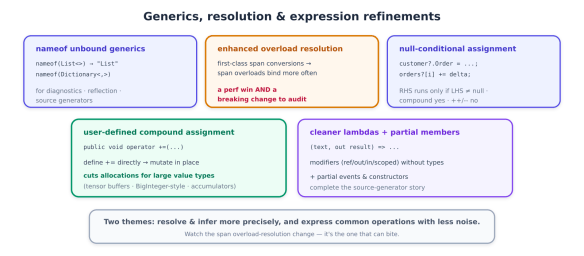
Generics, Resolution, and Expression Polish

Where previous features changed how you declare members, the next features change how the compiler resolves and how you express everyday operations. Several are small; one — overload resolution — is subtle enough to bite you, so it gets the most attention.

nameof for unbound generics

A small, welcome fix. Before C# 14, nameof required a closed generic type — you had to invent a placeholder type argument just to get a name:

// before: you had to supply a throwaway type argument
string n = nameof(List<int>); // "List" — but why should you need <int>?

C# 14 lets nameof accept an unbound generic type, so you write what you mean:

string list = nameof(List<>);          // "List"
string dict = nameof(Dictionary<,>); // "Dictionary"

It returns the name of the generic type definition — no type arguments required. This is squarely aimed at logging, diagnostics, reflection, source generators, and analyzers, where you want a type’s name without caring about (or having) its type parameters. It’s minor, but it removes a papercut that showed up constantly in framework and tooling code.

Enhanced overload resolution: a feature and a trap

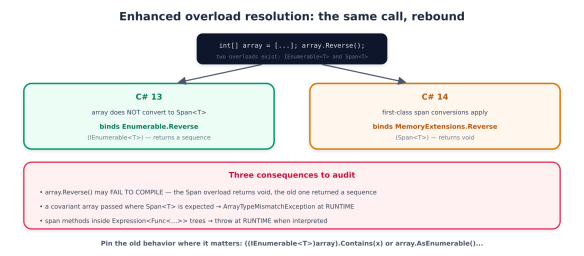
This is the one to read carefully. C# 14 introduces first-class support for Span<T> and ReadOnlySpan<T> — new implicit conversions between T[], Span<T>, and ReadOnlySpan<T>, plus the ability for spans to act as extension receivers and participate in generic inference. The everyday benefit is real: array-to-span code just works, with fewer explicit .AsSpan() calls:

void ProcessSpan(ReadOnlySpan<int> data) { /* ... */ }

int[] array = [1, 2, 3];
ProcessSpan(array); // implicit T[] → ReadOnlySpan<T>, no .AsSpan()

ReadOnlySpan<char> chars = "hello"; // implicit string → ReadOnlySpan<char>

But making span overloads applicable in more scenarios means the compiler now sometimes picks a different overload than it did in C# 13 — and that is a genuine, documented behavioral breaking change, not a footnote. The canonical example: in C# 13, an extension method taking a Span<T> receiver did not apply to a T[], so calls on arrays bound to the System.Linq.Enumerable (IEnumerable<T>) overloads. In C# 14, the span-based System.MemoryExtensions overloads become applicable — and win.

A diagram explaining enhanced overload resolution in C#, comparing C# 13 and C# 14. It illustrates changes in method binding for array reversal, highlighting updates to array handling and consequences for developers.

The concrete ways this surfaces are worth memorizing, because some fail loudly and some fail silently at runtime:

// 1. Compile break: the Span<T> overload returns void, the Enumerable one returned a sequence
_ = strings.Reverse(); // C#13: Enumerable.Reverse (IEnumerable<T>); C#14: MemoryExtensions.Reverse (void) → error

// 2. Runtime throw: a covariant array can't convert to Span<object>
void M(object[] arr) => Util.Do(arr); // C#14 binds Span<T> overload → ArrayTypeMismatchException at runtime

// 3. Pin the old behavior explicitly when you need it:
_ = ((IEnumerable<int>)array).Contains(x); // force the Enumerable overload
_ = array.AsEnumerable().Contains(x); // same, more readable

And the nastiest case: span-based methods now bind inside Expression<Func<...>> lambdas, where they compile fine but throw at runtime when the expression is interpreted rather than compiled. If you build LINQ expression trees (ORMs, query providers), audit them. The practical guidance: after upgrading, review span-heavy code and expression trees, lean on analyzer/ReSharper inspections that flag the change, and pin the old binding with an explicit IEnumerable<T> cast where behavior matters. This is the price of the performance win — worth it, but not free.

Null-conditional assignment

A clean ergonomic win. The null-conditional operators ?. and ?[] can now appear on the left side of an assignment or compound assignment — the mirror of the null-conditional read you already use:

// before
if (customer is not null)
customer.Order = GetCurrentOrder();

// C# 14
customer?.Order = GetCurrentOrder(); // assigns only if customer != null; RHS evaluated only then
orders?[i] += delta; // compound assignment works too

The right-hand side is evaluated only when the left side is non-null — so GetCurrentOrder() isn’t even called if customer is null, which matters when the RHS has side effects. One restriction: this works with assignment and compound operators (+=, -=, …) but not with increment/decrement (++, --).

User-defined compound assignment operators

Previously, x += y on your own type always meant x = x + y — the compiler synthesized the compound form from your binary + operator, allocating a new instance every time. For large value types that’s wasteful. C# 14 lets you define the compound operator directly, as an instance operator that mutates the receiver in place:

public struct BigAccumulator
{
private long[] _buffer;
// user-defined += : mutates in place instead of allocating a new BigAccumulator
public void operator +=(BigAccumulator other)
{
for (int i = 0; i < _buffer.Length; i++)
_buffer[i] += other._buffer[i]; // no new allocation
}
}

The payoff is allocation reduction for big value holders — think tensor buffers, BigInteger-style number types, or accumulators in a tight loop, where the old copy-on-+= behavior was pure GC pressure. This connects directly the allocation-free theme (and to the green-coding series’ point that efficient code is cheaper and greener). C# 14 also allows user-defined ++ and --.

Cleaner lambda parameters

Finally, a syntax polish: lambda parameters can now carry modifiers — ref, in, out, ref readonly, scoped — without forcing you to write the parameter types:

// before: modifiers required explicit types
TryParse<int> parse = (string text, out int result) => int.TryParse(text, out result);

// C# 14: modifiers with inferred types
TryParse<int> parse = (text, out result) => int.TryParse(text, out result);

One breaking change rides along: scoped is now a reserved word in lambda parameter position, so an identifier named scoped needs @scoped.

A related code-generation feature completes the picture: partial events and partial constructors. C# 13 made properties and indexers partial; C# 14 finishes the set, so a source generator can supply the implementation of an event or constructor whose declaration you wrote by hand — the same separation-of-definition-and-implementation pattern that makes generated code clean.

An illustration discussing generics, overload resolution, and expression refinements in programming, highlighting various features such as unbound generics, enhanced overload resolution, user-defined compound assignment, null-conditional assignment, and cleaner lambdas with partial members.

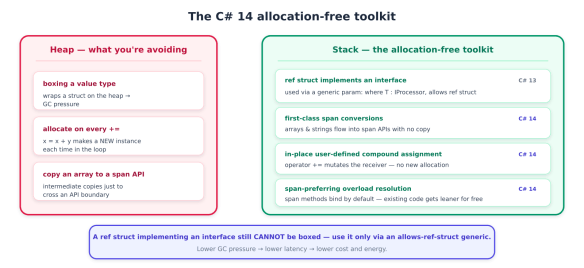
A recurring goal across recent C# versions is letting you write allocation-free code — code that keeps data on the stack, avoids heap churn, and so avoids the garbage-collection pressure that shows up as latency spikes and, per the green-coding series in this library, as wasted cost and energy. C# 14 advances that goal on several fronts. But it does so on top of work that landed in C# 13, and a deep dive should be precise about which is which — so let’s draw that line clearly.

Setting the record straight: ref struct interfaces are C# 13

The headline “ref struct interfaces” capability — the ability for a ref struct (a stack-only type like Span<T>) to implement an interface, and the allows ref struct anti-constraint that lets a ref struct be used as a generic type argument — arrived in C# 13, not C# 14. It’s foundational to the allocation-free story, so it belongs in this discussion, but calling it new in C# 14 would be wrong.

Here’s what C# 13 unlocked, because C# 14’s features build directly on it:

// C# 13: a ref struct can implement an interface
public interface IProcessor { void Process(); }

public ref struct SpanProcessor : IProcessor // stack-only type, now polymorphic
{
private readonly ReadOnlySpan<byte> _data;
public SpanProcessor(ReadOnlySpan<byte> data) => _data = data;
public void Process() { /* work over _data without copying to the heap */ }
}

// C# 13: 'allows ref struct' lets a ref struct be a generic type argument
public static void Run<T>(T proc) where T : IProcessor, allows ref struct
{
proc.Process(); // no boxing, no heap allocation
}

The significance: before this, a ref struct couldn’t participate in generic or interface-based polymorphism at all — you had to abandon stack-only types or abandon abstraction. Now you can write generic, abstracted, allocation-free code over Span<T> and your own ref structs. Note the crucial constraint that keeps it safe: a ref struct implementing an interface still cannot be boxed — you can only use it through a generic parameter constrained with allows ref struct, never as the interface type directly (that would require a heap allocation, defeating the purpose).

What C# 14 actually adds to the allocation-free toolkit

C# 14’s contribution is to make the surrounding code allocation-free and natural, and there are three pieces, each seen earlier in the series and now viewed through the performance lens.

First-class span conversions. The implicit T[] → Span<T>/ReadOnlySpan<T> and string → ReadOnlySpan<char> conversions from earlier aren’t just ergonomics — they let you thread arrays and strings through span-based APIs without intermediate copies or allocations, and let spans act as extension receivers and inference targets. That’s the connective tissue that makes ref-struct/span code read like ordinary code.

In-place user-defined compound assignment. The operator += from earlier that mutates the receiver instead of allocating a new instance is, fundamentally, an allocation-reduction feature — it turns a hot-loop sum += v over a large value type from N allocations into zero.

Overload resolution that prefers spans. The (breaking) resolution change from above means span-based library methods now bind by default in more places — so your existing code often gets more allocation-free without you rewriting it, which is exactly why the breaking change is worth tolerating.

A visual comparison of heap and stack allocation in C#. The heap section highlights issues like boxing a value type, allocation on every assignment, and copying an array to a span API. The stack section presents alternative solutions such as using ref structs, first-class span conversions, in-place user-defined assignment, and span-preferring overload resolution, emphasising lower garbage collection pressure.

Put together, a modern allocation-free pattern looks like this — stack-only data, interface abstraction, generic dispatch, no heap:

ReadOnlySpan<byte> payload = GetBuffer();          // no copy
var processor = new SpanProcessor(payload); // ref struct on the stack
Run(processor); // generic dispatch via allows ref struct — zero allocations

The honest limits

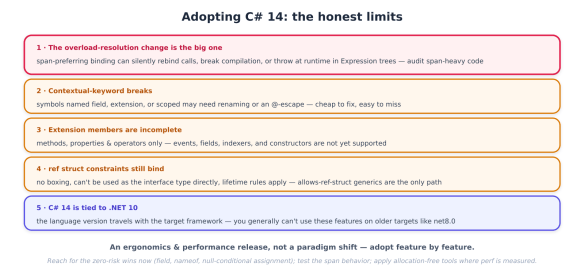
C# 14 is a strong release, but a deep dive owes you the edges — and there are several worth planning around.

Infographic titled 'Adopting C# 14: the honest limits' outlining five key changes and considerations regarding C# 14, including overload-resolution, contextual-keyword breaks, extension members, struct constraints, and framework compatibility.
  • The overload-resolution change is the real risk. As previously detailed, span-preferring binding can silently rebind calls, break compilation where return types differ, throw ArrayTypeMismatchException on covariant arrays, and — worst — throw at runtime inside interpreted Expression trees. This is the one thing to actively test after upgrading; the rest of C# 14 is additive.
  • Contextual-keyword breaks. field, extension, and scoped all became contextual/reserved in their positions. Existing symbols with those names need @-escaping or renaming. Cheap to fix, easy to miss.
  • Extension members are incomplete. Methods, properties, and operators only. Events, fields, indexers, nested types, and constructors are not supported yet — so don’t design an API assuming extension events exist (they don’t; that’s the separate partial events feature).
  • ref struct constraints still apply. Implementing an interface doesn’t make a ref struct heap-friendly: no boxing, no using it as the interface type, and the usual lifetime/scoped rules. The allows ref struct generic path is the only way to abstract over them.
  • C# 14 is tied to .NET 10. The language version travels with the target framework, so you generally can’t sprinkle C# 14 features onto a project still targeting net8.0. In practice, adopting C# 14 means adopting .NET 10 — which, per the previous series, is a forced move this year anyway.

The adoption playbook

  1. Adopt .NET 10 first — C# 14 rides with it, and the November 2026 support cliff (previous series) already forces that move.
  2. Turn on the analyzers. Let Roslyn and your IDE flag the span overload-resolution change; treat those inspections as a migration checklist, not noise.
  3. Audit span-heavy code and Expression trees specifically — this is where the behavioral break hides. Pin the old binding with IEnumerable<T> casts where behavior matters.
  4. Escape or rename any field, extension, or scoped identifiers.
  5. Reach for the ergonomic wins immediately — field in properties, nameof(List<>), null-conditional assignment — they’re zero-risk and cut boilerplate today.
  6. Introduce extension members where they read better than method-only helpers (extension properties on interfaces especially), staying inside the methods/properties/operators boundary.
  7. Apply the allocation-free tools where they pay — in-place compound assignment and span APIs in hot paths and high-throughput services; don’t micro-optimize cold code.