Multi-Agent Orchestration: From One Agent to Many (and When Not To)

You start with one coding assistant and it’s great. So you add a second agent to review the first. Then a planner. Then a tester. Each addition feels reasonable, and somewhere around the fourth one the system starts to wobble: the logs balloon, the agents make contradictory decisions, costs spike, and you’re back babysitting it at 2 a.m. wondering whether all this orchestration actually bought you anything.

That tension — more power versus more pain — produced one of 2025’s sharpest engineering disagreements. On June 12, Cognition (the team behind Devin) published “Don’t Build Multi-Agents,” arguing that parallel subagents make independent decisions on shared problems and produce conflicting, fragile output. Less than 24 hours later, Anthropic published “How we built our multi-agent research system,” reporting a multi-agent architecture that outperformed a single agent by 90.2% on their research evaluation. Two of the most respected teams in the field, opposite conclusions, same week.

Here’s the thing: they’re both right. Resolving that apparent contradiction is the key to using multi-agent systems well — and it starts by recognising what these systems actually are.

Multi-agent orchestration is distributed systems

The most useful reframe in this whole topic: you are not inventing something new. A team of agents passing messages, delegating work, and sharing state is a distributed system, and the patterns have names that predate LLMs by decades — orchestrator-worker, pipeline, message bus, blackboard, the actor model. The failure modes are the classic distributed-systems failure modes too: race conditions, cascading failures, coordination overhead, partial failure.

Separation of concerns, single responsibility, clear interfaces, idempotency, error handling, observability, bounded resources — everything you already know about building reliable systems still applies, and applies harder, because you’ve added a new source of nondeterminism on top. The teams that fail with multi-agent treat it as a vibe. The teams that succeed treat it as an engineering problem with known patterns and known failure modes. As one widely-shared 2026 benchmark put it bluntly: the gap between a good agent system and a bad one is almost never the framework — it’s the eval pipeline, the observability, and the failure-recovery logic.

When multi-agent actually helps

Anthropic and Cognition don’t actually disagree on the principle; they were describing different workloads. Anthropic’s own write-up is explicit about the boundary. Multi-agent systems earn their keep when a task has:

  • Heavy parallelism — it splits into independent strands that don’t need to talk to each other.
  • Information that exceeds a single context window — more material than one agent can hold, so you spread it across several windows.
  • Many complex tools to coordinate.
  • High enough value to justify the cost — and the cost is real: their multi-agent system used roughly 15× the tokens of a single chat.

And they’re equally explicit about when it doesn’t fit — which, notably, includes most coding:

“Most coding tasks involve fewer truly parallelisable tasks than research, and LLM agents are not yet great at coordinating and delegating to other agents in real time.”

That’s the resolution of the debate. Research parallelises beautifully — five subagents investigate five subtopics in isolation and report back. Coding often doesn’t, because changes are tightly interdependent: the function you’re writing depends on the type the other agent just changed. Cognition’s point is that splitting tightly-coupled work across agents fragments the context each one needs, and they make conflicting decisions. Anthropic’s point is that splitting loosely-coupled work across agents is a superpower. Both true.
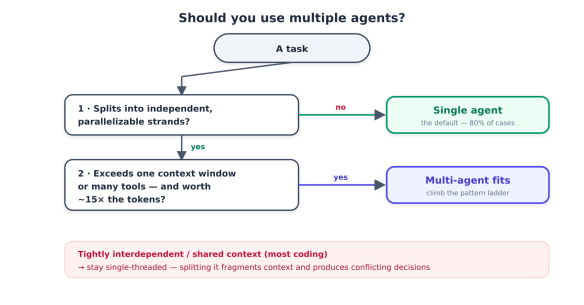
Flowchart illustrating when to use multiple agents for tasks, detailing conditions for single and multi-agent usage.

The default is still one agent

Before any pattern, internalise the most important rule: start with a single, well-prompted agent with good tools. It handles something like 80% of what people reach for frameworks to solve. Multi-agent is the exception you reach for when a single agent hits a hard wall — a context-window limit, a genuinely parallel workload, a tool-coordination problem — not the default architecture. This is the same instinct as “start with the monolith”: don’t pay distributed-systems complexity until a real constraint forces you to.

The pattern ladder

When you do go multi-agent, you’re choosing a topology, and there’s a clear ladder from simplest to most complex. Each rung adds capability and cost, and each has a characteristic failure mode worth knowing before you climb.
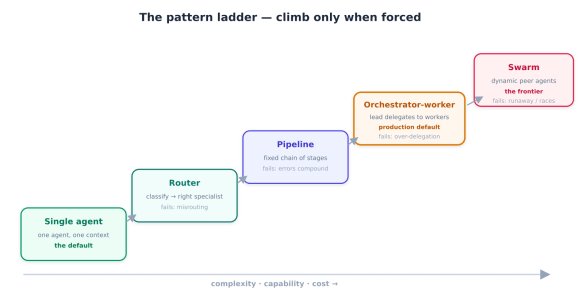
A diagram illustrating the 'pattern ladder' with various stages including Single Agent, Router, Pipeline, Orchestrator-worker, and Swarm. Each stage describes its characteristics, complexity, capabilities, and potential failures, emphasising the progression and relationships between different patterns.
  • Single agent — one agent, one context window, a good toolset. The baseline and the right answer most of the time.
  • Router — a lightweight classifier inspects each request and sends it to the right specialist agent. Still single-agent execution; you’ve just picked which one. Cheap and reliable. Failure mode: misrouting.
  • Pipeline (sequential) — agents in a fixed chain, each transforming the previous one’s output: writer → editor → fact-checker. Deterministic and easy to reason about. Failure mode: errors compound down the chain.
  • Orchestrator-worker (supervisor) — a lead agent decomposes a task and delegates sub-tasks to specialised workers, then synthesises their results. This is what production looks like in 2026, with the widest framework support (Claude Agent SDK, LangGraph, OpenAI Agents SDK, CrewAI’s hierarchical process). Failure mode: over-delegation — the orchestrator spawning workers endlessly — which you bound with iteration ceilings.
  • Swarm — a dynamic, open-ended population of peer agents that coordinate through shared memory or a message bus rather than a fixed coordinator. The frontier, powerful for massively parallel work. Failure modes: runaway spawning and shared-state race conditions, which you bound with population caps and concurrency safeguards.

Start at the bottom and climb only when forced. Most teams that succeed land on orchestrator-worker; most teams that fail jumped to a swarm because it sounded impressive.

A preview of the failure surface

One sobering data point to carry forward: a Berkeley research team catalogued 14 distinct failure modes specific to multi-agent LLM systems — things like agents losing track of who’s responsible for what, conversations derailing, and one agent’s error propagating through the whole team. These sit on top of every normal software failure mode, not instead of them. Multi-agent doesn’t replace your reliability engineering; it demands more of it. That’s the subject we keep returning to.

Building a Team of Coding Agents

We’ve just hit an uncomfortable truth: most coding isn’t parallelisable, so a team of coding agents is the exception, not the rule. This part is about finding the exceptions — the coding work that genuinely benefits from multiple agents — and building it correctly with the orchestrator-worker pattern.

First, find the parallel work

Before writing any orchestration code, do the analysis that most teams skip: figure out which parts of your task are actually independent. Coding work falls into two buckets, and only one belongs in a multi-agent system.

Tightly coupled (keep single-threaded): A refactor where every change depends on the last. Implementing a feature whose pieces share evolving types and assumptions. Anything where worker B needs to know what worker A just decided. Splitting this across agents fragments the context each needs and produces the conflicting decisions Cognition warned about. Use one agent.

Loosely coupled (parallelise): Work that decomposes into independent strands sharing little context:

  • Broad, read-only exploration. “Find every call site of this deprecated API across the monorepo.” “How do these eight modules each handle caching?” Each strand is independent and mostly read-only — the ideal multi-agent workload, exactly like Anthropic’s research case.
  • Independent implementation units. Three unrelated bug fixes in three unrelated modules. A set of similar-but-separate endpoints. Each can be a worker on its own branch.
  • The role split. Author, tester, reviewer, and security as separate agents with separate contexts — not parallel on the same code, but a pipeline of specialised perspectives.

The discipline here is just good old task decomposition. If you can’t write down sub-tasks that are genuinely independent, you don’t have a multi-agent problem — you have a single-agent task you’re overcomplicating.

The decision that makes or breaks it: the isolation boundary

Once you have independent sub-tasks, the single most important design decision is the isolation boundary: what does each worker need to know about what the others are doing? Anthropic’s answer for research was radical and worth copying: almost nothing. Each subagent gets a self-contained task description, an expected output format, and a fresh context window. It doesn’t know the other workers exist and can’t coordinate with them mid-task.

That isolation is not a limitation — it’s the whole point. It’s what lets workers run in true parallel, and it’s what keeps the orchestrator’s context window from drowning in cross-talk. In software terms, you’re enforcing single responsibility (each worker owns one job) and a clean interface (the task description is the worker’s API contract; its structured result is the return value). The workers are pure functions with respect to each other.

Diagram illustrating the Orchestrator-worker model for coding, showing the Orchestrator leading and delegating tasks to Workers A, B, and C, each with isolated environments and scoped tools.

For coding, isolation has a concrete, beautiful implementation: one git worktree per worker. Each agent gets its own checked-out branch in its own directory, so parallel workers physically cannot collide on the filesystem, and merging back is an ordinary pull request. Isolation boundary and execution isolation become the same mechanism.

Building the orchestrator

Here’s the shape of an orchestrator-worker system for coding. It’s deliberately framework-agnostic — the pattern matters more than the library, and you can map it onto LangGraph, CrewAI, or the Claude/OpenAI SDKs (more on that below).

from dataclasses import dataclass

@dataclass
class SubTask:
id: str
description: str # the worker's entire contract — self-contained
output_schema: dict # the expected structured result

# ---- ORCHESTRATOR ---------------------------------------------------------
def orchestrate(task: str, max_workers: int = 6) -> str:
plan = decompose(task) # lead agent: split into sub-tasks
if len(plan) <= 1:
return single_agent(task) # not parallel — don't multi-agent it
plan = plan[:max_workers] # bound fan-out (over-delegation guard)

results = run_parallel(spawn_worker, plan) # workers run isolated, in parallel
return synthesize(task, results) # lead agent merges the findings

def decompose(task: str) -> list[SubTask]:
"""Lead agent returns ONLY independent sub-tasks. If it can't, return one."""
system = ("Split this task into INDEPENDENT sub-tasks that share no state and "
"can run in parallel. Each must be self-contained. If the work is "
"tightly coupled, return a single task. Output JSON only.")
return [SubTask(**t) for t in call_model(system, task)["subtasks"]]

# ---- WORKER ---------------------------------------------------------------
def spawn_worker(sub: SubTask) -> dict:
"""A worker: fresh context, isolated worktree, self-contained brief."""
wt = make_worktree() # its own branch + directory
agent = Agent( # fresh context window
system=f"You are a focused coding agent. Task:\n{sub.description}\n"
f"Return a result matching this schema: {sub.output_schema}",
tools=scoped_tools(wt), # least privilege, confined to worktree
)
return bounded(agent.run, max_iterations=25) # cap iterations — no runaway loops

Read what’s not in there: no worker-to-worker channel, no shared mutable state, no unbounded loops. Every choice is a software fundamental:

  • decompose returns one task when the work is coupled — the system refuses to multi-agent a single-agent problem. This one guard prevents most multi-agent disasters.
  • max_workers and max_iterations bound resources — the direct fix for the over-delegation failure mode.
  • output_schema makes each worker’s result a typed contract the orchestrator can rely on, not free text it has to re-parse.
  • scoped_tools(wt) gives each worker least-privilege access confined to its worktree — containment, exactly as a single agentic worker needs.

Synthesis is where quality is won or lost

The orchestrator’s hardest job isn’t delegating — it’s synthesising. Workers return partial, independently-derived results; the lead agent has to reconcile them into one coherent answer, catch contradictions, and decide what to keep. This is the step Cognition was worried about: independent workers can reach incompatible conclusions. The mitigation is to keep synthesis single-threaded and authoritative — one orchestrator with the full picture decides, rather than letting workers negotiate. For coding specifically, synthesis often ends not in merged code but in N pull requests the orchestrator opens for human review — keeping a person at the merge boundary.

Mapping to frameworks

You can hand-roll the above, but in production most teams use a framework. The pattern maps cleanly onto all of them; pick by your needs, not hype:

  • LangGraph — models the orchestrator as a graph with conditional edges and durable execution, so a long-running team survives a server restart, with checkpointing and the most mature tracing (LangSmith). The production default for complex flows; steeper learning curve.
  • CrewAI — role-based “crews” with a hierarchical process; fastest to prototype (a team in ~20 lines), lighter on production observability.
  • OpenAI Agents SDK — explicit handoffs that pass context between agents; clean and opinionated, but model-locked and light on checkpointing.
  • Claude Agent SDK — subagents with tool-use chains, wired to data and tools via MCP.

But heed the consensus from every serious 2026 comparison: the framework is the least consequential choice. What determines whether your team survives its first production incident is the eval pipeline, the observability, and the failure-recovery logic.

Keeping the fundamentals intact

Notice that nothing in this build is novel computer science. It’s classic engineering applied to a new substrate:

  • Single responsibility → one job per worker.
  • Interface/contract → the self-contained task description and output schema.
  • Statelessness / isolation → fresh context window + dedicated worktree per worker.
  • Bounded resources → caps on workers and iterations.
  • Least privilege → tools scoped to each worker’s worktree.
  • A single authoritative integrator → the orchestrator owns synthesis; workers don’t negotiate.

Get those right and orchestrator-worker is robust. Skip them and you get the wobble.

Swarms, Coordination & Keeping It Production-Safe

Orchestrator-worker has a fixed coordinator and a bounded set of workers. The top rung of the ladder removes both constraints — and that’s exactly why it’s powerful and dangerous in equal measure.

Swarms: the frontier, and its sharp edges

A swarm dynamically spawns an open-ended population of peer agents based on workload, and they coordinate through shared memory or a message bus rather than through a central orchestrator. There’s no single agent holding the whole plan; coordination is emergent. This is the frontier of multi-agent design, and it shines for massively parallel, open-ended work where you can’t predict up front how many workers you’ll need or how they should divide labour.

It’s also where the distributed-systems bill comes due in full. Remove the fixed coordinator and you inherit every hard problem in concurrent computing:

  • Runaway spawning. A peer agent decides it needs help and spawns more agents, which spawn more — an unbounded fork bomb made of LLM calls, each one expensive. The fix is a hard population cap enforced outside the agents’ control.
  • Shared-state race conditions. Multiple agents reading and writing the same memory concurrently produce exactly the corruption you’d expect from any unsynchronised concurrent system. You need the classic safeguards: locks, atomic operations, or append-only logs with conflict resolution.
  • Nondeterminism and emergence. With no central plan, behaviour emerges from interactions and is hard to reproduce or debug. Two identical runs can diverge.
Diagram illustrating a swarm system with peer agents and emergent coordination, featuring a shared memory/message bus with no fixed coordinator, and indicating a population cap.

The honest guidance: most teams should not build a swarm. If orchestrator-worker can express your problem — and it usually can — use it. Reach for a swarm only when the workload is genuinely open-ended and massively parallel, and only with the safeguards above wired in from the start. A swarm without a population cap is not an architecture; it’s an outage waiting for a trigger.

Coordination and shared state

Whether you’re running a careful swarm or a more dynamic orchestrator-worker variant, the moment agents share state you’ve re-entered concurrent-systems territory. Two classic patterns cover most needs:

  • The blackboard. Agents read from and write to a shared “blackboard” of state. Simple, but every write is a potential race; guard it like any shared resource.
  • The message bus / actor model. Agents are actors that communicate only by passing messages — no shared mutable state at all. This is what AutoGen’s v0.4 rewrite adopted (an event-driven actor core), and it’s the more robust choice precisely because it sidesteps shared-memory races by design. If you’re building coordination from scratch, prefer message-passing over shared memory for the same reason you would in any concurrent system.

And recall Cognition’s core warning, which applies most sharply here: agents making independent decisions on a shared problem produce conflicting outputs, and the fragility compounds. The mitigation is to keep the parts that need shared context single-threaded, and only parallelise the parts that are genuinely independent. Coordination you can avoid is coordination you can’t get wrong.

The failure surface you’re signing up for

A Berkeley research team catalogued 14 distinct failure modes unique to multi-agent LLM systems — among them agents losing track of responsibilities, derailing into unproductive loops, one agent’s hallucination propagating through the team, and premature termination where the system stops believing it’s done before it is. The critical point for production: these are additional to every failure mode your software already has. Multi-agent doesn’t simplify your reliability engineering — it multiplies what you must account for. Which is why the rest of this part is about scaffolding, not agents.

Keeping the software fundamentals intact

Whatever pattern you land on — pipeline, supervisor, or swarm — the disciplines that keep it production-safe are the same disciplines that keep any distributed system reliable. The framework debate is a distraction; this scaffolding is the actual work, and it’s where the gap between a system that survives its first incident and one that doesn’t really lives.

Diagram illustrating key concepts of classic reliability engineering related to a multi-agent core, featuring elements such as Observability & tracing, Durable execution, Evals, and Bounded resources on one side and Structured contracts, Least privilege, and Human checkpoints on the other.
  • Observability and tracing. You cannot debug what you cannot see, and a multi-agent run is a distributed trace across many context windows. Capture every agent, every delegation, every tool call, every hand-off — this is what mature tooling (LangSmith and peers) exists to provide. Without it, a misbehaving fleet is a black box.
  • Durable execution and checkpointing. Agent runs are long; servers restart. Checkpoint state so a team can resume rather than restart from zero — a headline reason LangGraph leads in production. This is just write-ahead logging and crash recovery, applied to agents.
  • Evals — the real differentiator. Every serious practitioner converges on the same point: the eval pipeline matters more than the framework. You need a suite that measures whether the whole system produces good outcomes, because in multi-agent systems “minor changes cascade into large behavioural changes” — a one-line prompt tweak can reshape the whole team’s behaviour. Without evals you’re flying blind through a non-linear system.
  • Bounded resources. Iteration ceilings (against over-delegation), population caps (against runaway spawning), and token budgets (against the 15× cost blowing up silently). Every loop and every spawn needs a bound enforced outside the agent’s judgement.
  • Structured contracts between agents. Typed task descriptions in, structured results out — so a hand-off is a checked interface, not a hopeful paragraph. The same reason you type your function signatures.
  • Least privilege. Each agent gets only the tools, data, and credentials its job requires. One compromised or confused agent in a fleet shouldn’t be able to touch production — and at fleet scale, this is non-negotiable.
  • Human checkpoints. For anything consequential — merging code, spending money, touching customers — a human sits at the boundary. Autonomy scales the work; human checkpoints scale the trust.

None of these is AI-specific. They’re the reliability practices distributed systems have always needed. Multi-agent orchestration doesn’t let you skip them — it raises the price of skipping them.

The whole picture

The shape is clear. Start with one good agent. Climb to multiple agents only when a real constraint — parallelism, context limits, tool coordination, justified by value — forces you up the ladder. Prefer the simplest pattern that works: router, then pipeline, then orchestrator-worker, and only rarely a swarm. Isolate workers aggressively so they don’t have to coordinate. Keep the parts that need shared context single-threaded. And wrap the whole thing in the ordinary scaffolding of reliable software — observability, durable execution, evals, bounded resources, contracts, least privilege, human checkpoints.

The promise of agent swarms is real: for the right workload, a team of agents does things no single agent can. But the teams that realise that promise aren’t the ones with the most agents or the trendiest framework. They’re the ones who remembered that an agent fleet is a distributed system, and that we already know how to build those well. The intelligence is new. The engineering is not — and the engineering is what keeps it standing.

How Can AI Help My Business?

If you run a small business and you’ve been wondering whether this whole AI thing is for you, here’s the honest state of play in 2026: most of your peers have already started. Depending on which survey you read, somewhere between 82% and 89% of small businesses now use AI in some form — up from roughly a third just three years ago. The U.S. Chamber of Commerce found small firms adopting AI faster than large companies for the first time in the data’s history.

But that headline hides the part that should reassure you. When researchers look at who’s using AI well — built into how they actually operate, not just the occasional chatbot question — the number drops to around 15–20%. So the real race isn’t “have you started.” It’s “are you using it deliberately.” There is still plenty of room to get ahead, and the businesses that move thoughtfully now are the ones pulling away.

And the barrier almost certainly isn’t what you think. The single most common reason small businesses give for not using AI is that they “see no applicable use case” for their business — a perception that, in survey after survey, turns out to be a knowledge gap rather than a real limitation.

The reassuring truth about what it costs and takes

Two myths scare owners off. Let’s kill both.

“It’s expensive.” The two leading AI assistants cost about \$20–40 a month combined. A complete, capable AI toolkit for a small business runs \$200–500 a month and can be assembled one piece at a time. For comparison, the marketing output those tools can assist with would cost \$500–3,000 a month from an agency. McKinsey pegged the average small-business return on AI spending at 3.7×, and most owners recoup the cost within weeks when they point it at the right task.

“I need to be technical.” You don’t. Modern AI tools work in plain English — you type what you want the way you’d ask a capable assistant. There’s no code, no engineering team, no servers. If you can write an email, you can use them. (In fact, about three-quarters of small businesses already use AI without realising it, through features baked into software they already pay for, like their email, accounting, or online store.)

The honest catch: tools are easy, using them well is a skill. Only about a quarter of small businesses using AI have had any training, and most have no consistent approach — which is exactly why results feel inconsistent. The good news is that the skill is learnable.

The universal map: where AI helps any business

Here’s the key insight that dissolves the “no use case for my business” worry. Every business — whether you write software or fix sinks — shares the same handful of functions. AI helps with all of them. Your industry changes the details, not the map.

Diagram illustrating where AI can assist any business, featuring categories such as Customer Communication, Sales, Research & Decisions, Marketing & Content, Customer Service, and Admin & Back-Office.

1. Customer communication. Drafting emails, replying to inquiries, writing follow-ups, polishing your tone. This is the fastest place almost everyone starts, because every business writes messages all day. AI turns a 20-minute reply into a 3-minute one.

2. Marketing and content. This is the #1 use case among small businesses, and the clearest, fastest payoff. Social posts, blog articles, product descriptions, ad copy, newsletters, captions. Businesses report saving 5–15 hours a week on content work and cutting marketing-contractor costs by 50–70%.

3. Customer service. A chatbot on your website or a smart auto-responder handles common questions 24/7 — hours, pricing, availability, “where’s my order” — so you’re not answering the same thing at 9 p.m. Businesses using AI for customer service report meaningfully higher satisfaction and better retention.

4. Admin and back-office. The invisible time-sink: scheduling, invoicing, bookkeeping, data entry, summarising documents, sorting your inbox. AI quietly removes a chunk of the busywork that never felt like “real” work but ate your week anyway.

5. Research and decision support. Summarise a long contract, research a new supplier, compare your prices to the market, draft a plan, analyse your own sales data and tell you what’s selling. AI is a tireless analyst you can ask anything.

6. Sales. Following up on leads (the thing every busy owner forgets), writing proposals and quotes, keeping your customer list organised, spotting who hasn’t bought in a while.

Look at that list and the “no use case” worry evaporates. You do most of these every single day.

The one principle that keeps you out of trouble

Before the how-tos, internalise one idea that separates the businesses AI helps from the ones it embarrasses:

AI is an amplifier, not a replacement. It makes a good employee faster and a careful process smoother. It does not replace your judgement, your relationships, or your responsibility for what goes out the door.

A useful mental model: AI is a brilliant, fast, occasionally overconfident intern. It produces a great first draft of almost anything in seconds — and it will also, now and then, state something wrong with total confidence. So you let it do the heavy lifting, and you keep your hand on the wheel: you review what matters, especially anything that touches a customer, a contract, or money. Get that balance right and AI is the best-value hire you’ll ever make. Get it wrong — let it run unsupervised on things that matter — and it amplifies your mistakes just as fast as your wins.

Why it’s worth doing now

The payoff isn’t hypothetical. Across the 2026 research, AI-using small businesses report saving 5–7 hours per week per person, 26–55% productivity gains in the areas where they apply it, and — the number that matters most — they’re roughly twice as likely to report year-over-year growth than non-users. Among growing small businesses, 83% have adopted AI; among shrinking ones, just 55%. Correlation isn’t destiny, but the pattern is hard to ignore: AI use has become a reliable marker of which way a small business is heading.

You don’t need to do all six functions. You need to do one well, see the time come back, and build from there. That’s the whole strategy.

Five Businesses, Five Playbooks

The functions above are universal, but they look different in a code shop than in a kitchen. The fastest way to see your own opportunity is to watch how five very different businesses put the same toolkit to work. Find the one most like yours, borrow what fits, and ignore the rest.

A table displaying five different businesses along with their communication, marketing, service, admin strategies, and biggest wins.

1. The web design shop (IT)

Maya runs a four-person studio building websites for local businesses. Her team can code; their problem is everything around the code — proposals, client updates, documentation, and marketing their own services while billing client hours.

What AI changes for them:

  • Writing code faster. A coding assistant drafts boilerplate, suggests fixes, and explains unfamiliar code, so a junior developer ships like a mid-level one. (The catch: they review every line — confident-but-wrong code is real.)
  • Proposals and scoping. What used to be a half-day of writing a proposal is now a 30-minute edit of a solid AI first draft, built from a few bullet points about the client.
  • Client communication. Status updates, “here’s what we did this sprint” emails, and gentle nudges about overdue feedback — all drafted in seconds, in the studio’s voice.
  • Their own marketing. The shoemaker’s-children problem: agencies never market themselves. AI writes the case studies and social posts they never had time for.

The pattern: even a technical business gets its biggest wins in the non-technical work that surrounds the craft.

2. The marketing agency (semi-technical)

Devin’s six-person agency runs social media and content for a dozen clients. Their product is content, and AI is closest to a superpower here — which is also the trap.

  • Content at volume. First drafts of posts, articles, captions, and ad variations across a dozen brand voices. The agencies seeing real gains report saving 5–15 hours a week per person.
  • First-draft design. AI image and design tools produce concepts, mockups, and social graphics in minutes for the team to refine.
  • Reporting. Pulling a month of analytics into a plain-English client report — “engagement up 14%, here’s what worked” — instead of a dreaded manual slog.
  • Repurposing. One client podcast becomes a blog post, ten social snippets, and a newsletter, automatically.

The catch, sharpened: when your product is content, AI slop becomes your brand. The winning agencies use AI for the first 80% and reserve human craft and judgement for the 20% that makes it theirs — and clients pay for. Volume without taste is a liability.

3. The café (not technical at all)

Sofia owns a neighbourhood café with eight staff. She’s never written a line of code and never will. The trades-and-hospitality world has the lowest AI adoption — which means the most room to get ahead of the shop across the street.

  • Reviews and reputation. AI drafts warm, on-brand replies to every Google and Yelp review in minutes — the thing owners know they should do and never find time for.
  • Social media. A week of Instagram posts (today’s special, a staff spotlight, a weekend event) drafted from a few notes, so the feed stays alive without hiring anyone.
  • Menu and specials. Appetising descriptions for new dishes; translating the menu for tourists.
  • Scheduling and suppliers. Drafting staff schedules around availability, and writing the routine supplier and logistics emails.
  • Forecasting. Asking an assistant to look at last year’s sales and flag which weeks need extra staff or stock.

The pattern: for a non-technical local business, the wins are almost entirely admin and marketing — the after-hours paperwork that steals an owner’s evenings.

4. The plumbing business (not technical at all)

Tom runs a plumbing company with five vans. He’s on tools all day; the office work happens at night at his kitchen table. This is the classic first-mover opportunity — high-value, low-tech, barely-touched by competitors.

  • Quotes and estimates. Describe the job in a sentence; get a clean, itemised, professional-looking quote drafted in seconds. Faster quotes win more jobs.
  • Scheduling and reminders. Automated appointment confirmations and “your technician is on the way” texts cut no-shows and the phone tag that eats the day.
  • After-hours inquiries. A simple website chatbot answers “do you do emergency call-outs?” and “what areas do you cover?” at 10 p.m., capturing leads Tom would otherwise lose to a competitor who picked up.
  • Customer follow-up. “How did the repair hold up?” and review requests sent automatically — turning one-time jobs into repeat customers and referrals.
  • Invoicing and books. AI features in his accounting software categorise expenses and chase unpaid invoices.

The pattern: trades businesses win by getting their admin and customer communication off the kitchen table — and because so few competitors have, the edge is large.

5. The retail / online store (not technical)

Priya runs a boutique with a Shopify store. She competes against far bigger sellers, and AI is how a small shop punches above its weight.

  • Product descriptions. Dozens of distinct, search-friendly descriptions from a spreadsheet of product specs — a job that used to take days.
  • Personalised recommendations. The “you might also like” features built into modern e-commerce platforms; across the industry, AI recommendations drive 25–35% of revenue for stores that use them.
  • Customer service. A chatbot handles sizing, shipping, and returns questions, freeing Priya for the conversations that actually need a human.
  • Email marketing. Abandoned-cart emails, new-arrival announcements, and win-back campaigns drafted and personalised at scale.
  • Inventory and pricing. Demand forecasting and AI-assisted pricing — historically a big-company advantage — now within reach. (65% of small businesses are using or planning pricing tools.)

The pattern: retail wins by using AI to match the personalisation and responsiveness customers learned to expect from the giants.

What every example has in common

Read across the five and the same shape appears every time, exactly as predicted:

  • The biggest, fastest wins are in marketing, customer communication, and admin — the universal functions, not the industry-specific craft.
  • The less technical the business, the bigger the untapped opportunity, because adoption is lowest where the office work is heaviest and the competition is least likely to have moved.
  • The catch is always the same: AI produces the draft; you own the result. The businesses that win supervise it; the ones that get embarrassed let it run loose.
Infographic comparing AI adoption across industries, highlighting 'Higher adoption' sectors such as Professional services, Marketing & media, Retail & e-commerce, and Healthcare, versus 'Lower adoption' sectors like Trades, Construction, Food service, and Hospitality.

You’ve now seen the toolkit applied five ways. Whichever is closest to your business, the next question is the practical one: how do I actually start without wasting money or making a mess?

Getting Started Without Getting Burned

The mistake most small businesses make isn’t avoiding AI — it’s diving in with no plan, buying five tools, getting inconsistent results, and concluding “this doesn’t work for us.” The businesses that win do the opposite: they pick one high-value task, get good at it, prove the payoff, and expand. Here’s how to be one of them.

Step 1: Pick your first win

Don’t start with “how do I use AI.” Start with “what eats my time and isn’t risky to hand off.” Score your tasks on three questions:

  • How often do you do it? (Daily beats monthly.)
  • How long does it take? (Hours beat minutes.)
  • What happens if it’s a little wrong? (You want low stakes for your first win — embarrassing, not catastrophic.)

The sweet spot is the high-frequency, time-consuming, low-risk corner: drafting social posts, replying to routine emails, writing product descriptions, summarising documents, first-draft proposals. Avoid starting with anything that’s high-stakes if it’s wrong — final financial figures, legal language, medical guidance, or anything a customer sees unedited. Earn trust on safe ground first.

Step 2: Use off-the-shelf tools — you don’t need to build anything

You almost certainly do not need a developer, a custom system, or anything bespoke. The right starter stack for nearly every small business is just two things:

  1. One general AI assistant (ChatGPT, Claude, or Gemini — about \$20/month for a paid plan). This is your all-purpose “AI employee” for writing, summarising, research, and brainstorming. It’s the connective tissue across every function.
  2. The AI already inside the software you pay for. Your accounting tool, online store, email platform, and design app almost all have AI features now — about three-quarters of small businesses use AI this way without thinking of it as “adopting AI.” Turn those on before buying anything new.

That’s it to start. A median AI-using small business eventually runs about five tools, but you get there one proven win at a time — not by buying a stack on day one. Add a specialised tool (a dedicated chatbot, a marketing platform, a scheduling assistant) only when a specific recurring pain justifies it.

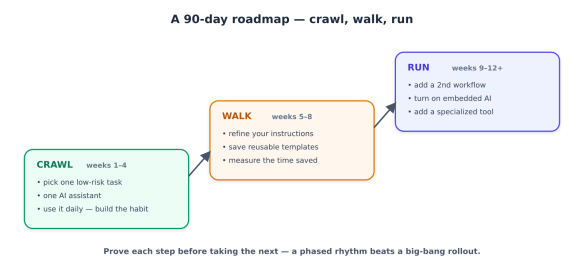
Step 3: Follow a 90-day roadmap, not a big bang

The pace that actually works for small teams is deliberately unglamorous: one workflow at a time, measured before you expand. Rushing produces tool sprawl, blown budgets, and a sceptical team.

A 90-day roadmap outlining a phased approach to implementing AI tasks, divided into three stages: Crawl (weeks 1-4), Walk (weeks 5-8), and Run (weeks 9-12+), with specific actions for each stage.
  • Crawl (weeks 1–4): Pick your one task from Step 1. Use a single assistant on it every day until it’s second nature. The goal is a habit and a feel for what the tool is good and bad at — not transformation.
  • Walk (weeks 5–8): Improve your instructions, save the prompts that work as reusable templates, and measure: how much time is this actually saving? Write the number down.
  • Run (weeks 9–12+): Add a second workflow. Turn on the embedded AI in your existing software. Consider one specialised tool if a clear pain calls for it. Then repeat the cycle.

Twelve months to get two or three areas of your business running on AI with proper habits and oversight may sound slow amid the hype. It’s the pace that compounds instead of collapsing.

Step 4: Learn the one skill that makes it work — good instructions

Most small businesses get mediocre results for one reason: they give the AI vague instructions. The fix is the highest-leverage skill, and it’s not technical — it’s just being specific and giving context. A weak prompt gets a generic answer; a good one gets something usable. The recipe:

ROLE:    Who the AI should act as.        "You're my café's social media manager."
CONTEXT: Facts about your business. "We're a family cafe in Leeds known for
sourdough and a relaxed vibe. Casual, warm tone."
TASK: Exactly what you want. "Write 5 Instagram captions for this week's
specials, each under 30 words, with a question
to drive comments."
FORMAT: How you want it back. "Number them. No emojis in the first two."

Save the instructions that work as templates you reuse — the difference between a business that gets consistent results and one that rerolls the dice every time. (Three-quarters of small businesses have no consistent approach to this, which is exactly why their results feel hit-or-miss.)

The guardrails: how not to get burned

This is the part that protects everything else. AI’s failures aren’t loud — it doesn’t crash, it confidently produces something wrong — so the guardrails are about catching that before it reaches a customer or your bank account.

Graphic titled 'Guardrails — how not to get burned', featuring five key points on the use of AI: 'Verify anything that matters', 'Protect your data', 'Never auto-send high-stakes content', 'Keep your voice', and 'Avoid tool sprawl', each accompanied by a checkmark.
  • Verify anything that matters. AI makes mistakes with total confidence — wrong facts, wrong numbers, invented details. Keep a human eye on anything customer-facing or money-related. The rule of thumb: the higher the stakes, the closer you look.
  • Protect your data. Don’t paste sensitive customer information, financial records, or anything confidential into a consumer AI tool. Use a business/paid account (the data handling is better), read the tool’s data policy, and decide deliberately what’s allowed — before an employee quietly pastes your customer list into a free tool they found online.
  • Never auto-send high-stakes content. AI can draft a contract clause, a financial summary, or health-related copy — it should never be the final word on them. Those get human sign-off, every time. When in doubt, a professional reviews it.
  • Keep your voice. Edit drafts so they sound like you, not like generic AI. Customers can increasingly tell, and “obviously AI” erodes the personal touch that’s a small business’s advantage.
  • Avoid tool sprawl. Every subscription is a cost and a login and a place your data lives. Add tools only when a specific, recurring pain justifies one.

Measure what matters

Finally, track outcomes, not activity. “We use AI now” is not a result. These are:

  • Time saved per week (the easiest, most immediate win — owners average 5–7 hours).
  • Revenue and leads — more content shipped, faster quotes, more reviews answered, recovered carts.
  • Customer satisfaction — faster responses, fewer dropped inquiries.

If a use case isn’t moving one of these after a fair trial, drop it and try another. That’s not failure; that’s the method working.

The bottom line

AI won’t run your business, and it won’t fix a broken one — it amplifies whatever you point it at. Point it at the right tasks, with good instructions and sensible guardrails, and a small team can market like a bigger one, respond faster than its competitors, and hand the evening paperwork to a tireless assistant. The owners who’ll look back on this year as a turning point aren’t the ones who bought the most tools. They’re the ones who picked one real problem, solved it with AI, measured the win, and built from there. Start there this week.

AI Slop & Review at Scale

Sonar’s 2026 State of Code Developer Survey put a hard figure on a feeling every engineer already had: 96% of developers don’t fully trust that AI-generated code is functionally correct. That’s the stat that made headlines. But the more revealing one sits right next to it: only 48% always verify AI code before committing.

Sit with that gap. Nearly everyone distrusts the output, and barely half consistently check it. Sonar calls the space between those numbers the verification gap — and AWS CTO Werner Vogels gave the accumulating consequence a name at re:Invent in December 2025: verification debt.

The pressure behind it is only growing. AI already writes about 42% of committed code, a figure developers expect to hit 65% by 2027. Generation has become nearly free. Trust has not. This series is about the discipline that closes the gap — engineering code review so it scales with the flood of machine-written code instead of drowning in it.

What “AI slop” actually is

“AI slop” is the catch-all term for output that looks like good code without being good code. It’s worth being precise, because each variety fails review differently:

  • Looks-correct-but-isn’t. The signature failure. 61% of developers in Sonar’s survey agreed AI often produces code that looks correct but isn’t reliable. It compiles, it reads cleanly, it passes the happy-path test — and it’s subtly wrong.
  • “Almost right, but not quite.” Stack Overflow’s 2025 survey of ~49,000 developers found this is the #1 daily frustration, named by 66%. It’s the most expensive failure mode precisely because it survives a casual review — the diff looks reasonable, so it gets approved, and the defect ships.
  • Hallucinated APIs and packages. The model invents a function that doesn’t exist, or imports a package that isn’t real — which has spawned slopsquatting, where attackers register the plausible-sounding names models hallucinate, turning a hallucination into a supply-chain attack.
  • Edge-case blindness. The happy path is handled; the timeout, the empty list, the concurrent write, the malformed input are not.
  • Security vulnerabilities. Multiple 2026 analyses put the share of AI-generated code containing vulnerabilities in the 40–48% range, with a large majority undefended against common classes like cross-site scripting.
  • Duplicative and unnecessary code. 40% of developers cite AI generating redundant code; it re-implements what your codebase already has because it never saw your codebase.
A diagram titled 'The anatomy of AI slop', showcasing various issues related to AI-generated code. It includes elements such as 'Looks correct, isn't', 'Almost right, not quite', 'Edge-case blindness', 'Hallucinated packages', 'Security vulnerabilities', and 'Duplicative code'. The central focus is 'AI SLOP', emphasising that all aspects pass a casual read.

The unifying property is the dangerous one: slop passes a casual read. It’s confident, idiomatic, and well-formatted. That’s exactly what makes it harder to review than a human’s bug, which usually looks like a mistake.

Why slop breaks code review specifically

Here’s the counterintuitive finding that reframes the whole problem. You’d expect AI to lighten the review load. The data says the opposite: 38% of developers report that reviewing AI-generated code takes more effort than reviewing code written by their human colleagues.

Why would reviewing be harder? Three reasons:

  1. No author intent to interrogate. When a colleague writes code, you can ask “why did you do it this way?” and their answer reveals their mental model — and its gaps. AI code arrives with no intent behind it. The reviewer has to reconstruct the reasoning from scratch.
  2. A false sense of security. AI output compiles cleanly and passes basic tests, which creates an illusion of readiness. Human bugs often announce themselves with rough edges; slop is camouflaged as competence.
  3. Volume. A human writes a few hundred lines a day and you review at that pace. An agent generates thousands of lines in seconds. The review surface explodes while the number of qualified reviewers stays fixed.

The market data confirms the bottleneck is real and measurable. LinearB’s 2026 benchmark of 8.1 million pull requests across 4,800 teams found that AI-generated PRs have a 32.7% acceptance rate versus 84.4% for human-authored ones, and wait 4.6× longer for review. Two-thirds of AI PRs need significant rework or get rejected — after a reviewer has already spent time on them.

The toil swap

The promise was that AI would eliminate grunt work. What actually happened is what Sonar’s data calls a toil swap: the effort saved during code creation reappeared during code review. Developers still spend roughly 24% of their work week on toil — checking, fixing, and validating output — and that number is essentially unchanged whether they use AI heavily or not. The work didn’t disappear. It moved downstream, from your fingers to your judgement.

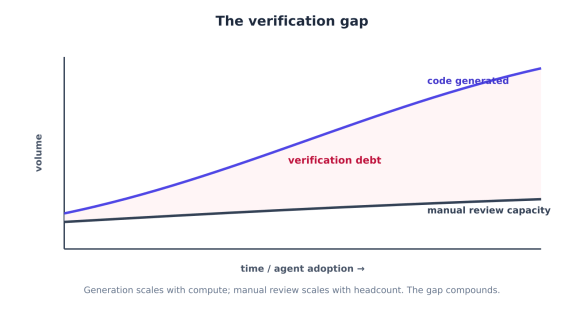
A graph illustrating 'The verification gap', showing the relationship between time/agent adoption and volume. It features two curves: one representing 'code generated' and another indicating 'manual review capacity', with a red area labelled 'verification debt' highlighting the growing disparity.

This is the shape of the problem. Generation scales with compute; manual review scales with headcount. Point an agent fleet at a codebase and the gap between the two curves — the verification debt — grows without bound unless you change how review works.

The reframe: trust is the new bottleneck

Sonar’s CEO framed the shift bluntly: value in software is no longer defined by the speed of writing code, but by the confidence in deploying it. The same survey found the single most important skill developers now name for the AI era isn’t prompting — it’s “reviewing and validating AI-generated code for quality and security” (47%, the top answer).

That’s the thesis for the rest of this series. When generation is commoditised, verification is the discipline that creates value. And there’s evidence it pays: teams pairing AI generation with systematic automated verification report markedly better outcomes — in Sonar’s data, teams using a dedicated verification platform were 44% less likely to suffer AI-caused outages and reported 24% lower vulnerability rates than teams relying on ad-hoc checks.

The teams that win the agentic era won’t be the ones generating the most code. They’ll be the ones who can trust the most code — because they engineered review to keep pace.

Building the Review Pipeline

The instinct when faced with untrustworthy AI code is “review it more carefully.” That doesn’t scale, and we previously showed why: review effort is already the bottleneck. The answer isn’t more human review — it’s a pipeline where each layer catches the slop it’s best at, so that by the time a human looks, only the things requiring human judgement remain.

There are three layers, and the most important design decision is knowing which kind of problem each one owns.

A flowchart illustrating a multi-layer review pipeline consisting of three stages: Blocks, Advises, and Judges. The Blocks stage includes deterministic gates such as static analysis, linters, dependency scans, and checks. The Advises stage involves semantic AI review for logic errors, architectural drift, missed edge cases, and more. The Judges stage concerns human review focusing on business logic and risk assessments.

Layer 1 — Deterministic gates (these block)

The first layer is rule-based static analysis, and its defining property is that it’s deterministic: the same code always produces the same finding. That makes it the only layer you can use as a hard gate — something that mechanically blocks a merge — because it never flakes and never hallucinates a violation.

This layer owns the slop categories that are mechanically detectable: security patterns, complexity, duplication, style, dependency risk. Tools like SonarQube, Semgrep, and the linter family (ESLint, Pylint, RuboCop) live here.

GATES = [
Gate("format", ["ruff", "format", "--check", "."]),
Gate("lint", ["ruff", "check", "."]),
Gate("types", ["mypy", "."]),
Gate("sast", ["semgrep", "--config", "auto", "--error"]), # security patterns
Gate("deps", ["pip-audit"]), # known-CVE deps
Gate("dup", ["sonar-scanner"]), # duplication, complexity
]

But generic gates miss the slop that’s specific to AI. Two checks earn their place in any AI-era pipeline:

Hallucinated-package detection. Slop invents imports. Before anything else, verify every new dependency actually exists — and is the one you meant, not a slopsquatted look-alike registered to catch exactly this mistake:

def check_new_dependencies(new_deps: list[str]) -> list[Finding]:
findings = []
for dep in new_deps:
meta = registry_lookup(dep) # query npm / PyPI
if meta is None:
findings.append(Finding("error", f"package '{dep}' does not exist — "
"likely hallucinated (possible slopsquatting target)"))
elif meta.age_days < 30 or meta.weekly_downloads < 50:
findings.append(Finding("warn", f"'{dep}' is new/obscure — confirm it's the "
"intended package, not a typosquat"))
return findings

Contract and schema checks. “Looks right but isn’t” often means the code violates an interface the rest of the system depends on. If you have an OpenAPI spec, a DB schema, or typed contracts, validate the diff against them — a deterministic way to catch a whole class of subtle wrongness.

The rule for this layer: if a check is deterministic and the failure is unambiguous, it blocks. No human time is spent on a missing return type or a hallucinated import.

Layer 2 — Semantic AI review (this triages)

Deterministic gates can’t read intent. They’ll never catch “this function silently swallows the timeout error that two callers depend on” — that requires understanding the code’s meaning and its neighbours. This is the job of an LLM-backed reviewer (CodeRabbit, Greptile, Qodo, Claude Code Review, Copilot’s reviewer), and it catches the context-dependent slop the first layer can’t express as a rule: logic errors, architectural drift, missed edge cases, misread requirements.

The critical caveat: semantic review is variable, so it advises — it does not block. An LLM reviewer that hard-gates merges will eventually block on a hallucinated objection, and your team will route around it. Use it to triage and surface, not to enforce.

def ai_review(diff: str, repo_context: str) -> list[Finding]:
system = (
"You are a senior reviewer. Review this diff for LOGIC, ARCHITECTURE, and "
"EDGE-CASE issues a linter would miss. For each, give file:line, severity "
"(error/warn/note), and a one-line rationale. Do NOT report style or "
"formatting — gates already cover those. Return JSON only."
)
user = f"REPO CONTEXT:\n{repo_context}\n\nDIFF:\n{diff}"
return parse_findings(call_model(system, user))

Two things make this layer pay off rather than annoy:

Give it repo context. A reviewer that sees only the diff catches generic issues. One that sees the surrounding code, conventions, and call graph catches your issues — the violated invariant, the bypassed auth layer. (This is exactly the context engineering from the companion series: the reviewer is only as good as the context you feed it.)

Manage signal-to-noise ruthlessly. Review tools trade precision against recall, and the trade matters. In 2026 benchmarks, CodeRabbit favours precision (few false positives, so fewer misses get dismissed) while Greptile favours recall (catches more bugs at the cost of more noise). Pick deliberately: a noisy reviewer trains your team to ignore all its comments, including the true ones. Tune severity thresholds, scope it to the diff, and suppress the categories Layer 1 already owns.

The “AI-reviews-AI” pattern

Notice that the author of the code and the reviewer of the code should not be the same model instance with the same context. Letting an agent grade its own output is a conflict of interest — it’s confident about exactly the things it got wrong. The robust pattern is a separate reviewer model, with its own fresh context, critiquing the author’s output before any human sees it:

def review_pipeline(pr) -> ReviewResult:
findings = []
findings += run_deterministic_gates(pr) # Layer 1 — may block
if blocking(findings):
return ReviewResult(lane="RED", findings=findings) # don't waste later layers

findings += check_new_dependencies(pr.new_deps)
findings += ai_review(pr.diff, pr.repo_context) # Layer 2 — independent reviewer
return triage(findings, pr) # route to a human

This is the same independence principle that makes human peer review work, applied at machine speed: the grader is structurally separate from the author. Anthropic reported its own agentic reviewer marked under 1% of findings as incorrect and — the number worth showing a manager — raised the share of PRs receiving a substantive review from 16% to 54%. The point isn’t that AI review replaces humans; it’s that it clears the mechanical backlog so humans review more of what matters, not less.

Layer 3 — Human review (this judges)

The final layer is a human, and the pipeline’s whole purpose is to make sure they spend their attention only where human judgement is irreplaceable. The earlier layers handle correctness, security patterns, and context-dependent bugs. What’s left is what tools fundamentally can’t assess:

  • Business logic and intent. AI reviewers can’t read your Jira, your Slack threads, or your product docs. They review code without knowing why it exists or what problem it’s meant to solve. A human confirms the code does the right thing, not just a correct thing.
  • Architecture fit. Does this belong here? Does it set a precedent the team wants? Is there a simpler approach the agent didn’t consider?
  • Acceptable-risk calls. Whether a known trade-off is worth shipping is a judgement, not a finding.

The reviewer should never receive a raw diff. They should receive a structured packet: what the gates found, what the AI reviewer flagged (and dismissed), what changed, and the blast radius. That packet — and how to route it by risk so humans aren’t reviewing everything — is next.

Routing, Trust & Governance

The previous pipeline catches slop, but it doesn’t by itself solve the scale problem from above. When an agent fleet opens thousands of pull requests, even a great pipeline ends with “route to a human” — and you don’t have thousands of humans. The missing piece is deciding which PRs need a human at all, and how much of one. That decision is risk-based routing, and it’s what makes review tractable at agent scale.

Stop reviewing everything equally

The reflex of treating every PR the same is what breaks under volume. A one-line copy fix and a change to the payments authorisation path get the same review queue, so either the trivial change waits behind deep reviews or the dangerous change gets the same skim as the trivial one. Both outcomes are bad.

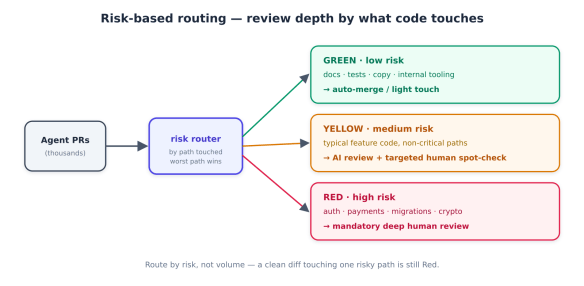
The fix is to route by risk, not by volume. A practical and widely-adopted scheme is three lanes — Green, Yellow, Red — assigned by what a change touches, not how big it is:

Flowchart illustrating risk-based routing for review depth in code changes, categorising paths into green (low risk), yellow (medium risk), and red (high risk) based on the type of code touched.
  • Green — low risk. Passed every deterministic gate, touches only low-blast-radius areas (docs, tests, internal tooling, copy). Auto-merge or a light human acknowledgement. Spending senior-reviewer time here is the waste you’re trying to eliminate.
  • Yellow — medium risk. Typical feature code in non-critical paths. Gets the full AI review from before plus a targeted human spot-check guided by the structured findings — the reviewer looks where the pipeline pointed, not at the whole diff.
  • Red — high risk. Touches authentication, authorisation, payments, data migrations, cryptography, or other security-sensitive surfaces. Mandatory deep human review, every time, no matter how clean it looks — because this is exactly where “looks right but isn’t” is catastrophic.

The risk map is just code, versioned in the repo — a CODEOWNERS-style file that classifies paths:

# review-risk.yml — risk lane by path (most-specific wins)
"**": yellow # default
"docs/**": green
"**/*.test.ts": green
"src/marketing/**": green
"src/auth/**": red
"src/payments/**": red
"**/migrations/**": red
"infra/**": red
def lane_for(pr, gate_findings) -> str:
if blocking(gate_findings):
return "RED" # gate failure is always deep-review
risk = max(risk_of_path(f) for f in pr.files_changed) # worst path wins
return risk # green / yellow / red

Note the “worst path wins” rule: a PR that touches docs and src/auth/ is Red. Slop hides in the one risky file inside an otherwise boring diff.

Make human reviewers effective, not just present

Routing decides who reviews. The other half of scaling is making each human review fast and high-signal. A reviewer handed a raw 600-line agent diff will skim and approve — the failure mode behind the previous verification gap. A reviewer handed a structured packet reviews with precision.

The packet for every Yellow/Red PR should contain, in priority order: what the deterministic gates found, what the AI reviewer flagged and what it explicitly dismissed, the blast radius (which risky paths and call sites are affected), and a tight diff summary — not the raw diff first. Pair it with a short, enforceable checklist the reviewer can actually complete:

AI-PR review checklist (reviewer answers YES to merge):
[ ] I understand WHY this change exists (linked issue / intent is clear)
[ ] Every new dependency is real, maintained, and the intended package
[ ] Error paths and edge cases are handled, not just the happy path
[ ] No auth / validation / data-access pattern was bypassed
[ ] It reuses existing utilities rather than re-implementing them
[ ] Tests exercise the actual behaviour, not just that it runs
[ ] Business logic matches intent (not merely "a correct thing")

The checklist encodes the slop taxonomy from above as questions. It turns “review this” — vague and skippable — into a finite, answerable task.

Measure trust, not speed

You manage what you measure, and measuring the wrong thing is how teams convince themselves AI is working while quality erodes. The trap is real: 2026 benchmark data found senior developers were actually 19% slower with AI on some tasks while feeling faster — a perception gap that hides the cost.

So retire raw velocity as the headline metric and track trust instead:

  • Trusted-merge rate — share of PRs that pass the pipeline and merge without later revert or hotfix.
  • Escaped-defect rate — slop that reached production, traced back to lane and cause. This is the number that tells you if your risk map is right.
  • Substantive-review rate — share of PRs that got a real review, not a rubber stamp. (Anthropic moved this from 16% to 54% with agentic review; it’s a strong health signal.)
  • AI-PR acceptance vs human baseline — LinearB’s benchmark put AI PRs at 32.7% acceptance against 84.4% for humans; watching your own ratio tells you whether your generation and review are improving.

The reframe from above, made operational: value isn’t lines shipped, it’s code you can deploy with confidence.

Govern it — including the AI you can’t see

Two governance realities bite at scale. First, shadow AI: 35% of developers in Sonar’s survey access AI tools through personal accounts, outside any sanctioned workflow — code entering your repos from tools your security team can’t see. Risk-based routing helps here, because it gates on what the code touches regardless of how it was produced. Second, policy has to be enforceable, not aspirational. Version your review policy and risk map in the repo; align your gates to a recognized standard (the OWASP LLM Top 10, NIST SP 800-218A); and make the pipeline — not a wiki page — the thing that enforces it. The payoff is measurable: teams with systematic verification reported 44% fewer AI-caused outages than those relying on ad-hoc checks.

Close the loop

The final move turns review from a cost into a compounding asset. Every piece of slop a reviewer catches is a lesson the system can keep. When a human rejects a PR for bypassing the auth layer, that shouldn’t just fix one PR — it should become a deterministic gate (a Semgrep rule), a line in the agent’s context file (AGENTS.md: “all handlers go through withAuth()“), or an entry in the risk map. The slop caught today becomes the slop prevented tomorrow.

Flowchart illustrating the review process at agent scale, depicting agents generating code, a pipeline with AI review, risk routing, human review, and trust metrics. Highlights a feedback loop for continuous improvement.

That feedback loop is what makes review scale sub-linearly with generation. Without it, every new agent adds review burden forever. With it, the burden per PR falls as the system learns your patterns — the gates get smarter, the context files get sharper, and more PRs land safely in the Green lane.

The bottom line

Generating code is no longer the hard part, and it’s no longer where value lives. The 96% who don’t trust AI output are right to be cautious — but caution without infrastructure is just the verification gap. The teams that turn AI speed into shipped value are the ones that engineer review to scale: deterministic gates that block, semantic review that triages, humans routed by risk to where judgement matters, trust measured instead of speed, and a loop that turns every caught defect into a prevented one. Slop is inevitable at agent volume. Shipping it is a choice — and a solvable one.